OpenClaw was an initial hobby project, and it has been growing fast on GitHub.
Now we’ll see why this tool is special and why it also raises security concerns.
What is OpenClaw?
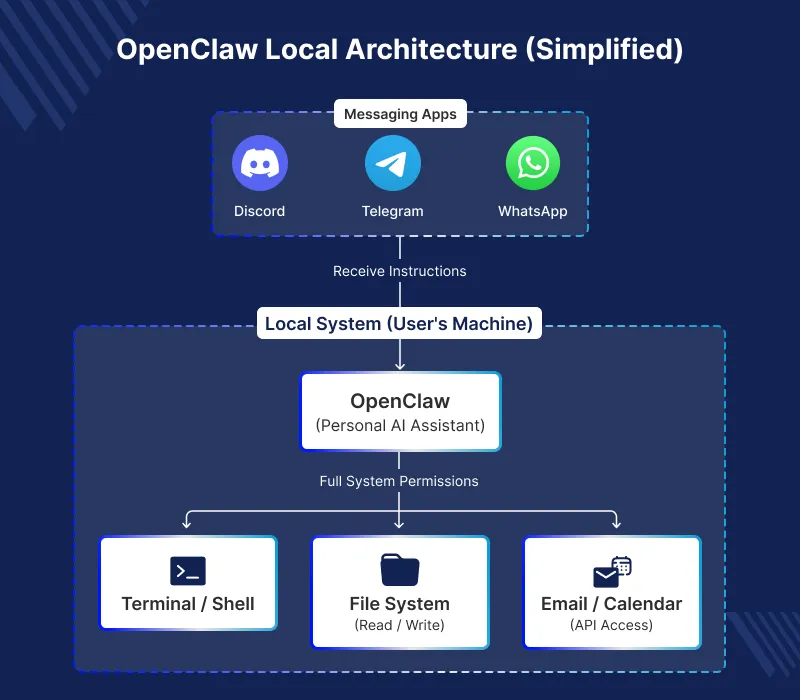
OpenClaw is an open-source Artificial Intelligence agent, developed by Peter Steinberger.
It runs locally on your device and works with your chat apps, unlike browser AI tools.
OpenClaw was first revealed by Steinberger as Clawdbot in November 2025.
Following trademark battles, they called it Moltbot, and the next day, three days later, they called it OpenClaw.
The outcome is an AI that exists on your computer and helps you on your chat applications.
How OpenClaw Works
1) Local, Secure, and Private
OpenClaw is your own personal AI assistant that is available to be run on your own devices.
Messaging platforms like Telegram, WhatsApp, Discord, and Signal directly link to it.
Your data does not leave your device, no third-party computers, no data leaks possible.
Supported platforms are:
It works on Windows, macOS, Linux, VPS, Mac mini, and cloud servers.
2) Multi- Platform messaging integration
It works with all your chat apps, like WhatsApp, Telegram, or Slack.
Imagine it as a one AI friend that works at all times on all of your messaging apps.
3) Real Task Automation
It is where OpenClaw is used to its full strength.
It has access to your files, web browser, email, calendar, and even smart-home gadgets.
OpenClaw can:
- draft and send emails,
- manage calendar entries,
- make reservations and travel services,
- execute shell or terminal commands,
- control your browser and smart-home system,
- investigate information and create reports,
- insurance claims and reimbursements of processes,
- maintain code and Git repositories,
- create pictures and make up multimedia.
Unlike Siri or Alexa, OpenClaw can control your whole computer.
3) Persistent Memory Which becomes ever smarter
It logs your conversations and activities on your computer.
The assistant doesn’t need daily resets; it learns your workflow and improves over time.
It also recalls previous dialogues and personalizes its replies according to your patterns.
4) Proactive and Autonomous
OpenClaw is able to provide updates and send notices without any prompting.
5) Flexible AI Model Support
You can run it locally and choose models like Claude or GPT. You can also integrate it through OpenRouter and select models that determine what the AI can do.
6) Extensible Plugin System
Due to the nature of OpenClaw as an open source, they can add new integrations.
Community already developed thousands of extensions to its functionality.
The Viral Growth of OpenClaw
The figures are staggering.
With over 184,000 stars and 30,000 forks, OpenClaw is quickly growing on GitHub.
The project has over 50 contributors and an active Discord with 8,900+ members.
Videos of the assistant working on its own have gone viral on X, TikTok, and Reddit, with some calling it the iPhone moment for AI assistants.
Real‑World Examples of OpenClaw
OpenClaw is being used creatively by users.
At a friend’s birthday in Morocco, Steinberger saw a tweet about a bug in his library.
He sent a picture of the tweet on WhatsApp, and the AI found the bug, fixed it, updated the code, and confirmed it worked.
With OpenClaw, you can browse the web, summarize PDFs, manage calendars, shop online, and handle emails.
The Security Concerns in OpenClaw
Power comes at a high cost on security with OpenClaw.
One of the most dangerous threats is the prompt injection.
Hidden commands can make the AI act without the user knowing.
Cryptocurrency stealing and attempts to steal it are the vulnerability attempts by hackers.
What This Means :
Malicious content that is external to OpenClaw can be compromised.
Hidden malicious software can compromise the assistant, even for trusted users.
1) Security researcher warnings
Security developers give these warnings to alert users about risks.
Snyk says prompt injection is a major risk for AI agents that use outside data.
A third-party skill with big security flaws was found to steal data.
A total of 4000 skills contained defects that may spill sensitive information.
2) New Critical Vulnerability
A serious bug let code run through a malicious link, but it was fixed in version 2026.1.29.
3) Creator’s Response
Steinberger recognizes the danger and emphasizes that it should be well configured.
He cautions not to use the tool by the non-technical.
Who Should Use OpenClaw?
OpenClaw is robust yet sophisticated, and for professionals.
Best For:
- Creators who want to be in complete control of their AI assistant,
- Competent command-line users,
- Customers who value privacy and like self-hosted solutions,
- Customers who are ready to take the time to manage security.
Not Ideal For:
- Non‑technical users,
- Anyone who is not comfortable with security threats,
- Persons requiring a plug and play solution.
The Future of Personal AI
The OpenClaw moment means AI agents are now used by regular employees, not just researchers.
Its growing popularity shows that providers no longer need to control AI agents.
This shows that communities, not just big companies, can create powerful AI agents.
Conclusion
OpenClaw is an open-source, highly versatile, powerful AI assistant.
The community is active, the features are strong, and a true personal AI is emerging.
With great power comes great responsibility, and the current security issues are serious.
The OpenClaw is an indication of a future when you can talk to your applications.
To the timid, one might want to wait until the technology has reached a higher maturity level.
To get latest Advancements in AI visit webkul !!


Be the first to comment.