Opencart Event System allows you to write the code which will execute when something like inserting, deleting and updating happens in Opencart. Like when any customer place an order or admin add any product. If you are using Opencart Event System, you do not need to use vQmod or OCMOD for adding a large amount of code.
Firstly you have to add Event Handler to your module. Here we add two events to customer add for catalog side and on product edit for admin side. Before using Event System you have to load event model file, then call to addEvent() function like mentioned below.

After adding an event, you can also delete the registered event by using the deleteEvent() function.
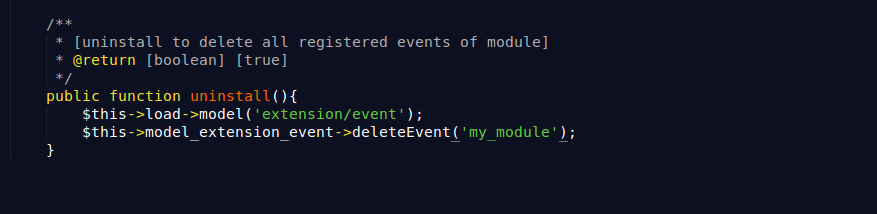
Now you can implement the registered event handler like:

You can track each product and can manage your module record with this registered handler on each product edit.
At last, you have to trigger this registered event into product edit code. For trigger event, you have to use trigger() function of the event model.



2 comments
You can use install and uninstall methods in your custom module extension at the admin end. In the same controller, add your backend event’s action like on_product_Edit
Lastly, the trigger script is optional. In the older versions, Opencart didn’t trigger events automatically so you had to do it manually.
The register event’s syntax was changed in past versions so please check with your version.
Here, I shared samples of version 3.0.3.9
db – https://github.com/opencart/opencart/blob/3.0.3.9/upload/install/opencart.sql#L1390
register method – https://github.com/opencart/opencart/blob/3.0.3.9/upload/admin/model/setting/event.php#L3