The Odoo Shell is a powerful command-line interface that allows developers and administrators to interact directly with an Odoo database using Python. It is especially useful for debugging, testing, data manipulation, and administrative tasks without using the Odoo web interface.
What Is Odoo Shell?
Odoo Shell is an interactive Python console that loads the Odoo environment. Once launched, you can:
- Access Odoo models using ORM
- Query and update records
- Test custom logic
- Perform quick data fixes
- Debug issues efficiently
It provides direct access to the env object, similar to what is available inside Odoo models.
Why Use Odoo Shell?
- Direct ORM access for testing and debugging
- Faster than using the UI for data operations
- No need to create temporary modules or scripts
- Useful for server-side troubleshooting
- Ideal for administrators and developers
How to Start Odoo Shell
Navigate to your Odoo installation directory and run the following command:
./odoo-bin shell -c /etc/odoo.conf -d your_database_name

Command Breakdown:
- ./odoo-bin: This specifies the path to the Odoo executable (odoo-bin). The ./ indicates it is located in the current directory.
- shell: Opens the interactive Odoo shell
- -c /etc/odoo.conf: Path to the Odoo configuration file
- -d your_database_name: Database you want to work on
After running the command, the shell will start and load the Odoo environment.
Using ORM Inside Odoo Shell
Once inside the shell, you can use Odoo ORM just like in Python code.
Suppose you have a product in your Odoo database with an ID of 1 and you want to change its name to “odooshelltestproduct”.
You can browse the product using the following command:
product = env['product.template'].browse(1)

You can then easily change its name using the assignment operator, as commonly used in Odoo.
product.name = “odooshelltestproduct”
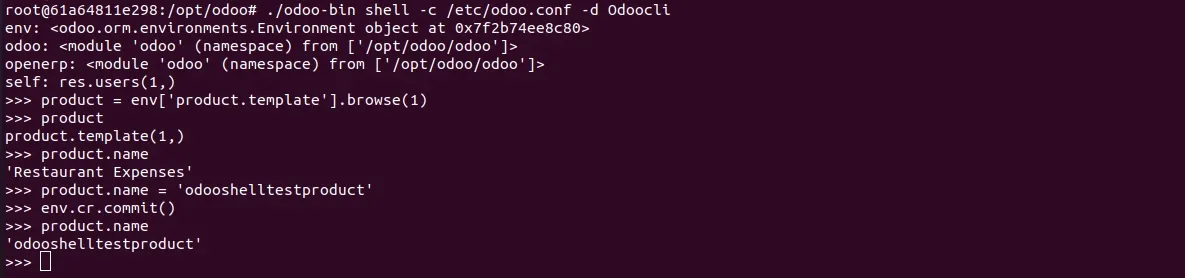
Note: As you may have noticed, you have to commit your changes to ensure they are saved to the database.
NEED HELP?
Hope you find the guide helpful! Please feel free to share your feedback in the comments below.
If you still have any issues/queries regarding the same, please raise a ticket at the UV Desk.
For any doubt, contact us at our support mail.
Thanks for paying attention!!
Current Product Version - Odoo 19, Odoo 18


Be the first to comment.