Introduction
Odoo Advance All in one Merge PDF Attachments module helps users easily merge multiple PDF files with key documents such as sales orders, invoices, and purchase orders.
By streamlining the merging process, it ensures that all necessary attachments are included in a single report, making document management more efficient.
Odoo Advance All in one Merge PDF Attachments module merges PDFs automatically when printing or emailing reports, saving time and effort with flexible settings for efficient document handling.
Features
- Merge multiple PDF attachments into a single file for reports such as sales orders, transfers etc.
- Supports only PDF files to ensure consistency during the merging process.
- Automatically merges PDFs when printing or emailing essentials reports to clients and vendors.
- Allows users to enable or disable merging based on specific report requirements.
- Sends merged PDF reports directly via email, ensuring all relevant documents are included.
- Attaches important documents, such as contracts, policies, or specifications to core reports.
- Simplifies document handling by reducing the need to manually attach multiple files.
- Offers customizable settings to enable or disable merging for specific reports and emails.
- Ensures consistent document formatting when merging PDFs with key business documents.
Installation
- Once you purchase the app from the Webkul store, you will receive the link to download the module zip file.
- Extract the file on your system after the download finishes. As a result, you will be able to see a folder named- ‘wk_advance_merge_pdf’
- Copy and paste this folder inside your Odoo Add-Ons path.
- Now, open the Odoo App and click on the Settings menu. Here, click on Activate the Developer Mode.
- Then, open the Apps menu and click ‘Update Modules List.’
- In the search bar, remove all the filters and search ‘wk_advance_merge_pdf’
- The module will appear in the search results. Click on ‘Install’ to install it.
Workflow
- First, install the Odoo Advance All in one Merge PDF Attachments module.
- Click on “New” to create a Merge Attachment configuration.
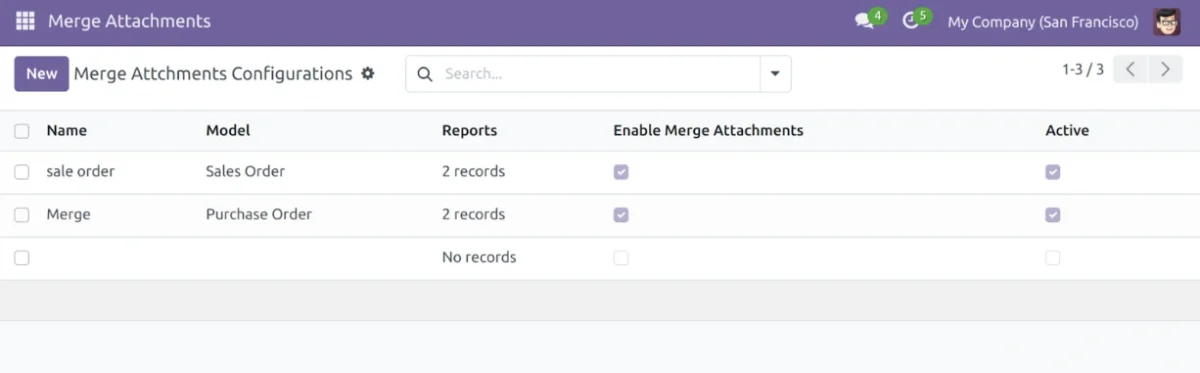
- Enter details, add reports and enable Merge Attachments and Merge on Send Mail.

- Select attachments in the Merge Attachments field. Now print the report with Quotation/Order.

5. Users can also send reports with merged attachments by email.

6. Printed report with the merged PDF attachments.

NEED HELP?
Hope you find the guide helpful! Please feel free to share your feedback in the comments below.
If you still have any issues or queries about it, please raise a ticket at the UV Desk.
I hope this helps. In case of any further queries, contact us at our support mail.
Thanks for paying attention!!
Current Product Version - 1.0.0
Supported Framework Version - Odoo V17, V18


Be the first to comment.