With the globalisation, there emerges a need for showing the time to the users according to their location. And there emerges another question too that how can we find out the time zone of a user. Although, it is very easy to get the time zone of a user using client side language, i.e. “Javascript”. So, how to use the time zone saved in javascript into the PHP code to view zone-wise time. So, in order to use the time zone difference in the PHP, we will make use of cookies to store the time difference of a user.
In PHP, if we will use Date() function to print the time then we will have something like this:
PHP Code:
<?php
echo Date("Y-m-d H:i:s");
?>
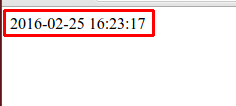
Output of date and time:
So, in order to get a correct time as per my location, I will use this code which will save the difference in a cookie and then we can easily make use of that difference saved in the cookie to show time as per a user.
<?php
$myDate = Date("Y-m-d H:i:s");
echo 'PHP Time : '.$myDate;

echo '<script>
 createCookie("time_diff"); // calling the createCookie() function and saving the difference in "time_diff" variable

 function createCookie(name) {
	var rightNow = new Date();
	var jan1 = new Date(rightNow.getFullYear(), 0, 1, 0, 0, 0, 0);
	var temp = jan1.toGMTString();
	var jan2 = new Date(temp.substring(0, temp.lastIndexOf(" ")-1)); // manages the daylight hours saving
	var std_time_offset = (jan1 - jan2) / (1000 * 60 * 60);
  	document.cookie = escape(name) + "=" + std_time_offset + "; path=/";
 }
</script>';

if (isset($_COOKIE['time_diff'])) {
	echo "<br>";
	echo 'Time difference : '.$_COOKIE['time_diff'];
	$time_diff = $_COOKIE['time_diff'] * 3600;
}
$date = strtotime($myDate);

if (isset($time_diff) && $time_diff) {
	$date = $date + $time_diff;
}

$newDate = date('Y/m/d H:i:s', $date);
echo "<br>";
echo 'Converted Time : '.$newDate;
?>
The output of the above code will be:
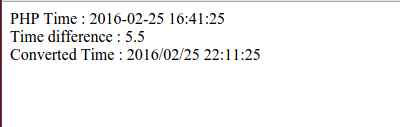
So, as per my location “India”, I’m able to get a time difference of +5.5.
PS: The time difference mustn’t be saved in the cookie on the same page as it may give an error on using the cookie on the same page. The cookie must be saved a bit earlier than calculating the time.


Be the first to comment.