Magento SMTP mailer module sets up a different SMTP server on your web store so that all the web store emails are sent through the selected/configured host.
Make the tracking and sending of emails through your store easy from this module.
SMTP mailer module is available for Magento 2. You can also visit the link to checkout our Magento 2 SMTP Extension.
Features Of Magento SMTP Mailer
- Admin can easily setup SMTP Host.
- Admin can choose from a list of various Host Providers.
- Select others and then input the required values. when hostname is not included,
- Admin can test the host by sending test emails.
- Admin will be able to see the success message for test emails.
- The receiver will receive the mail successfully.
Installation Of Magento SMTP Mailer
After you have downloaded the module zip file, installation is super easy. You will have to move the app folder into the Magento root folder.

After moving the folder, flush the cache from the Magento admin panel by navigating through -> System->Cache management.

SMTP Mailer – Configuration
Store Owner can configure SMTP setting by going to System –> Configuration –> Webkul –> SMTP Mailer.

Here the admin will be able or enable or disable the module, select a Host provider from within the available list of host providers.
Lastly, enter the email id and password received from the selected host provider.
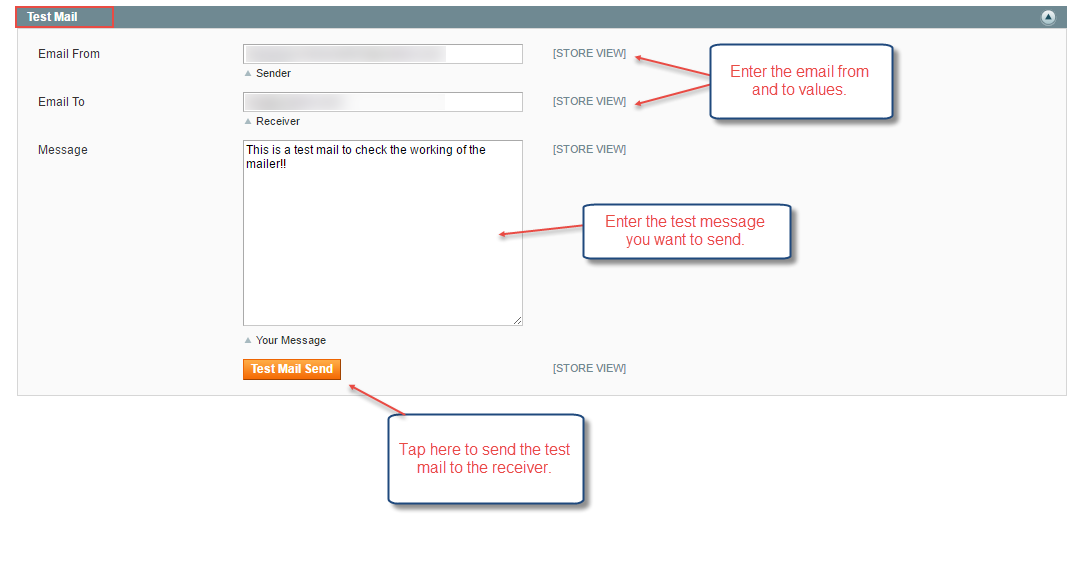
Now to test the configuration you can enter the Email From & To values, the test message for the receiver and, tap on the “Test Mail Send” button to send the mail to the receiver.
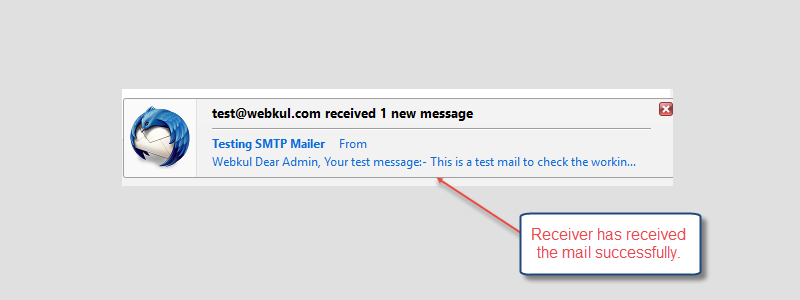
After the mail delivers to the receiver, the receiver will receive the mail successfully as shown below in the snapshot.
After the mail is successfully send to the receiver, the admin can see a message pop-up saying “sent“.

Support
That’s all for the Magento SMTP Mailer if you still have any issue feel free to add a ticket and let us know your views to make the module better at webkul.uvdesk.com.
Also, Upgrade your Magento 1 experience with OpenMage Upgrade Services, offering expert solutions to help your online store thrive
Current Product Version - 2.0.0.0
Supported Framework Version - 2.0.x.x, 2.1.x.x, 2.2.x.x


Be the first to comment.