Laravel eCommerce SEO Management module helps to improve the SEO of the Bagisto eCommerce store.
Using this extension, you can also display Rich snippets for product and category pages.
The admin can even add content for Facebook and Twitter.
This will help to share products on Facebook and Twitter. This module also includes a feature that shows suggestions to improve SEO.
This extension provides various tools and options for improving the SEO of your online store.
Check a brief overview of the plugin –
Feature List.
- View product SEO meter with suggestions to improve.
- View Facebook and Twitter snippet preview in product create form.
- Show Facebook and Twitter sharing icons on the product page.
- Customers can also share any product with their friends and followers.
Installation
How to install the module?
Unzip the respective extension zip and then merge “packages” into project root directory.

Goto config/app.php file and add the following line under ‘providers’.
Webkul\SEO\Providers\SEOServiceProvider::class
Goto composer.json file and add the following line under ‘psr-4’
"Webkul\\SEO\\": "packages/Webkul/SEO/src"
Run the below-mentioned commands from the root directory in the terminal:
composer dump-autoload
php artisan seo:install
Module Configuration
After the successfull installation of the module the admin can configure the module under the admin panel. The admin needs to navigate to configure>>seo.
Here the admin needs to fill the following details as shown in the image below:-

In this page the admin can perform several details such as:-
The admin can enable or disable the module.
Company Name:- The admin needs to enter the company name in this field.
Alternative URL:- The admin needs to enter the alternative URL here.
Enable Sitelink Searchbox:- The admin can select between yes or no.
Type:- The admin can select between the organisation and website from the dropdown menu.
Products
Create redirect on delete:- The admin can select between the 404 page and CMS page.
CMS Page:- If the admin has selected the CMS page.
Then admin can select from various options like Home page, Privacy policy, About Us, Customer Service.
Similarly the admin can also enter the Facebook and Twitter details as shown in the above image.
Product SEO
The admin can also do seo for product while creating a product or editing a product that will show the seo meter for that particular product.
The seo Meter will show you the status of the product’s SEO level. The higher is the percentage, the better will be the SEO.
The admin can view the ways and suggestions for improving the SEO level for the product.
Focus Keyword – The admin can also enter the focus keyword for this product.

The admin can view how the product page will appear on the search engine result page on the desktop as well as mobile view.
Desktop View
The desktop view will look like as shown in the image below:-

Mobile View
The mobile view will look like as shown in the image below:-

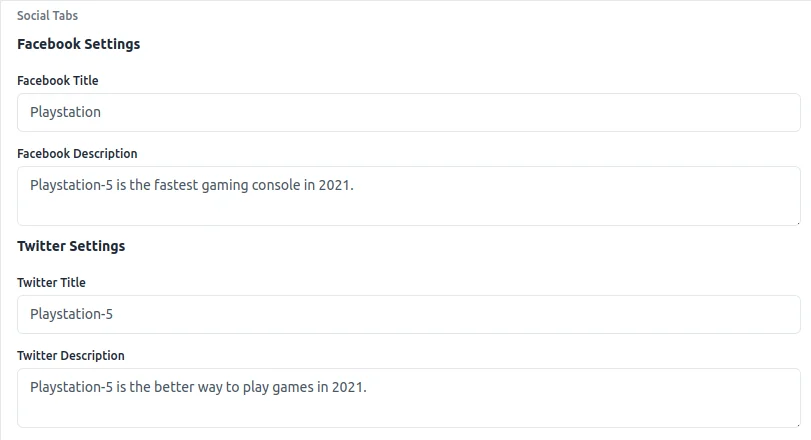
Social Tabs
Under the social tabs the admin can enter the product description details and name for the Twitter and Facebook.
This module can be very useful to increase the product SEO aswell as eCommerce site SEO to increase the rank in search engine.
Support
So, that was much about the User Guide of Laravel eCommerce SEO Management for any queries or doubts reach out to us at [email protected]. You can also raise a ticket at our HelpDesk System.
Please explore our Laravel Development Services and Quality Bagisto Extensions.
Current Product Version - V2.2.3
Supported Framework Version - Bagisto 2.2.3


Be the first to comment.