Laravel Customer Credit Extension allows the admin to provide the credit to their store customers for purchasing the product. The customer can use that credit amount while checking out the store’s product.
Now the store owner can attract more customers to the store and hence increase their store sales.
Additionally, if you’re looking to add Goods and Service Tax to your products on Bagisto store, then you can check Laravel eCommerce GST Extension.
Feature List of Laravel Customer Credit Extension
- The admin can assign credit to the customer group.
- Customers can see their points under assigned credit in their dashboard.
- The customer can use their credit points while making purchases from the store.
- The admin can bulk assign the credit point to the customer using CSV file upload.
- The admin and customer can check transaction details.
- The credit amount is used to deduct the amount from the total purchase while checkout.
Installation- Laravel Customer Credit
Unzip the respective extension zip and then merge the “packages” folder into the project root directory.

Goto config/app.php file and add the following line under ‘providers’
Webkul\CustomerCreditSystem\Providers\CustomerCreditSystemServiceProvider::class,

Go to the composer.json file and add the following line under psr-4
"Webkul\\CustomerCreditSystem\\": "packages/Webkul/CustomerCreditSystem/src"

Run these commands below to complete the setup
composer dump-autoload
php artisan optimize
php artisan migrate
php artisan vendor:publish --force -> Press CustomerCreditSystemServiceProvider to publish all assets and configurations.
Configuration
Once the command has been successfully executed the Customer Credit System is available under the configuration.

Enable Customer Credit System module : Admin can enable/disable the extension as per their store need.
Enable the module to show in shop : If Admin enable it then Customer Credit Amount option will be visible on the frontend.
Enter Minimum Credit system : Here, admin can set the minimum credit amount which will use while assigning credits to the particular customer group.
Enter Maximum Credit system : Here admin can set the maximum credit amount which will use while assigning credits to the particular customer group.
Assign Credit
Here, the admin can select a customer group and credit points they want to assign. Even the credit points can be assigned in bulk by uploading the .csv file under the Bulk Assign tab.

The admin can check Assigned credit points and can even delete them under the Action section.
Pending Credit Request
Under Customer Credit System-> Pending Credit Request, the admin can review and approve the pending credit requests.

The admin can check the order id, customer name, and requested credit amount and approve them after reviewing.
Transactions
The debit/credit amount of the credit points is visible under transactions.

Here, the admin can check the transaction details with transaction ID, type, amount, message, status of transaction and when transaction was created.
User Credit
Here, the admin can check the user credits of the customer group.

The admin can track the credit amount and due credit of the customers.
Customer View- Laravel Customer Credit
The credit points will be visible to the customer on their dashboard.

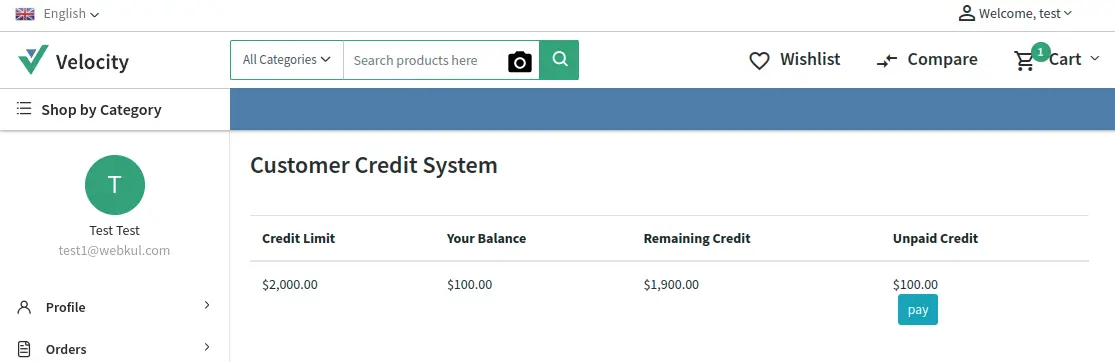
Here, the customer can see their credit limit, balance amount, remaining credit to be added, and Unpaid credit.
The customer can also request to add credit points manually from Add Credit with message.
The transaction history also is visible to the customer.
Unpaid Credit
To pay unpaid credit, the customer will click on the Pay button, which will add the due amount to the cart.
Then the customer will open the checkout page to pay the amount.

The customer can even use the credit point to pay the balance and then click on Place Order.
Similarly, while on product checkout the customer may use credit points to place an order.

Order Details
Once the order is placed, the customer can check their order details from the dashboard.

That’s all for Laravel Credit Extension, still have any issues then feel free to add a ticket and also let us know your views to make the module better https://bagisto.uvdesk.com/en/
Current Product Version - 1.4.5
Supported Framework Version - Bagisto 1.4.5


Be the first to comment.