While working on Custom Theme in Magento 2 we sometimes require to develop a theme in Magento 2 which is separate for mobile devices.
Let’s Learn how we can set different themes for Mobile Devices
1. Login to your admin and navigate to Content -> Design -> Configuration.
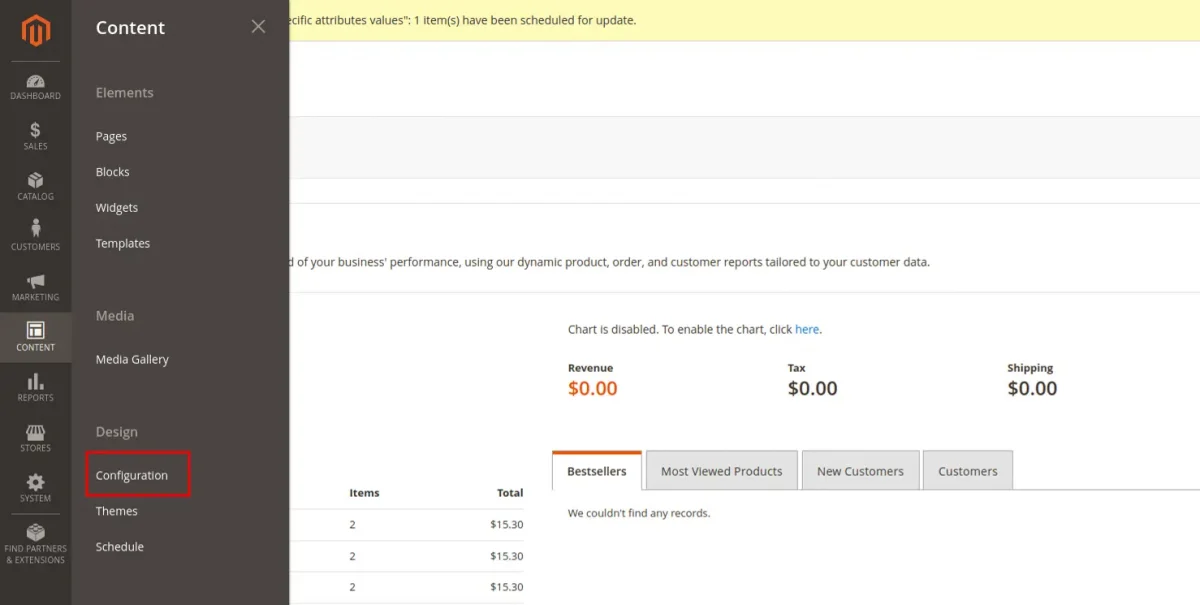
2. Click on the “Edit” button of the first row(Global) or the store for which you would like to configure the mobile theme.

3. Under the “Design Rule” tab, click “Add New User Agent Rule”.

4. Add the below string or specify a particular device name and then select your desired theme.
/iPhone|iPod|BlackBerry|Palm|Googlebot-Mobile|Mobile|mobile|mobi|Windows Mobile|Safari Mobile|Android|Opera Mini/
We hope it will help you. Thank you!!
If you require technical support, feel free to email us at [email protected].
Additionally, explore a wide array of solutions to boost your store’s capabilities by visiting the Adobe Commerce modules section.
For expert advice or to create tailored features, hire Adobe Commerce Developers for your project.


Be the first to comment.