Largest Contentful Paint (LCP) is one of the most important Core Web Vitals metrics that measure how quickly a web page’s primary content loads or visible in the viewport.
LCP element might be an image, text block, video, or an animation. It’s deferred from Desktop to Mobile.
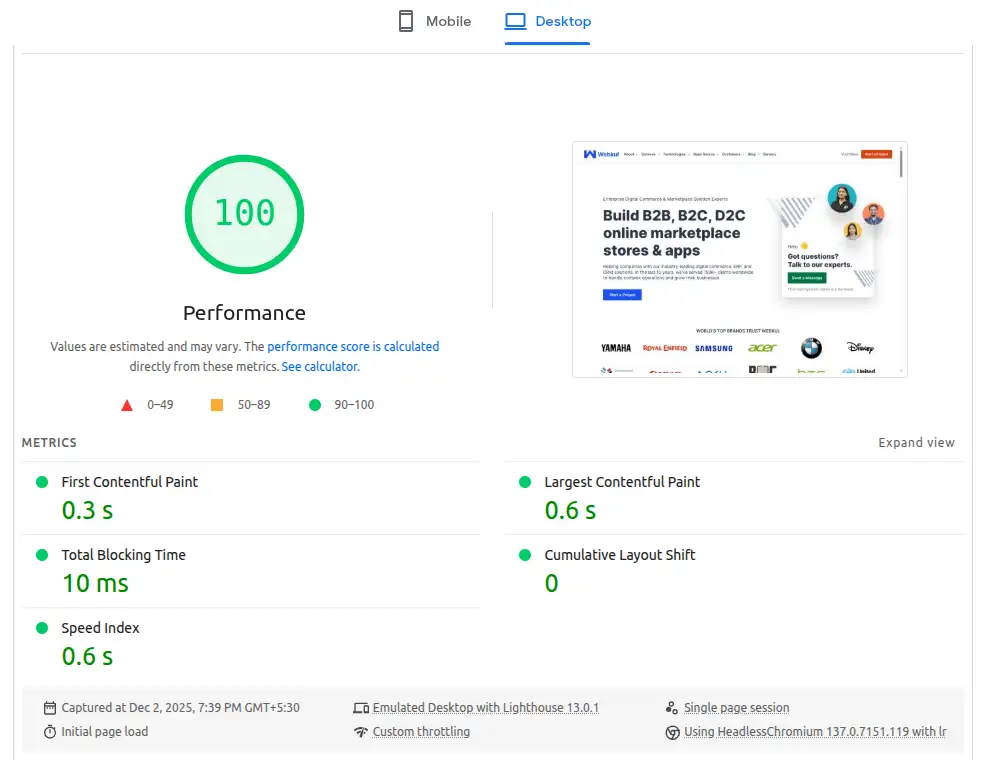
According to Google’s Web Vitals, a good LCP is under 2.5 seconds on desktop and mobile
You can check this PageSpeed Insight test score for reference.
Quick Introduction
LCP is a metrics from Core Web Vital that measures the times when the user starts loading the page until the largest image or text block is rendered in the viewport.
Lots of parameters impact your site as how quickly the browser load and render the page, and any blockage or any delays across all of them can have considerable effect on LCP.
To improve LCP, you need to examine the entire loading process and optimize each stage.
Largest Contentful Paint is important for giving a fantastic user experience as well as for enhancing your SEO performance.
Optimizing Largest Contentful Paint is complex task ,it is usually preferable to divide it into smaller, more manageable tasks and deal with each one separately.

Breakdown Your Site LCP
Most page loads often involve several network requests, but to find possibilities to enhance LCP, you should first focus on just two of them:
- The initial HTML document
- The LCP resource (if applicable)

Other page requests may have an impact on LCP, but these two requests—more precisely, the times the LCP resource starts and stops—show whether or not your page is LCP-optimized.
We have lots of developer tool for identify the LCP element, you can use Chorme Dev Tool, WebpageTest, GTmetrix.
Here is the refernce speed score tested on debugbear of KrayinCRM, an open source laravel based CRM framework.

I mentioned four LCP sub-part that can be used to calculate the LCP value of any page

These four sub-parts can be used to calculate the LCP value of any page. There is no overlap or space between them, and when added together, they equal the entire LCP time.
Optimizing Your Sub-Parts
It’s critical to comprehend the optimum breakdown of these sub-parts on a well-optimized page in order to optimise each LCP sub-part.
| LCP Sub-Parts | % of LCP |
| Time to First Bite ( TTFB ) | ~40% |
| Resource load delay | <10% |
| Resource load time | ~40% |
| Element render delay | <10% |
| Total | 100% |
A useful approach to consider how LCP time is broken down is as follows:
1. HTML document and LCP source should be loaded for the great majority of the LCP period.
2. There is always possibility of improvement whenever one of these two resources is not loaded before LCP
Optimize each part of LCP
I mentioned some methods for enhancing Largest Contentful Paint performance and resolving “LCP issue: longer than 2.5s or LCP issue: longer than 4s”, both from mobile and/or desktop.
If you’re looking to improve your website’s speed and performance,our WordPress Speed Optimization Services can help to boost your site’s loading times and enhance your user’s experience.
1. Remove delayed load and render-blocking resources from your WordPress woo-commerce site
Make sure that the LCP resource begins loading as soon as possible is the goal of this stage.
Although in theory a resource may begin loading right after TTFB, in fact there is always some lag time before browsers begin to load resources.
By scanning the HTML document response, the browser can find the LCP resource, in the following conditions:
- The “src” or “srcset” properties of the <img> element contained in initial markup HTML
- LCP requires CSS background image, but that image is preloaded via
<link rel="preload">in the HTML markup (or via aLinkheader). - In case of text node they required WebFont and it is loaded using the HTML markup tag <link rel=”preload”> (or a Link header).
Some tips to rescue this condition:
- Images added dynamically via Javascript
- You can lazy load the images that hide the src and srcset ( often use data-src and data-srcset )
- Download font from provider and load from your server in head

2. You can use CDN for the resources at your WordPress woo-commerce site
3. Defer your JavaScript
4. Remove Unused JavaScript
5. You can defer Non-Critical CSS, Inline Critical CSS, and Remove Unused CSS
6. Minify all CSS and JS Files at your WordPress woo-commerce site
7. You can use Preload for critical assets
8. Compress and optimize your images
9. You can compress your text files
10. Establish Third-party Connections Early ( dns-prefetch and preconnect )
11. Serve Webp Images ( https://webkul.com/blog/how-to-use-webp-images-in-woocommerce/ ) at your WordPress woo-commerce site
12. Remove unused plugins
13. Implement Caching at your WordPress woo-commerce site
14. Remove 404 request
15. Pre-Load LCP element resources like image, font, video, CSS
16. Use server-side rendering
Code for log the LCP time at your console
const lcp_sub_parts_titles = [
    'Time to first byte',
    'Resource load delay',
    'Resource load time',
    'Element render delay',
];

new PerformanceObserver((list) => {
    const lcpEntry = list.getEntries().at(-1);
    const navEntry = performance.getEntriesByType('navigation')[0];
    const lcpResEntry = performance
        .getEntriesByType('resource')
        .filter((e) => e.name === lcpEntry.url)[0];

    // Ignore LCP entries that aren't images to reduce DevTools noise.
    // Comment this line out if you want to include text entries.
    if (!lcpEntry.url) return;

    // Compute the start and end times of each LCP sub-part.
    // WARNING! If your LCP resource is loaded cross-origin, make sure to add
    // the `Timing-Allow-Origin` (TAO) header to get the most accurate results.
    const ttfb = navEntry.responseStart;
    const lcpRequestStart = Math.max(
        ttfb,
        // Prefer `requestStart` (if TOA is set), otherwise use `startTime`.
        lcpResEntry ? lcpResEntry.requestStart || lcpResEntry.startTime : 0
    );
    const lcpResponseEnd = Math.max(
        lcpRequestStart,
        lcpResEntry ? lcpResEntry.responseEnd : 0
    );
    const lcpRenderTime = Math.max(
        lcpResponseEnd,
        // Use LCP startTime (which is the final LCP time) as sometimes
        // slight differences between loadTime/renderTime and startTime
        // due to rounding precision.
        lcpEntry ? lcpEntry.startTime : 0
    );

    // Clear previous measures before making new ones.
    // Note: due to a bug this does not work in Chrome DevTools.
    lcp_sub_parts_titles.forEach((part) => performance.clearMeasures(part));

    // Create measures for each LCP sub-part for easier
    // visualization in the Chrome DevTools Performance panel.
    const lcpSubPartMeasures = [
        performance.measure(lcp_sub_parts_titles[0], {
            start: 0,
            end: ttfb,
        }),
        performance.measure(lcp_sub_parts_titles[1], {
            start: ttfb,
            end: lcpRequestStart,
        }),
        performance.measure(lcp_sub_parts_titles[2], {
            start: lcpRequestStart,
            end: lcpResponseEnd,
        }),
        performance.measure(lcp_sub_parts_titles[3], {
            start: lcpResponseEnd,
            end: lcpRenderTime,
        }),
    ];

    // Log helpful debug information to the console.
    console.log('LCP value: ', lcpRenderTime);
    console.log('LCP element: ', lcpEntry.element, lcpEntry.url);
    console.table(
        lcpSubPartMeasures.map((measure) => ({
            'LCP sub-part': measure.name,
            'Time (ms)': measure.duration,
            '% of LCP': `${Math.round((1000 * measure.duration) / lcpRenderTime) / 10
                }%`,
        }))
    );
}).observe({ type: 'largest-contentful-paint', buffered: true });
You can also use chrome extension -> Web vital
If you need custom WordPress Development services then feel free to reach us and also explore our exclusive range of WooCommerce Extensions.
Happy coding!!


Be the first to comment.