Create a new Odoo module
Odoo is a web-based, open-source, and modular business software platform.
It includes multiple integrated applications such as CRM, POS, E-Commerce, ERP, Manufacturing, Inventory Management, Accounting, and Project Management.
Introduction to the Odoo module
Describe the importance of the module in Odoo
Odoo module is a set of business logic that helps to enhance the existing functionality or add new functionality in Odoo.
Where to create a new module in Odoo?
Odoo is a modular framework, and all core modules are present within the Odoo Apps.
You can find the addons path inside the Odoo configuration file(If you are managing), and inside the configuration file, you can find the “addons_path”

Or you can use the below command to find the Odoo addons path,
-> ps aux | grep odoo
Odoo Module Structure
- models – Python business logic and database models
- views – XML UI definitions (form, tree, kanban, menus, actions)
- data – Default data, sequences, cron jobs
- report – QWeb PDF reports and report actions
- demo – Demo/sample data (optional)
- security – Access rights and record rules
- static – Web assets (CSS, JS, images, XML templates)
- controllers – HTTP routes, website, and API logic
- wizard – Transient models (pop-ups)
- tests – Automated test cases
- manifest.py – Module metadata
- init.py – Python initialization
Now, for example, we are creating a module whose technical name is “‘webkul_elearning_module”
Required Files to Create a Basic Module
- __manifest__.py
- __init__.py
What is a Manifest file?
The __manifest__.py file defines the metadata of an Odoo module. It tells Odoo how the module should be loaded, its dependencies, and whether it should appear as an application in the Apps menu.

- Name (Module Name)
- Description (Contains the module’s long description)
- Depends (Contains the list of dependent modules)
- And there are many more.
NOTE: __manifest__.py only helps to show the module inside Odoo app list but when you will try to install module then you will get “ImportError: No module named ‘webkul_elearning_module’ ”

So to make your module installable, you also need to define the “__init__.py” file.
What is an __init__.py file?
__init__.py is a Python package initialization file. It is used to import Python files and submodules so that Odoo can recognize and load them when required.

These two files are enough to make modules installable in Odoo.
Steps to create/install the module at Odoo
- Create a folder, then set the technical name for the module.
- Make sure the module technical name does not contain any spaces, e.g., “webkul_elearning_module”.
- Then create an “__init__.py” file inside the folder,
- You can define Python packages/files inside this file.
- Then create a “__manifest__.py” file,
- You can define the module name(If not defined, the name will be ‘Unnamed’) and some other metadata.
- Then restart your Odoo server.
- Now login to your Odoo.
- Then open developer mode in your Odoo from Odoo “settings”.
- Also, you can press CTRL + K and then type debug. After that, press enter on “activate debug mode”(It will support the latest versions of Odoo).


- Then go to the “Apps” menu.
- Inside the “Apps” menu, you will see a button “Update App List”.
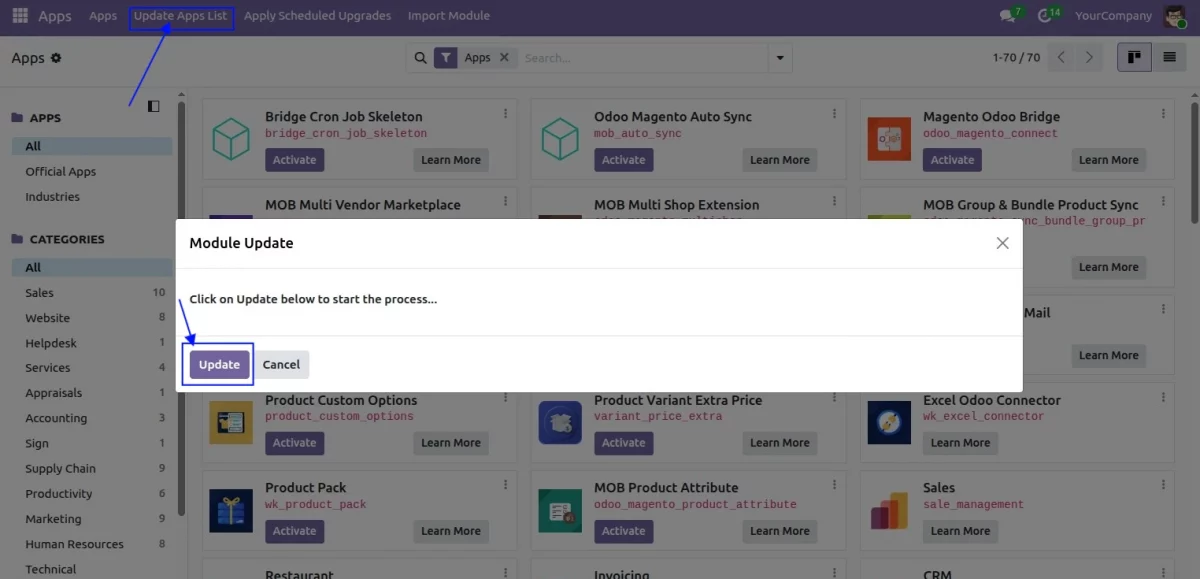
- Click on that button.
- Then check the module using the module name.
- After that, you will find your module inside the app list.
- Then click on the “install” button to install your module at Odoo’s end.
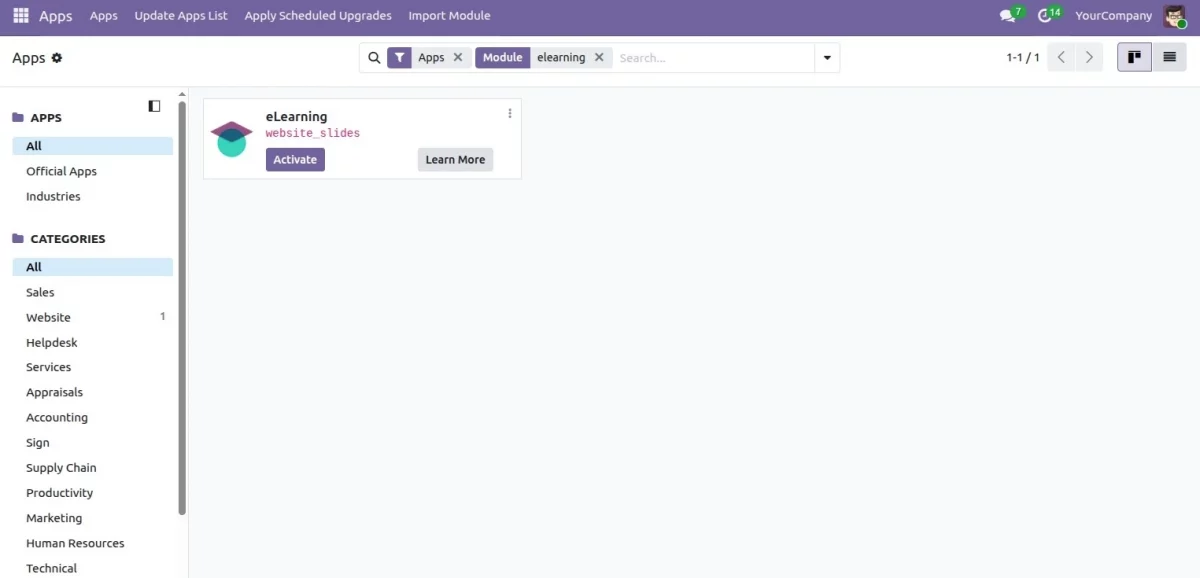
So this is how you can create a new module in Odoo and install modules at Odoo’s end.
You can also check some other informative blogs
We Would Love to Hear From You!
Hope you find the blog informative! Please feel free to share your feedback in the comments below.
Also, check webkul store page to go through our Odoo apps. As an Odoo Partner, we also provide odoo customization services, You may Hire Odoo Developers for odoo ERP development services.
If you still have any issues/queries, then please raise a ticket at https://webkul.uvdesk.com/en/customer/create-ticket/
For any doubt, contact us at [email protected].
Thanks for paying attention!!
🙂 😊


10 comments
It seems like the below screenshot confuses you with the name “webkul_test”.
https://cdnblog.webkul.com/blog/wp-content/uploads/2020/03/error.png
Actually “webkul_test” is a technical name of the module and you don’t need to define it on “__manifest__.py” or “__init__.py“.
A technical name is basically a folder name of the module.
Feel free to ask in case you have any confusion related to the above points.
Thanks & Regards,
Ashish Singh
when i am using above command i m getting below error
odoo-bin is not recognizeing as an internal or external command. what shuould i do any help
It seems you are running this command from the wrong path. odoo-bin is present just before the odoo addons path.
https://github.com/odoo/odoo/blob/13.0/odoo-bin
Now, kindly run the command from the correct path and let me know in case you still have the same issue.
Thanks & Regards,
Ashish Singh
Controller plays very important role in Odoo. As you know Odoo modules follow the MVC design pattern.
The controller helps to manage the backend/frontend actions of Odoo. It also helps to render data on the Web page.
Feel free to ask in case you have any doubts related to the above points.
Thanks & Regards,
Ashish Singh
There is no specific software or tools are required to prepare any custom Odoo application.
You can feel free to use any editor to prepare the custom module.
You can also create Odoo custom module using “Scaffolding“. The following command will help you to create a custom module.
/opt/odoo/odoo-bin scaffold {custom module name} {path where you want to create module}
Thanks & Regards,
Ashish Singh
views/elearning_view.xml
demo/demo_elearning_data.xml
We have shared the blog for creating base module in Odoo; for that XML file is not required. However, if you are working in view level or with some demo data then you need to add XML file.
Regards
Anisha Bahukhandi