The navigation menu is the view of the tab section in the Akeneo, which is the result of the js configuration files.
For the navigation menu view, there is the main <div> class, like ‘AknTitleContainer navigation.’ This div shapes how your page looks and handles important elements: the navigation bar title, breadcrumb trail, tabs bar, and custom buttons. The YAML configuration file (e.g., form_extension.yml) loads the user interface of the module. This YAML file renders the js file configurations and the template which creates the view of the page.
Why change the navigation menu view?
- Enhance the Akeneo navigation menu view.
- Resolve tab bar conflicts for direct mass action execution in the grid.
- Fix search bar issues after tab switching.
- Address filter problems in the data grid.
How to create?
- In the form_extension.yml file which loads the main module js files and template.
- Load the ‘pim/menu/tab’ module using ‘pim-menu’ as the parent module. This action loads and creates the tab view.
- Load the ‘pim/menu/column’ module with ‘pim-menu’ as the parent module to establish the column block. This step creates the side column.
- Load the ‘pim/menu/navigation-block’ module with the column block as the parent module to specifically define the navigation block. This step creates a block for each tab in the navigation menu.
- Load the ‘pim/menu/item’ module with the navigation block as the parent module to specifically handle the addition of tabs.
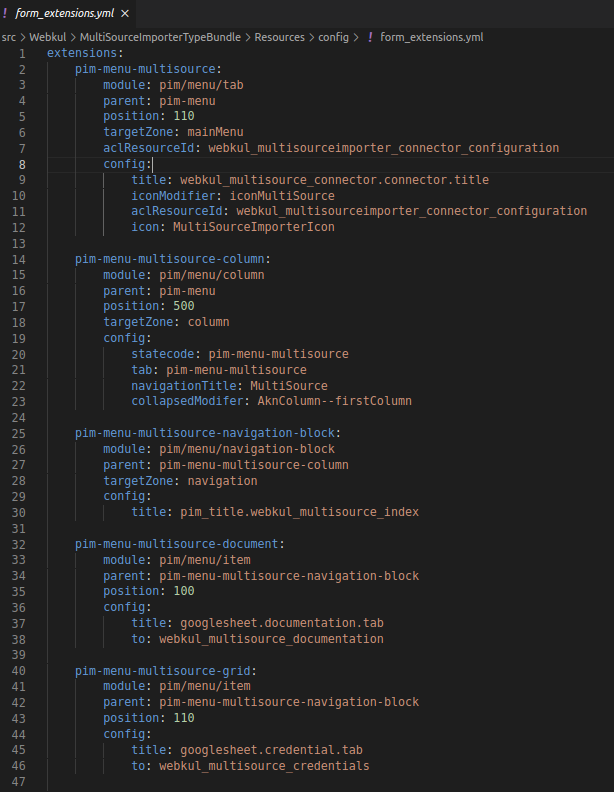
- For each tab define the separate routes and create a separate yml file that loads the js file configurations.
- List the routes for each tab in the
routing.ymlfile then, define a route using ‘to’ as the key under theconfigkey to render the HTML template at that route. - In the
requires.ymlfile under ‘pim/controller-registry.controller’, define the module that will be rendered to that route. - For that module, an entity key is defined under the config key. This entity key is very crucial for the navigation menu.
In the yml file for each tab, the root key will be “pim – ‘entity key’ – index”. Then in ‘index-container’ using the entity key as the parent load the template under the config key.


Be the first to comment.