ChatGPT Product Feed for WooCommerce helps you turn your online store into an AI-powered shopping experience.
With this plugin, you can connect your products to OpenAI’s ecosystem, so customers can easily discover items, ask questions, and even complete purchases directly within ChatGPT.
Using the Agentic Commerce Protocol (ACP) and structured product feeds, the plugin makes the buying process smooth and hassle-free.
Customers don’t need to switch between platforms—they can go from product discovery to checkout in one place.
Whether someone is searching for a gift or a specific product, your store can act like a smart assistant—providing accurate information, real-time pricing, and a seamless checkout experience.
Key Features of ChatGPT Product Feed for WooCommerce
- OpenAI-Compliant Feeds: Generate feeds in JSONL, CSV, XML, and JSON formats that meet 100% of the OpenAI 2025 commerce specifications.
- Agentic Commerce Protocol (ACP): Power the full checkout lifecycle within the chat interface, handling session management and item validation via secure REST APIs.
- Delegated Stripe Payments: Process secure, PCI-compliant payments where ChatGPT collects tokens and your store confirms the transaction.
- Real-Time Totals Calculation: Dynamically calculate subtotals, taxes, and shipping costs using your native WooCommerce engines.
- Smart Variation Support: Automatically map product variations (color, size, etc.) as unique entries while maintaining their parent relationships.
- Automated Feed Regeneration: Keep your AI catalog fresh with scheduled updates (Hourly, Twice Daily, or Daily) via WordPress Cron.
- Robust Webhook System: Notify external systems about order status changes with built-in exponential backoff retry logic.
- Enterprise-Grade Security: Protect sensitive API keys with libsodium-based encryption and verify every request using HMAC signatures.
ChatGPT Product Feed Compatibility
ChatGPT Product Feed for WooCommerce is designed to be highly compatible with modern WordPress environments.
- HPOS Compatible: Fully supports High-Performance Order Storage for improved site performance.
- WooCommerce Native Engine: Integration with native shipping and tax rules ensures consistent behavior across all sales channels.
- Expert Assistance: For any technical queries or custom functionality requests, you can raise a ticket or contact us at [email protected].
This module is not just a feed generator—it helps you bring your store into the world of AI-powered shopping.
By providing AI-ready product data and secure checkout, this plugin helps WooCommerce store owners reach users who prefer shopping through ChatGPT and other AI assistants.
Start using this WooCommerce AI product feed today and offer your customers a faster, smarter, and more convenient way to shop—combining conversational buying with the trusted experience of your
Installation of ChatGPT Product Feed for WooCommerce
The user will get a zip file that he has to upload in the “Add New” menu option in the WordPress admin panel.
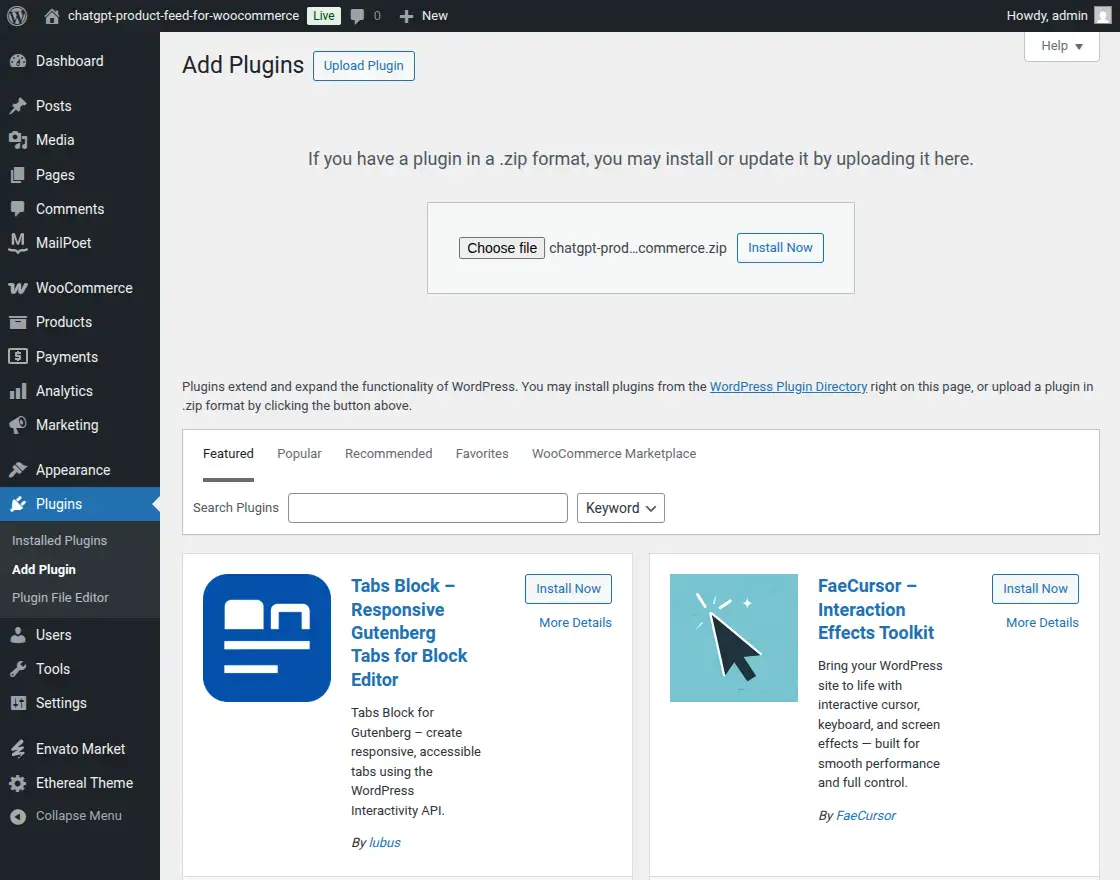
For this, login to WordPress Admin Panel, and Under the Dashboard hover your mouse over the “Plugins” menu option which brings out a Sub-Menu and then select the “Add New” option.

After this, you will see an option on the top of your page that is “Upload Plugin”, click the option to upload the zip file.

By clicking on the “Upload Plugin” option, below that you will see a button “Choose File” click on the button to browse for the zip file as per the snapshot below.

After browsing the file, click the “Install Now” button to install the plugin as per the snapshot.
Now when the plugin is installed correctly, you will see the success message and an option to activate the plugin. Henceforth now, click on “Activate Plugin” to activate the installed plugin.
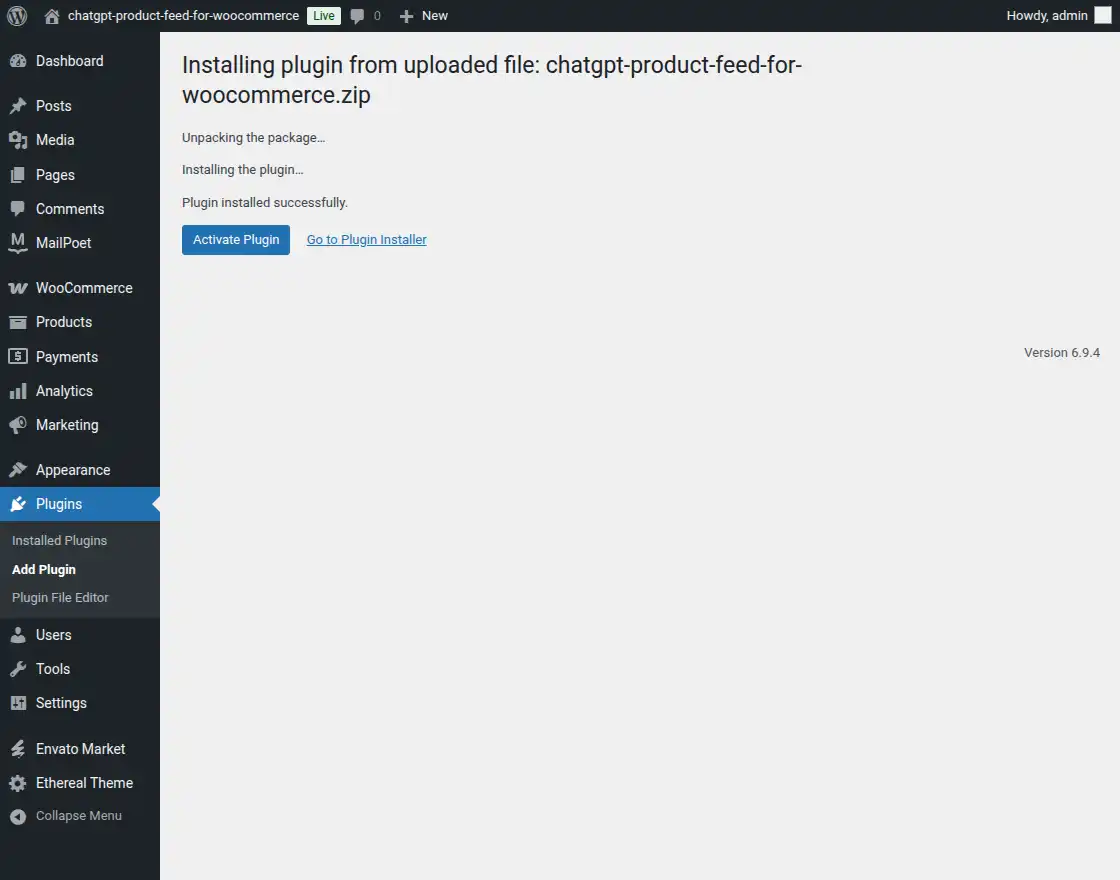
Thus, in this, the admin can install the module.
ChatGPT Product Feed for WooCommerce Configuration
Once activated, the admin can manage the plugin settings through a dedicated menu.
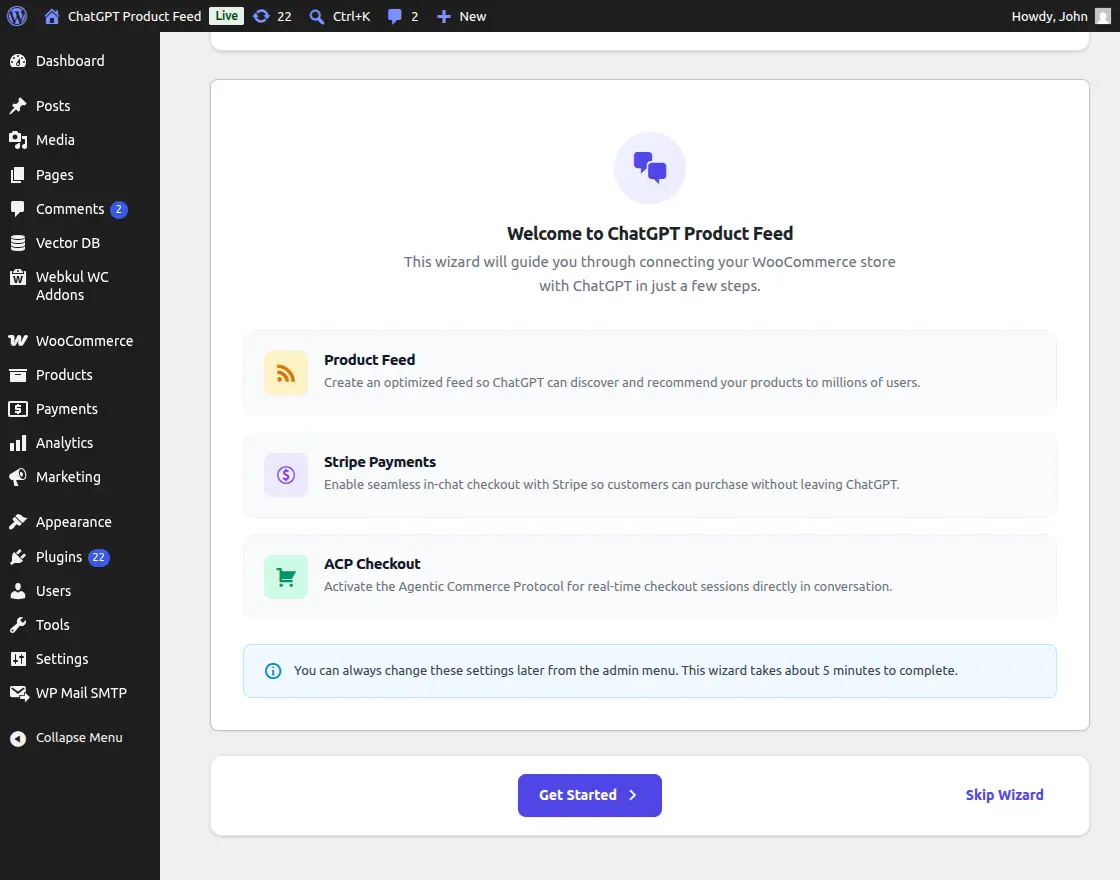
1. Setup Wizard
The 8-step Setup Wizard ensures you don’t miss any critical configurations. It covers merchant information, feed creation, Stripe key integration, and security validation.
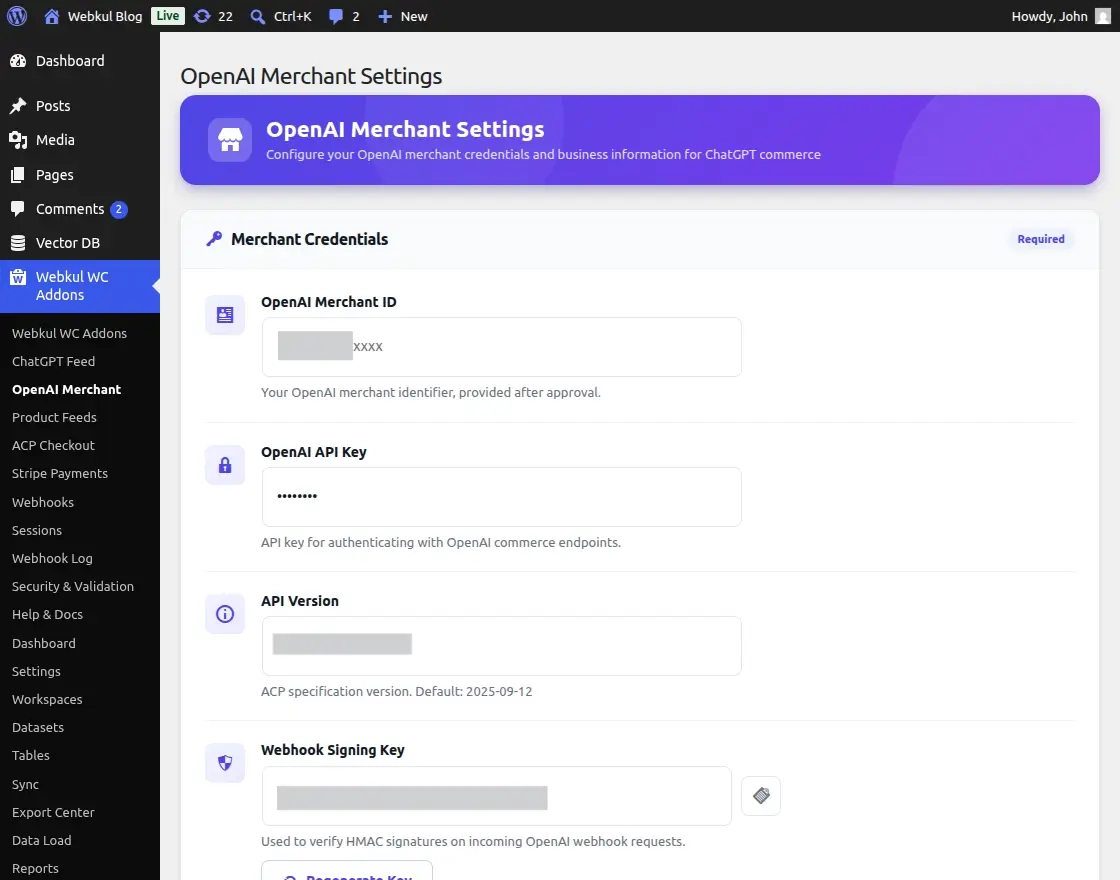
2. OpenAI Merchant Settings
In this section, the admin can configure global merchant details such as the Merchant Name, Privacy Policy URL, and Terms of Service.
These details are essential for OpenAI’s merchant verification process.
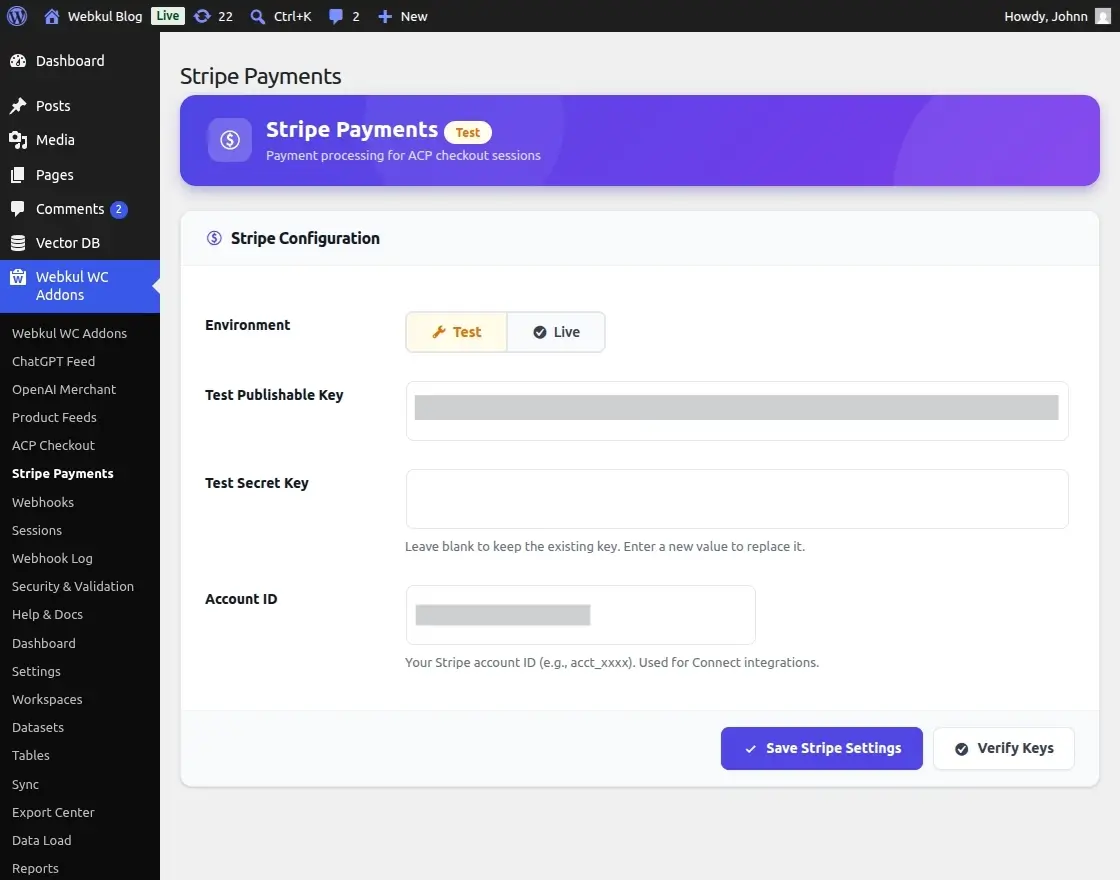
3. Stripe Payment Settings
Secure your transactions by entering your Stripe Publishable and Secret keys. The admin can verify these keys with a single click and switch between Test and Live modes effortlessly.
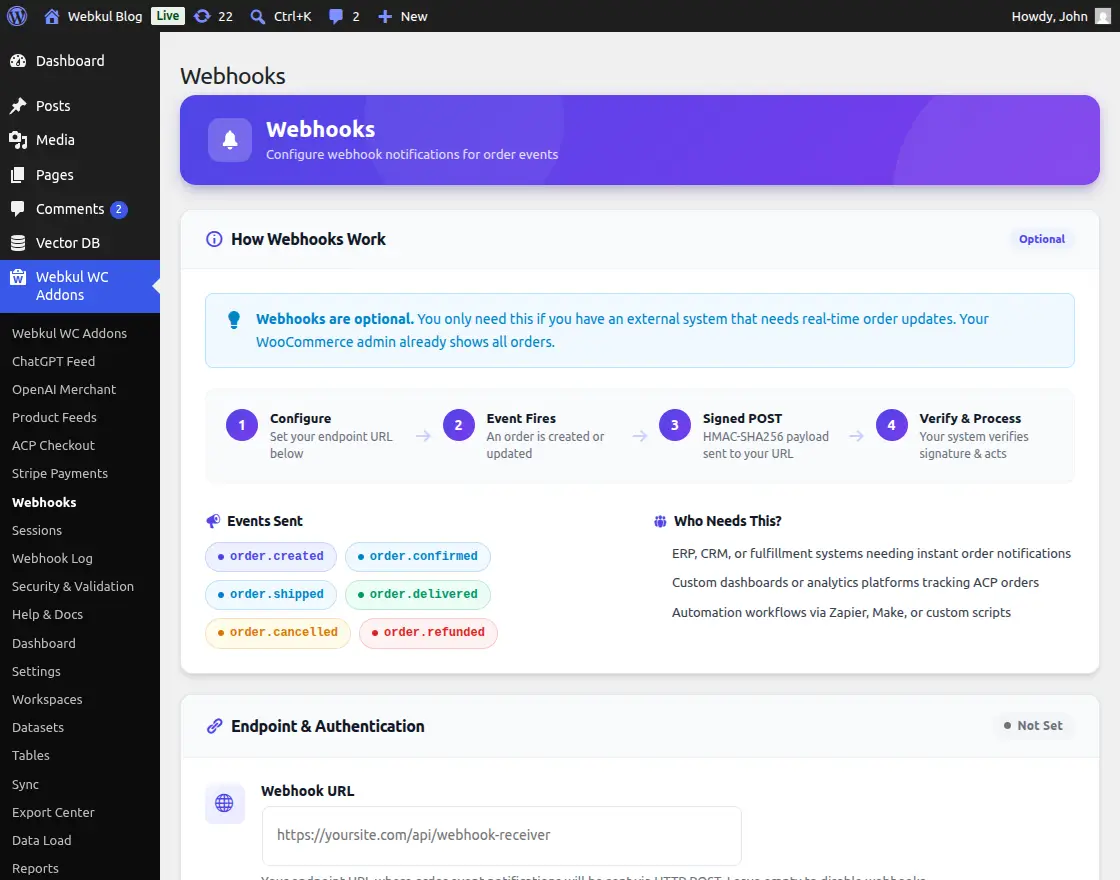
4. Webhook Configuration
Configure the notification system to alert external platforms (like OpenAI) whenever an order is created, confirmed, or shipped. The admin can set retry attempts and delays for maximum reliability.
How ChatGPT Product Feed for WooCommerce Works
The ChatGPT Product Feed for WooCommerce works in three simple stages: product discovery, interaction, and checkout.
1. Feed Generation
The plugin creates a secure product feed URL that AI platforms like ChatGPT use to understand your product catalog, including pricing and availability.
2. AI Product Discovery
When a customer asks for product suggestions, ChatGPT uses your WooCommerce AI product feed to recommend the most relevant items with accurate details.
3. Conversational Checkout (ACP)
Once the customer decides to buy, the checkout process begins directly inside the chat:
- Checkout Initiation: ChatGPT starts a secure session using ACP APIs
- Real-Time Validation: Your store verifies the cart and calculates tax and shipping based on the customer’s location
- Secure Payment: The customer completes payment via Stripe, and the order is created in WooCommerce
ChatGPT Product Feed Overview
Feed Dashboard & Analytics
The dashboard provides a real-time overview of your AI commerce performance.
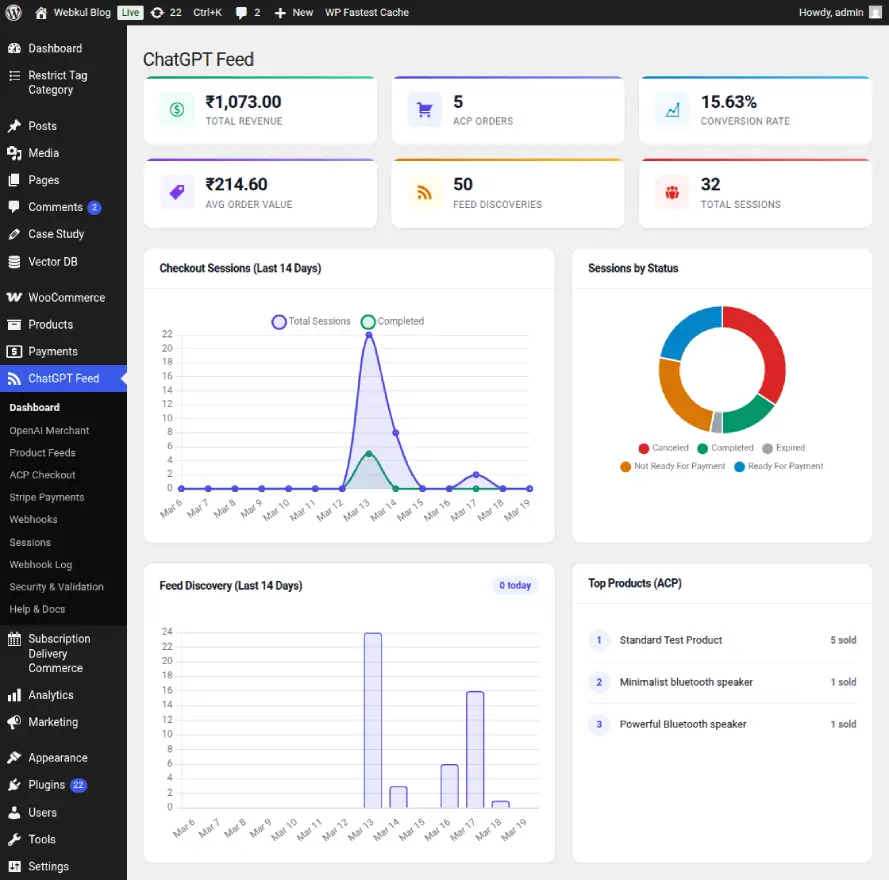
The admin can monitor key metrics such as total revenue, order count, and conversion rates specifically for sales originating from ChatGPT.
Interactive charts track session trends and feed request volume.
AI-Compliant Feed Management
This section acts as the AI-Compliant Feed Discovery Hub.
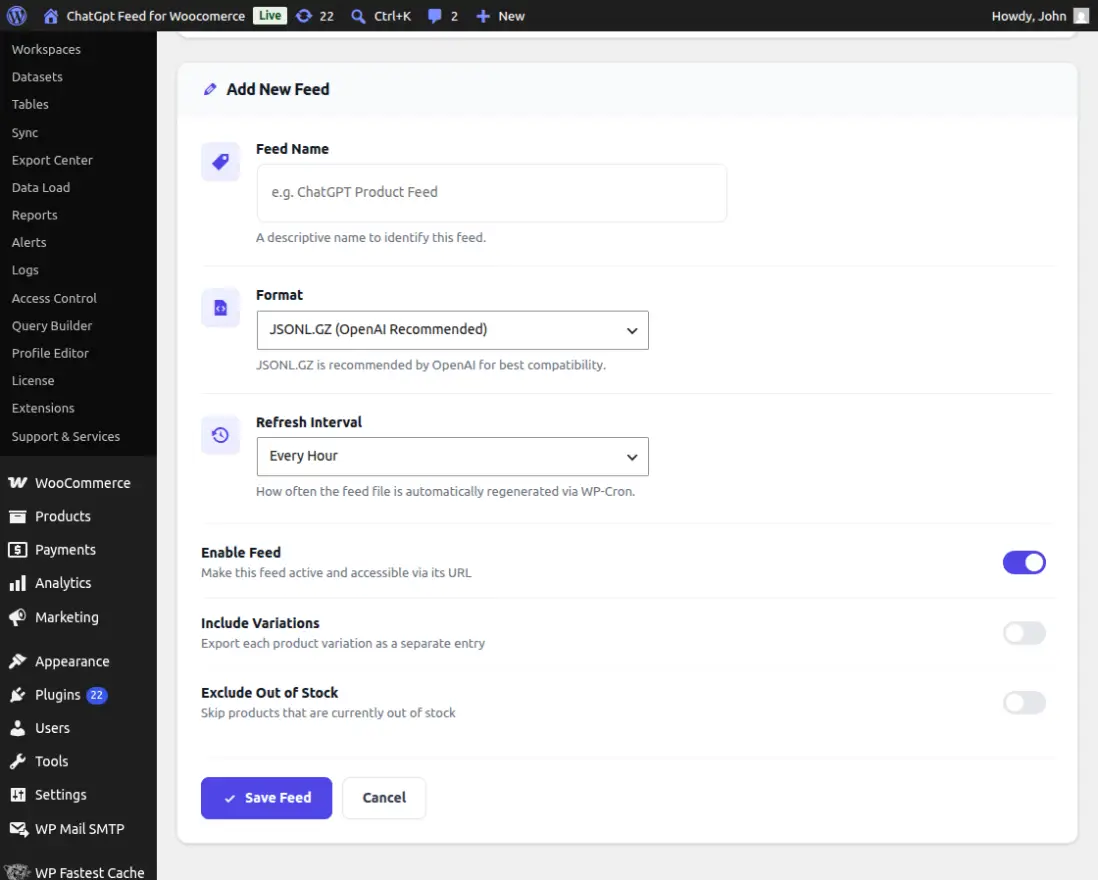
Here, the admin can manage product feed. The system automatically maps WooCommerce fields to the OpenAI spec (GTIN, MPN, availability, etc.).
Feed can be configured with specific categories and out-of-stock filters.
Agentic Commerce Protocol (ACP) & Sessions
The plugin tracks every interaction through the Real-Time ACP Checkout Lifecycle.
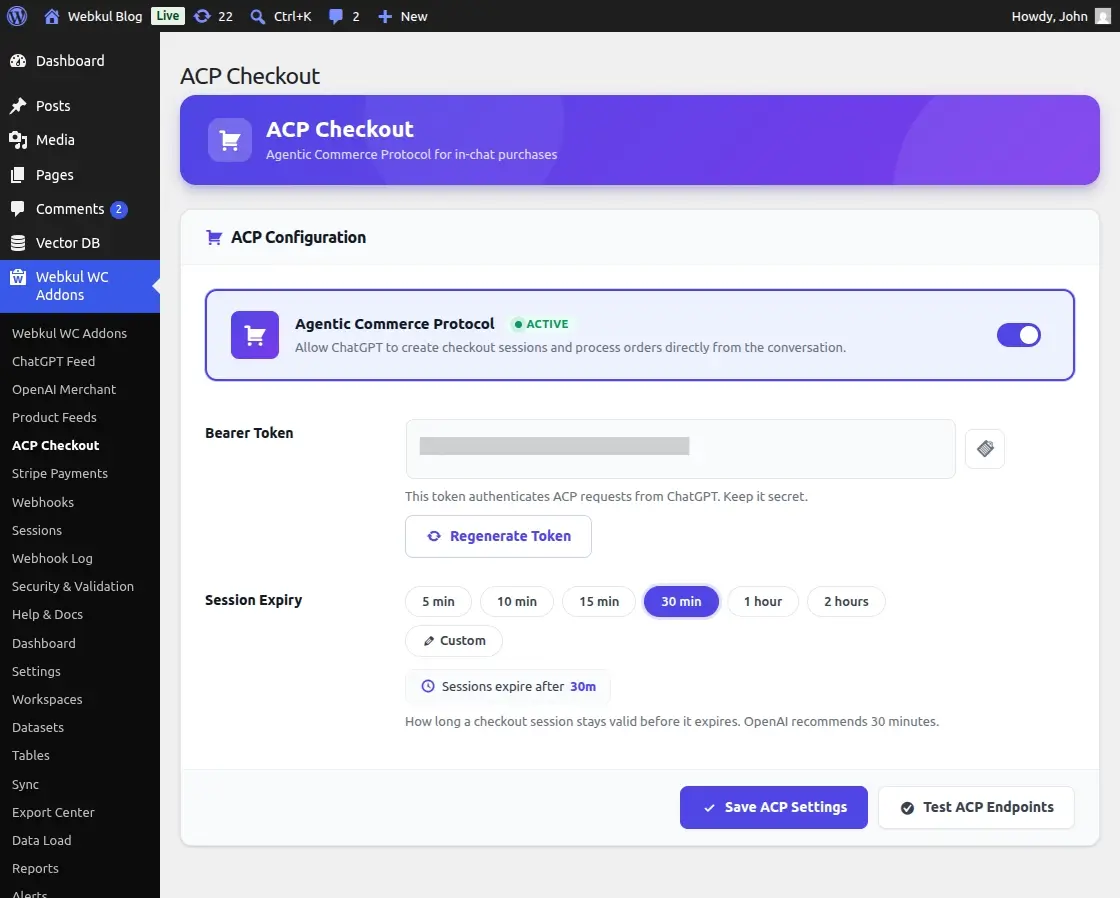
The admin can view active sessions, their current status (e.g., ready_for_payment or completed), and the buyer’s details.
This ensures transparency in the conversational checkout process.
Security & Validation Dashboard
To ensure your store is production-ready, this module includes a Robust Security Validation Dashboard.
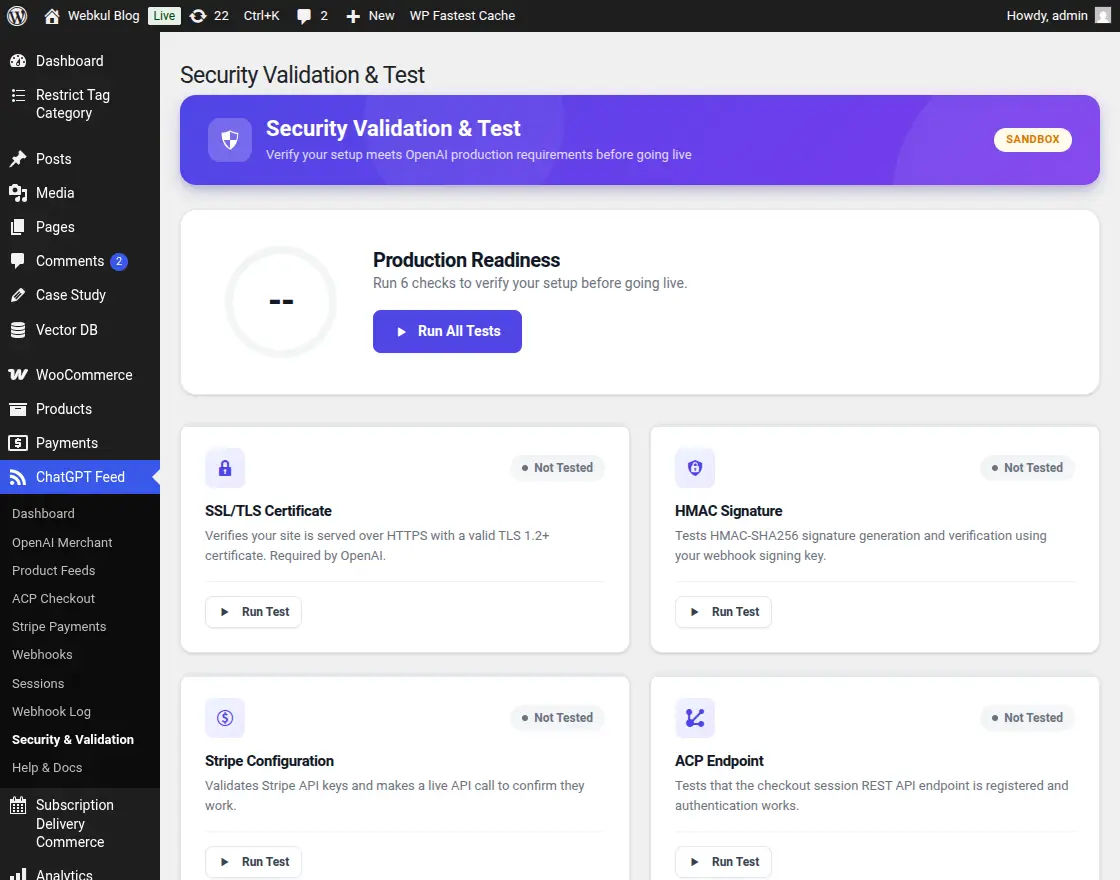
It runs automated tests for SSL integrity, HMAC signature verification, API endpoint reachability, and Stripe connectivity. Any configuration errors are highlighted with suggested fixes.
Webhook Dispatcher & History
The Automated Webhook & Order Dispatcher ensures your store stays in sync with external tracking systems.
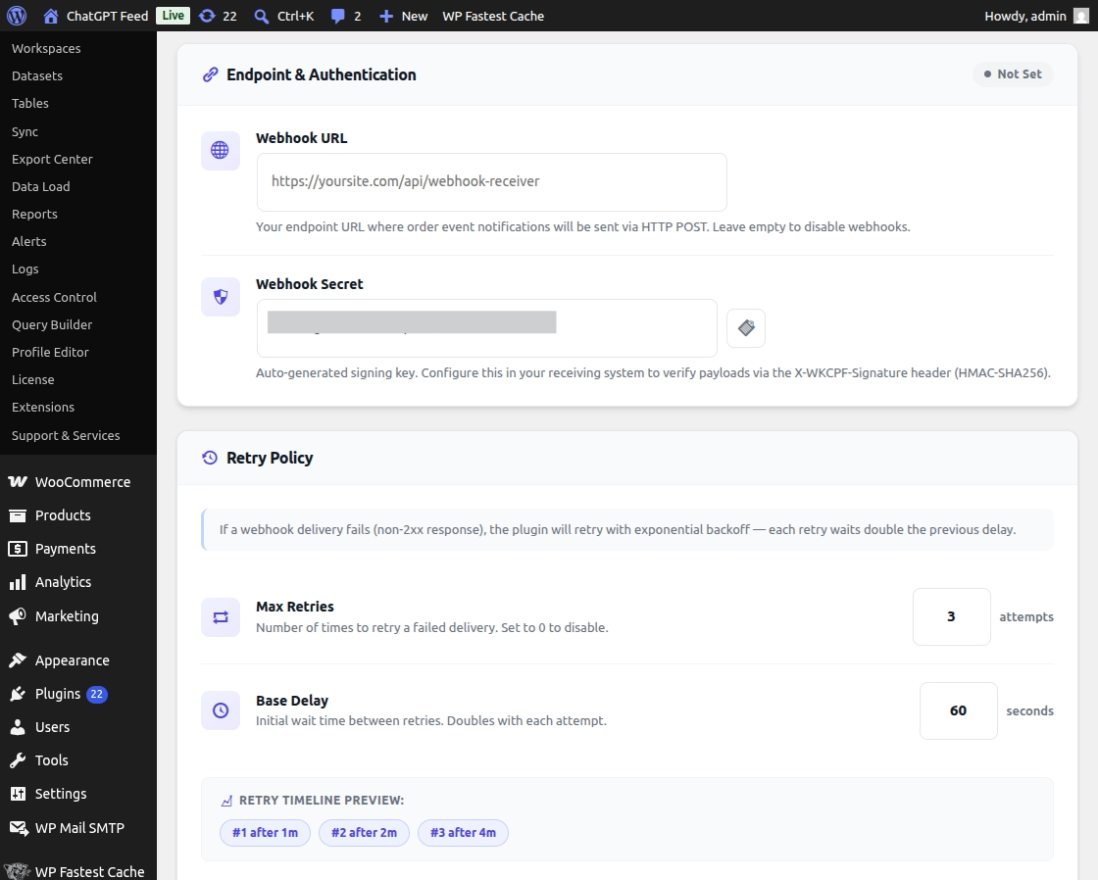
The admin can view a detailed log of every webhook sent, including the request payload, response status, and retry history, ensuring no order update is lost.
Webhook Log
The Webhook Log gives you a complete view of all webhook activity in your store, helping you track events and ensure everything is working smoothly.
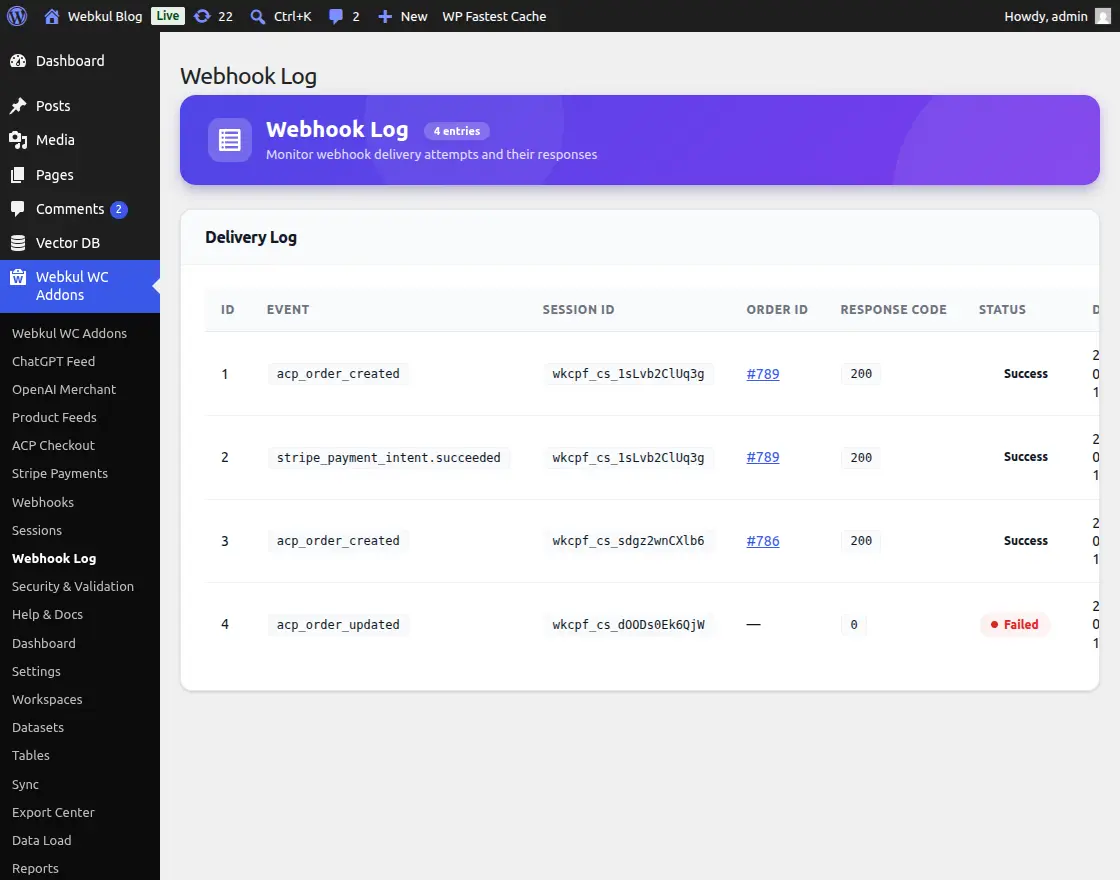
It shows important details like event type, session ID, order ID, response code, and delivery status—all in one place.
If any webhook fails, it is clearly highlighted, so you can quickly identify and fix the issue.
You can also check response messages from external systems to understand the exact reason for the failure.
The log also tracks retry attempts, so you know whether a webhook was re-sent successfully.
With this feature, the ChatGPT Product Feed for WooCommerce ensures reliable communication between your store and third-party services, helping you maintain a stable and efficient integration.
Sessions
The Sessions section allows you to track and manage all checkout sessions created through ACP.
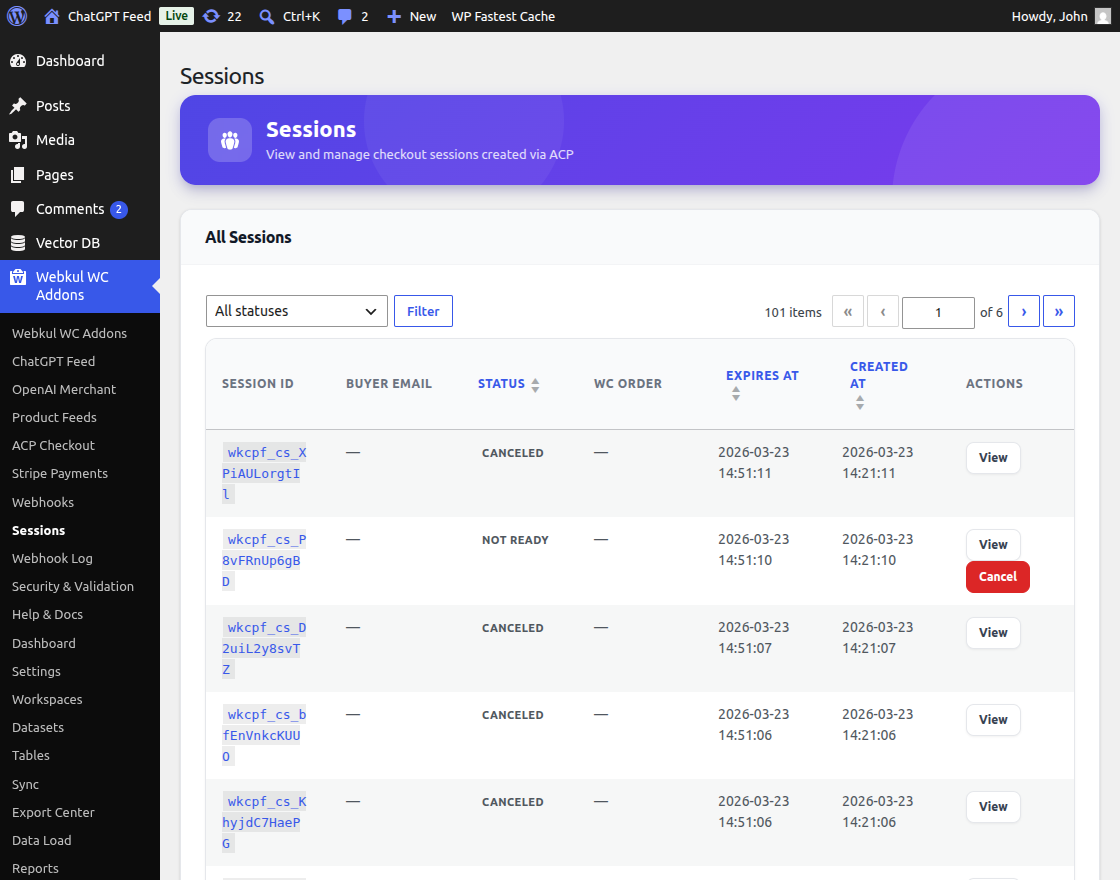
Each session tracks a customer’s checkout journey with product details, pricing, and status. You can filter sessions, view details, and cancel incomplete or inactive checkouts easily.
The module lets you track session statuses like completed, canceled, or expired. With timestamps, you can see when customers start and leave the checkout process.
This makes it easier to identify drop-offs, improve your WooCommerce checkout flow, and increase overall conversions.
Help & Docs
The Help & Docs section provides all the essential resources required to set up and manage the plugin effectively.
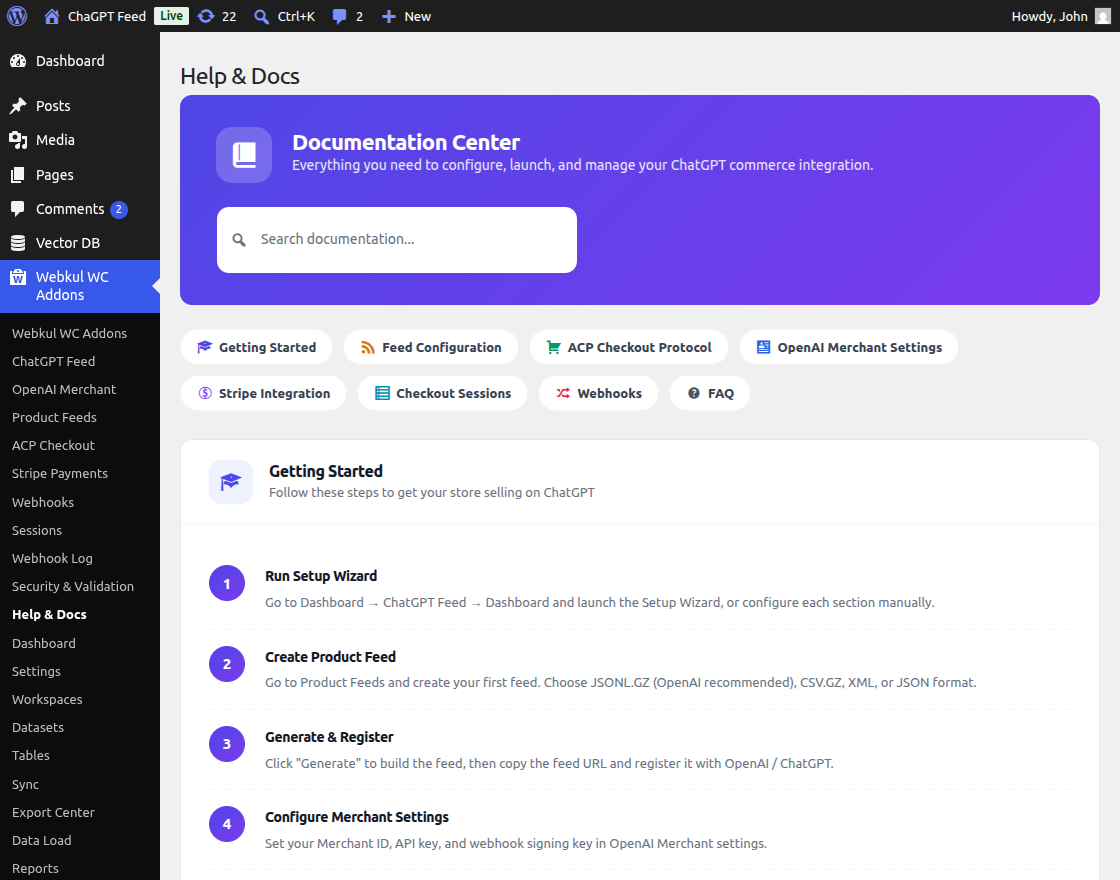
It includes setup guides, configuration steps, troubleshooting tips, and best practices.
Additionally, it helps users quickly resolve issues without external support.
You can follow step-by-step guides to set up product feeds, configure ACP, and enable payments. Clear explanations also help you understand advanced features easily.
Thus, it acts as a centralized knowledge base, ensuring smooth onboarding and efficient plugin usage.
Real-World Use Cases & Benefits
- AI Product Recommendations: Enable ChatGPT to act as a personal shopper, recommending the best products from your catalog based on user intent.
- Frictionless Checkout: Reduce cart abandonment by allowing users to finish their purchase within the same chat window where they discovered the product.
- Automated Inventory Accuracy: By syncing feeds automatically, you prevent the AI from recommending products that are out of stock or have outdated pricing.
- Reduced PCI Burden: Using the delegated payment flow with Stripe ensures that sensitive payment data is handled securely, reducing your compliance workload.
Support
So that is all for ChatGPT Product Feed for WooCommerce plugin.
If you need any further support, please drop us an email on [email protected] or create a ticket.
Current Product Version - 1.0.0
Supported Framework Version - WordPress: 6.9 Woo-commerce: 10.6


Be the first to comment.