On March 10, 2026, Google released Gemini Embedding 2 in preview. It is a big step forward in embedding technology.
It is the first natively multimodal embedding model of Google, and it is made over the Gemini foundation model architecture.
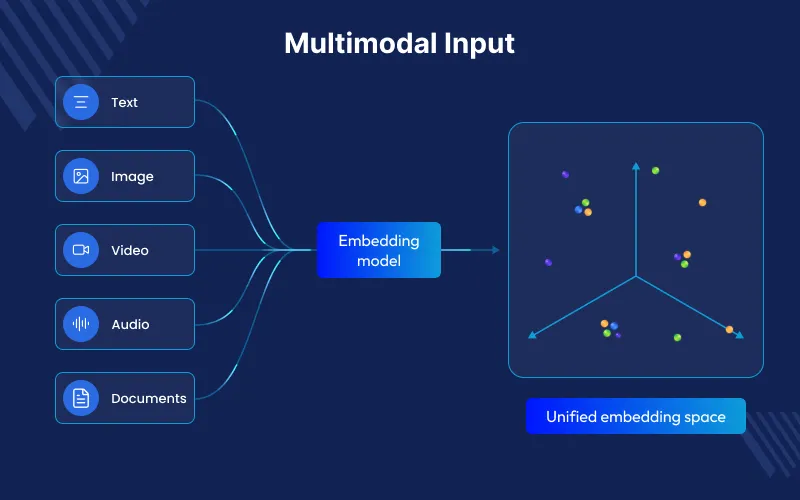
Gemini Embedding 2 can process text, images, video, audio, and documents in one shared space. Older models needed separate systems for each type of data.
This enables true cross-modal retrieval—where a text query can seamlessly surface relevant videos, audio clips, images.
This lets a text search find videos, audio clips, images, or parts of documents.
Why Natively Multimodal Matters
Most older multimodal models use separate encoders for each type of data. They connect them later during training so they can work together.
This lacks rich deep interactions that take place in middle layers within a common transformer.
Gemini Embedding 2 is the multimodal understanding of Gemini.
Each of the modalities is routed through the same architecture, and each of them captures subtle semantic relationship.
The outcome: better, more consistent embeddings of all forms of media.
It can also take mixed inputs in one API call, like text with an image or audio with video, and create the needed embeddings.
Major technical specifications of Gemini Embedding 2 :
Model ID: gemini-embedding-2-preview ( Gemini API and Vertex AI)
Input Modalities and Limits (Vertex AI is a description; Gemini API resembles)
- Text: 8,192 tokens (4 times larger than the previous models, which had a limit of about 2,048 tokens)
- Images: 6 images per request (PNG, JPEG)
- Video: Up to 120 seconds (without audio) or ~80–128 seconds (with audio); formats like MP4, MOV.
- Audio: 80 seconds maximum (MP3, WAV); natively processed, no transcription needed.
- Documents (PDF) Up to 6 pages in a file; supports OCR text + layout.
Output: 3072-dimensional vectors default.
Flexible Dimensions: 128–3072 through output dimensionality parameter (courtesy of Matryoshka Representation Learning ).
Recommended sizes: 768, 1536, 3072. Reduced dimensions store/compute with less loss of quality.
Task Type: You can use it for tasks reterival document, reterival query, semantic search , classification, clustering, semantic similarity, question & answering, etc
Languages: Good results in 100+ languages.
Knowledge Cutoff: Around November 2025 (for the underlying model).
Important : Embeddings of various models do not inhabit compatible vector spaces. The re-indexing of your data is required when migrating.
Major Improvements Over Prior Models
Unified Space: It uses one model instead of many separate encoders for text or other data types.
Increased Context Lengths and Richer Inputs: 8,192 tokens and support of native video/audio/PDF.
Efficiency: It can reduce vector size, optimize for tasks, and process many items at once to lower cost.
Less complex Pipelines – No longer embedded calls individually + post process alignment. Mixed media in one request.
For text-only tasks, gemini-embedding-001 can still be used. But Gemini Embedding 2 works better when images, audio, video, or other data are included.
Practical Use Cases of Gemini Embedding 2
Gemini Embedding 2 excels in:
Cross-Modal Search & RAG: You can use text to find videos, audio, images, or document pages, or search the other way around.
Multimodal Recommendations: It can suggest videos, images, and product details together.
Document Intelligence: It can use full PDFs with text and images to search, sort, and answer questions
Content Moderation & Classification: It can check posts, videos, or audio to find topics, feelings, or unusual content.
Multimedia Archives and Knowledge Bases: It helps store and search videos, podcasts, reports, and images in one place.
Two-stage Retrieval: First, it quickly finds possible matches with small vectors. Then it checks them again with larger vectors for better results.
In real use, it makes systems simpler, faster, and cheaper to store. It can also add new data types without changing the system design.
How to Get Started with Gemini Embedding 2
Via Gemini API (Python example – single image):
from google import genai

types. from google.genai import types.

client = genai.Client()

with open('example.png', 'rb') as f:

    image_bytes = f.read()

result = client.models.embed_content(

    model='gemini-embedding-2-preview',

    contents=[types.Part.from_bytes(data=image_bytes, mime_type='image/png')]

)

print(result.embeddings[0].values)  # 3072-dim vector (or dimensionality)
You can send text, images, and audio together in one request to create one embedding.
The same is true with video, audio, and PDF.
Migration Tips & Best Practices
- Re-index strategically– Indexing by the use of the Batch API is cost-effective.
- Shadow testing and A/B – Run old and new indexes in parallel and step by step redistribute traffic and re-trained similarity thresholds.
- Dimension Strategy – start with full 3072 quality, MRL prefixes + normalization production storage/speed.
- Task types – always provide tasktype (e.g. RETRIEVAL_DOCUMENT to index), so it will be more relevant.
The Future of Embeddings
Gemini Embedding 2 compresses multimodal stacks into a powerful single model.
It makes development much easier, retrieval on any media is better, and more intensive.
Artifical Intellignece applications become available- intelligent multimedia searching and well-integrated knowledge management in enterprises.
Models such as these are now the new standard as multimodal data becomes a flood: a single embedding space to govern them all.
Want to Build AI-powered solutions visit Webkul!


Be the first to comment.