In this blog, we will walk through how to display extra content on the cart page for each product added to the cart on the frontend of the PrestaShop store.
This is helpful when we need to show additional information, such as stock availability, custom labels, or special notes for individual products on the cart page.

We can achieve this by using the ‘displayCartExtraProductInfo‘ hook. This hook, introduced in PrestaShop 9, enables us to add extra content for each product in the shopping cart.
Register the PrestaShop Hook
$this->registerHook('displayCartExtraProductInfo');
Now that we have registered the hook, we need to create a hook definition function in our module, which will be triggered by PrestaShop for each product.
The function ‘hookDisplayCartExtraProductInfo‘ will display the content on the cart page for each product individually added to the cart on the Cart page.
/**
* Function to display the stock alert for each product on cart page
*/
public function hookDisplayCartExtraProductInfo($params)
{
    $product = $params['product'];

    $this->context->smarty->assign([
        'product_id' => $product['id_product'],
        'stock_quantity' => $product['quantity_available'],
        'is_low_stock' => ($product['quantity_available'] < 10),
    ]);

    return $this->display(__FILE__, 'views/templates/hook/cart_product_info.tpl');
}
In this example, we are assigning product-related data (e.g., stock quantity) to Smarty variables. We can extend this with other custom fields or product data as needed.
Now, create the ‘cart_product_info.tpl‘ template file, which will be used to display the extra content on the cart page. Create this file in the ‘/views/templates/hook/‘ within the module.
{if $is_low_stock}
    <div class="product-low-stock-warning text-danger">
        Only {$stock_quantity} items left in stock!
    </div>
{/if}
In this example, we are displaying a message if the product has fewer than 10 units in stock. We can customize this message or display other content based on the requirements.
Here is the result below:
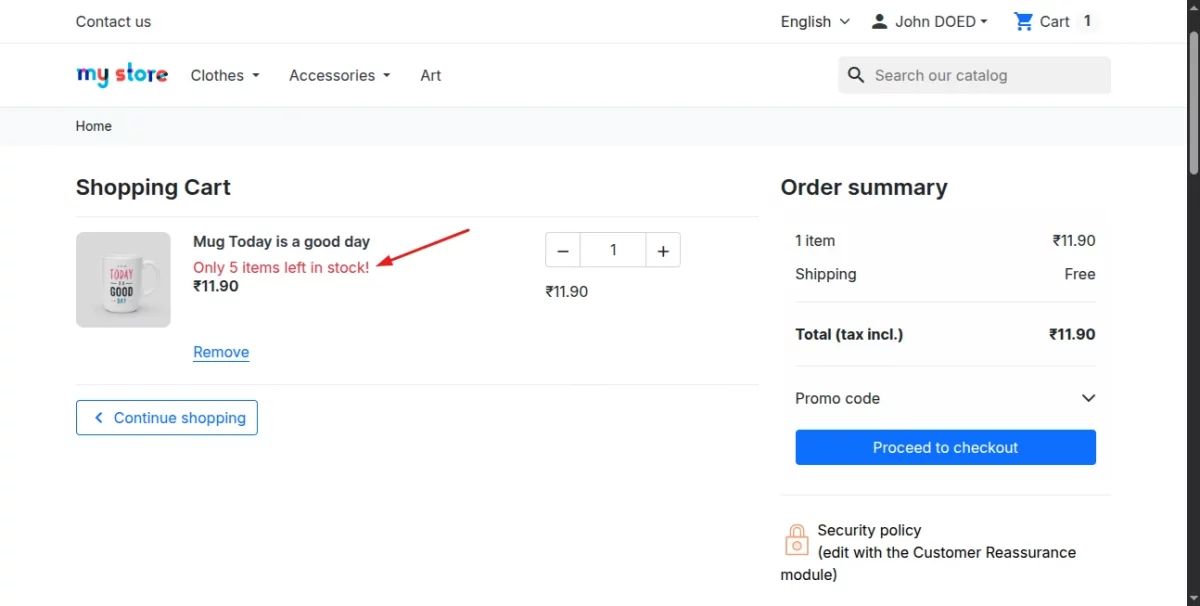
Note: In this example, we have shown how you can add extra content for each product on the cart page; you can follow a similar process to display additional content.
That’s all about this blog.
If any issues or doubts, please feel free to mention them in the comment section.
Or contact us at [email protected]
I would be happy to help.
Also, you can explore our PrestaShop Development Services and a large range of quality PrestaShop Modules.


Be the first to comment.