In this blog we will learn how to create custom layout for community pages in salesforce using lightning components and using it through community builder.
Prerequisites
- Community should be enabled.
- Make sure that community template has Builder option.

Important keywords
1) implements=”forceCommunity:layout” – It makes the component available for custom layouts in community.
2) Aura.Component[] – Array of components.
create custom layout for community pages in salesforce
Create a new lightning component and write the following code:
<!--TestCustomLayout.cmp-->
<aura:component implements="forceCommunity:layout" access="global"> <!--Access should be global-->

    <!--
    /**
     * Webkul Software.
     *
     * @category  Webkul
     * @author    Webkul
     * @copyright Copyright (c) 2010-2016 Webkul Software Private Limited (https://webkul.com)
     * @license   https://store.webkul.com/license.html
     */
     -->

    <aura:attribute name="column1" type="Aura.Component[]" required="false"/>

    <div class="container">
    	<div class="contentPanel">
        	{!v.column1}
        </div>
    </div>

</aura:component>
Add some css to it:
/**
 * Webkul Software.
 *
 * @category  Webkul
 * @author    Webkul
 * @copyright Copyright (c) 2010-2016 Webkul Software Private Limited (https://webkul.com)
 * @license   https://store.webkul.com/license.html
**/

.THIS .contentPanel:before,
.THIS .contentPanel:after {
    content: "";
    display: table;
}
.THIS .contentPanel {
    width: 100%;
}
Using Custom Layout in Communities
Step 1: Open Community Builder.
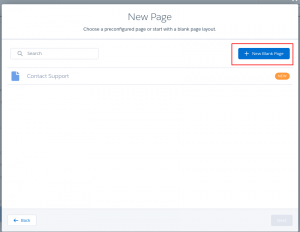
Step 2: Add a New Page

Click on New Blank Page.
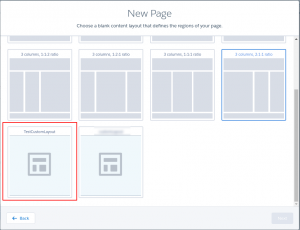
Step 3: You can view the layout you created. Select it for the page.
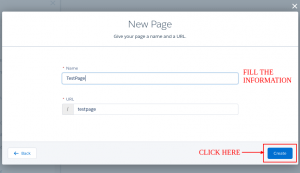
Step 4: Fill the information, and create page.
Output
Here is your output:
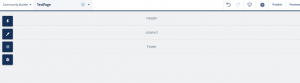
You can add the components to the layout.

Support
That’s all for how to create custom layout for community pages in salesforce, still have any issue feel free to add a ticket and let us know your views to make the code better https://webkul.uvdesk.com/en/customer/create-ticket/


Be the first to comment.