HAR converter is one of the Gatling Recording Mode which is responsible for the .har file conversion to the Gatling simulation. It removes the hassles of getting certificates over any https request.
As, there is need of certificates to work over the https request for recording the Gatling simulation. So, HAR file conversion to Gatling simulation is one of the solution in the case of no certificates available.
HAR file(i.e HTTP Archive Format) is the json formatted archive file which tracks the information between the web browser & a website. HAR file is basically used for the performance related issues or page rendering problems.
How to Generate HAR File:
HAR file can be generated with the help of tools which captures the network data like Chrome, Fiddler, Charles, Proxy & many more. Below process is explained for the HAR file generation via Chrome.
Step 1.
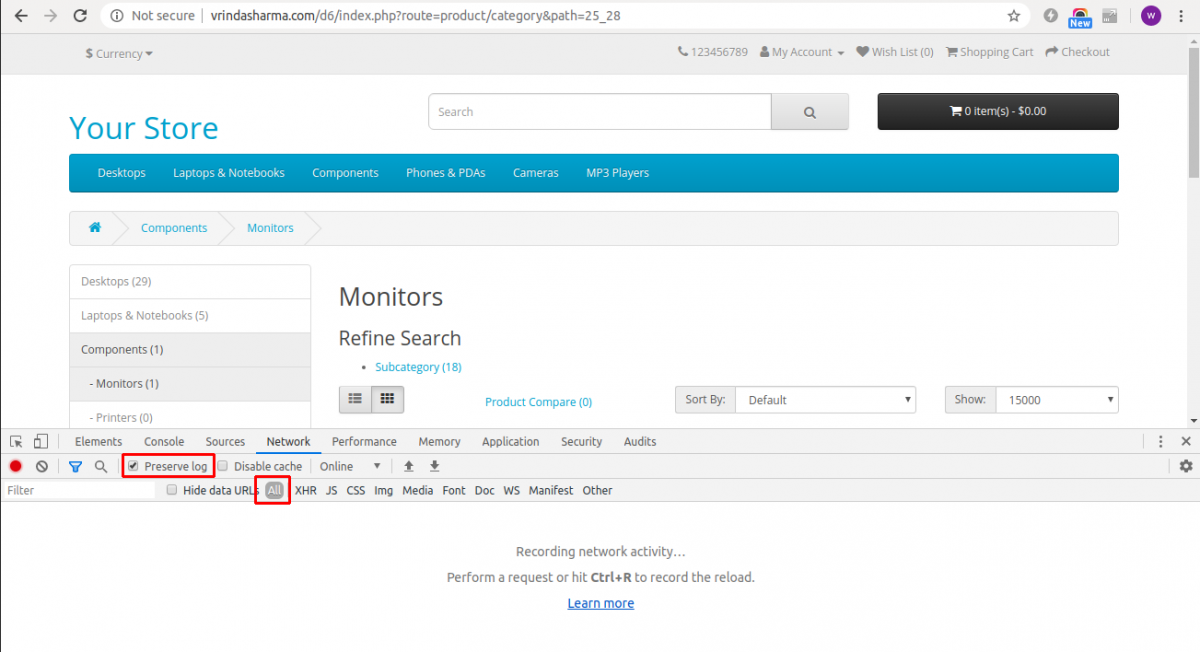
Navigate to menu > More Tools > Developer Tools. Now, go to network tab & select the preserve log & All option as given in the below image.
Step 2.
Now, perform the scenario for which Gatling simulation needs to be created. Then in Developer Tools, right click on the HTTP Request & click on “Save all as Har with content” option & save the file with .har extension.

Step 3.
Now in terminal navigate to the Gatling setup file path > bin folder, then run the Gatling Recorder via following command:
For Windows- ./recorder.bat
For Linux/Unix- ./recorder.sh

Step 4.
In the recorder window, select the HAR Converter option given in the upper right corner & browse the .har file from the system files & name the package & class name & click on the “Start” button.

The Gatling Simulation is generated for the scenario given in the .har file & saved with the same class name at the path mentioned in the above image field named as “Simulations Folder*” under the package name given in the Simulation Information.
In case you have any queries then feel free to ask in the comment section below.


2 comments
Please do share the link for which you are converting the Har file into Gatling Simulation.