How To Call Model Popup In Magento 2- Here I am going to explain you how you can call model popup in magento2.
First of all create your popup form data in your phtml file.
<div id="custom-model-popup">
	<dl>
		<dt>Definition list</dt>
		<dd>Consectetur adipisicing elit, sed do eiusmod tempor incididunt ut labore et dolore magna
		aliqua. Ut enim ad minim veniam, quis nostrud exercitation ullamco laboris nisi ut aliquip ex ea
		commodo consequat.</dd>
		<dt>Lorem ipsum dolor sit amet</dt>
		<dd>Consectetur adipisicing elit, sed do eiusmod tempor incididunt ut labore et dolore magna
		aliqua. Ut enim ad minim veniam, quis nostrud exercitation ullamco laboris nisi ut aliquip ex ea
		commodo consequat.</dd>
	</dl>
	<form action="/my-handling-form-page" method="post">
		<div>
			<label for="name">Name:</label>
			<input type="text" id="name" name="user_name">
		</div>
		<div>
			<label for="mail">E-mail:</label>
			<input type="email" id="mail" name="user_mail">
		</div>
		<div>
			<label for="msg">Message:</label>
			<textarea id="msg" name="user_message"></textarea>
		</div>
	</form>
</div>
Now include javascript code.
<script>
	require([
		"jquery",
		"Magento_Ui/js/modal/modal"
	], function($, modal){
		var options = {
			type: 'popup',
			responsive: true,
			innerScroll: true,
			title: "Model Popup Heading...", //write your popup title
			buttons: [{
				text: $.mage.__('Submit'),
				class: 'button',
				click: function () {
					console.log('Do something here......');
					// Do something here........
				}
			}]
		};
		var popupdata = $('<div />').append($('#custom-model-popup'));
		modal(options, popupdata);
		popupdata.modal('openModal');
	});
</script>
So the output of this snippet will be same as below screenshot.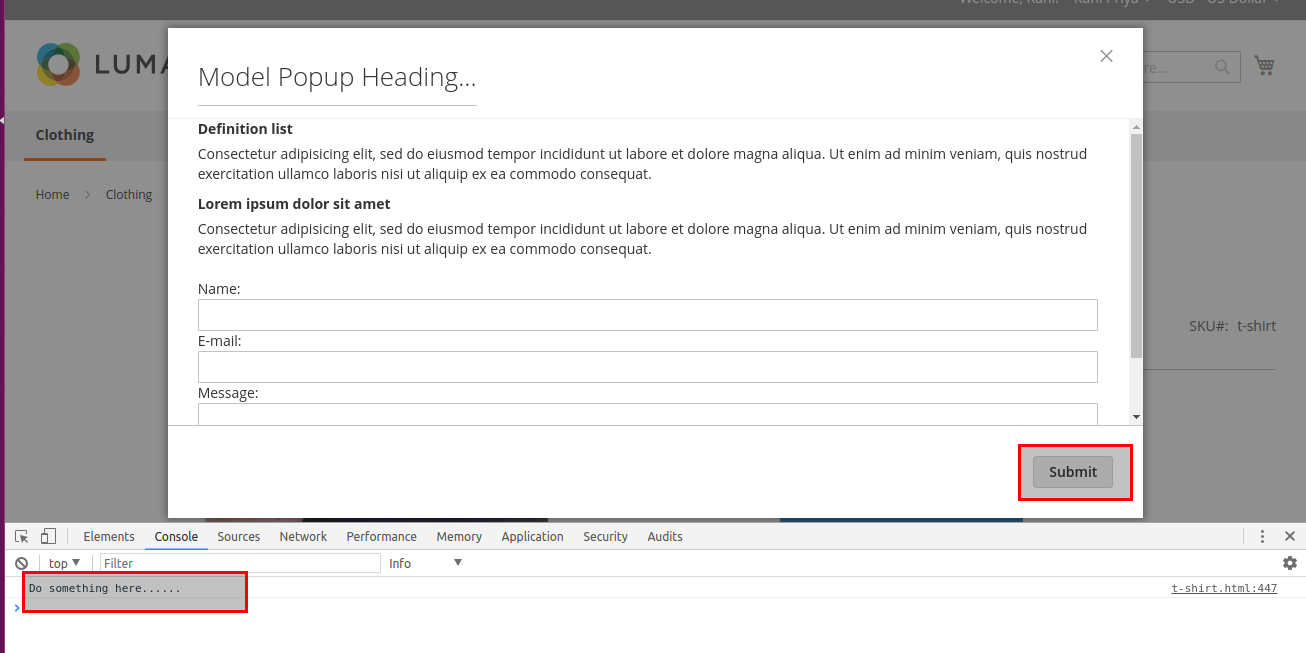
In this way you can call model popup and if you have any query then comment below.


Be the first to comment.