Here we will see how to add new mass action in any existing grid.
For this we need to create uiComponent xml file in our module with same name of the existing grid’s uiComponent xml file.
Lets add mass action in product’s grid in magento admin.
New Mass Action
Create product_listing.xml file in location “Namespace/ModuleName/view/adminhtml/ui_component” and add mass action.
<?xml version="1.0" encoding="UTF-8"?>
<listing xmlns:xsi="http://www.w3.org/2001/XMLSchema-instance" xsi:noNamespaceSchemaLocation="urn:magento:module:Magento_Ui:etc/ui_configuration.xsd">
    <listingToolbar name="listing_top">
        <massaction name="listing_massaction">
            <action name="export_products">
                <argument name="data" xsi:type="array">
                    <item name="config"xsi:type="array">
                        <item name="type" xsi:type="string">export_products</item>
                        <item name="label" xsi:type="string"translate="true">Export Product Names</item>
                        <item name="url" xsi:type="url"path="modulename/controller"/>
                    </item>
                </argument>
            </action>
        </massaction>
    </listingToolbar>
</listing>
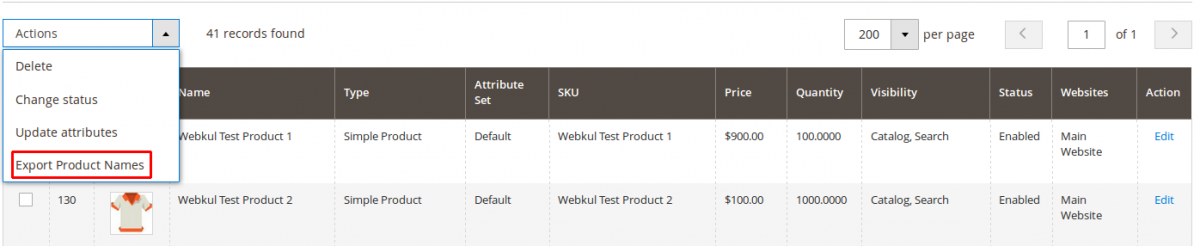
In this way you can add new mass action in existing grid.
If you are using Magento 2.0.x then read how to add mass action in existing grid in Magento 2.0.x Admin.
If you have any query please comment below.


I add xml in view/adminhtml/ui_component/sales_order_grid.xml.By adding this XML MassAction is show in dropdown.But when I select the MassAction I did not get the order ids in post request.
Please help me in to find out how to get order ids via custom MassAction in MassAction controller in Magento2 ?