How To Add Custom Field At Billing Address Form In Magento 2 : In this post, i’ll explain how we can add custom fields in billing address form at checkout. so just follow these steps.
Step1 => Please check in the Sales Checkout configuration Display billing address (Admin->Stores -> Configuration -> Sales -> Checkout->Checkout Options) Option must be Payment method

Step 2 => As we know that billing and shipping forms are generated dynamically. So we need to create a plugin for the \Magento\Checkout\Block\Checkout\LayoutProcessor::process method.
So for creating the plugin first we should make an entry in di.xml on this path.
app/code/CompanyName/Module/etc/frontend/di.xml
<config xmlns:xsi="http://www.w3.org/2001/XMLSchema-instance" xsi:noNamespaceSchemaLocation="urn:magento:framework:ObjectManager/etc/config.xsd">
    <type name="Magento\Checkout\Block\Checkout\LayoutProcessor">
        <plugin name="add_custom_field_checkout_form" type="CompanyName\Module\Model\Plugin\Checkout\LayoutProcessor" sortOrder="100"/>
    </type>
</config>

2 => Create the plugin class on this Directory.
app/code/CompanyName\Module\Model\Plugin\Checkout
namespace Webkul\CompanyName\Module\Plugin\Checkout;
class LayoutProcessor
{
    /**
     * @param \Magento\Checkout\Block\Checkout\LayoutProcessor $subject
     * @param array $jsLayout
     * @return array
     */
    public function afterProcess(
        \Magento\Checkout\Block\Checkout\LayoutProcessor $subject,
        array  $jsLayout
    ) {
        $configuration = $jsLayout['components']['checkout']['children']['steps']['children']['billing-step']['children']['payment']['children']['payments-list']['children'];
        foreach ($configuration as $paymentGroup => $groupConfig) {
            if (isset($groupConfig['component']) AND $groupConfig['component'] === 'Magento_Checkout/js/view/billing-address') {

                $jsLayout['components']['checkout']['children']['steps']['children']['billing-step']['children']
                ['payment']['children']['payments-list']['children'][$paymentGroup]['children']['form-fields']['children']['company_tax_id'] = [
                    'component' => 'Magento_Ui/js/form/element/abstract',
                    'config' => [
                        'customScope' => 'billingAddress.custom_attributes',
                        'template' => 'ui/form/field',
                        'elementTmpl' => 'ui/form/element/input',
                        'options' => [],
                        'id' => 'custom-field'
                    ],
                    'dataScope' => 'billingAddress.custom_attributes.custom_field',
                    'label' => 'Custom Field',
                    'provider' => 'checkoutProvider',
                    'visible' => true,
                    'validation' => [],
                    'sortOrder' => 250,
                    'id' => 'custom-field'
                ];
            }
        }


        return $jsLayout;
    }
}
Now custom field will be visible at billing form.
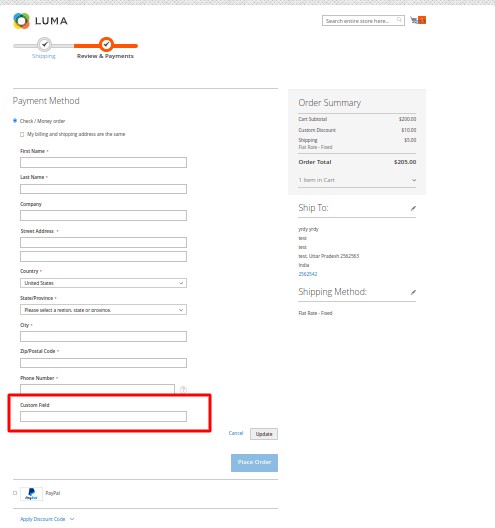
Hope so it will you help you.


8 comments
https://webkul.com/blog/add-extension-attribute-magento2/
i think, it will give you a direction.
1. With just this, you can access to the new attribute(s) from anywhere? In other words, Can you get the value with the order id in all the backend or even by API?
2. I need a checkbox with the name want_bill, but it need to be outside of the checkbox with id “billing-address-same-as-shipping-cashondelivery”. Does this solution work for me?
Thanks for sharing. Greetings
If yes please suggest me
Thanks 🙂