INTRODUCTION
POB Extension Discount On Products: Easily export special discounts in Prestashop and Odoo
POB Extension Discount On Products allows you to easily export special discounts from Prestashop to Odoo.
This module simplifies the process of managing discounts, ensuring that both platforms stay in sync, and customers get the best deals.
Users can modify pricelists in Odoo and sync them back to Prestashop, ensuring consistent pricing across both platforms.
With this extension, you can share special discounts such as percentage deals and offers, making it easier to manage your sales.
Prerequisites For Using POB Extension Discount On Products
POB Extension Discount On Products works in conjunction with the following module:
FEATURES
- Export the special discounts from Prestashop to Odoo ERP.
- Use special discounts on Prestashop in Odoo Point of Sale.
- Easily manage the special discounts on both platforms.
- Sync currency from Prestashop to Odoo as a pricelist.
- Modify and export discounts from Odoo back to Prestashop.
INSTALLATION
- Once you purchase the app from the Webkul store, you will receive the link to download the module zip file.
- Extract the file on your system after the download finishes. As a result, you will be able to see a folder named- ‘pob_discount_pricelist’
- Copy and paste this folder inside your Odoo Add-Ons path.
- Now, open the Odoo App and click on the Settings menu. Here, click on Activate the Developer Mode.
- Then, open the Apps menu and click on ‘Update Modules List.’
- In the search bar, remove all the filters and search ‘pob_discount_pricelist’
- The module will appear in the search results. Click on ‘Install’ to install it.
WORKFLOW
CONFIGURATION
- After the successful installation of the module, the configuration settings need to be done at the Prestashop end.
- Navigate to module manager>> search discounts>> update the pricelist info accordingly.
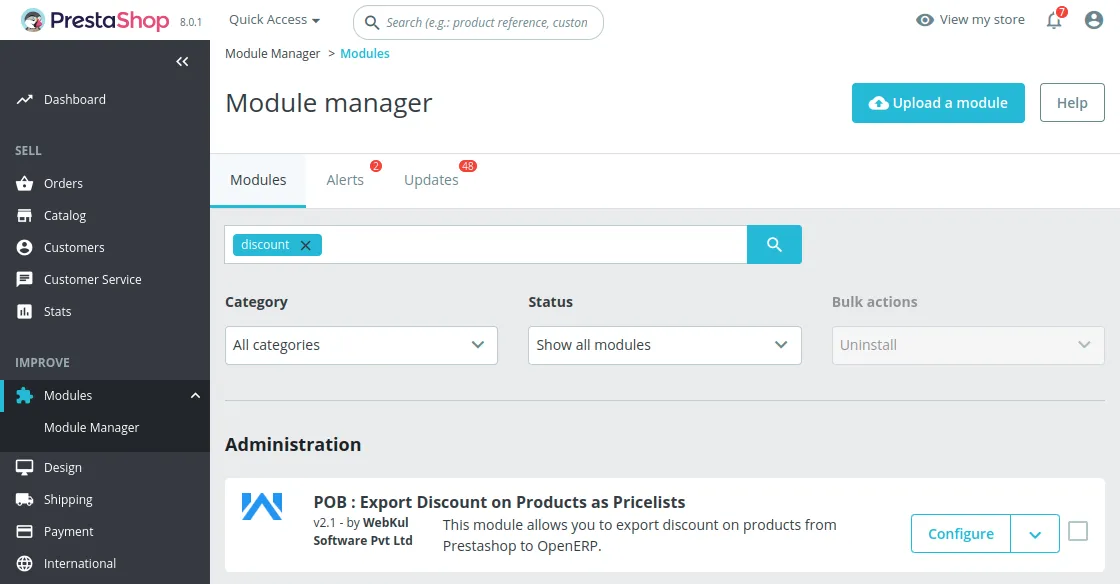
3. The following settings need to be selected in Configuration settings.
- The name of the Pricelist that will be created for exporting the Product’s discount.
- Currency for the specific price rule combination.
- Country/All countries for the discount.

Prestashop To Odoo export
4. Once configured, go to the product where you want to apply a special discount and find the pricing section in its details.
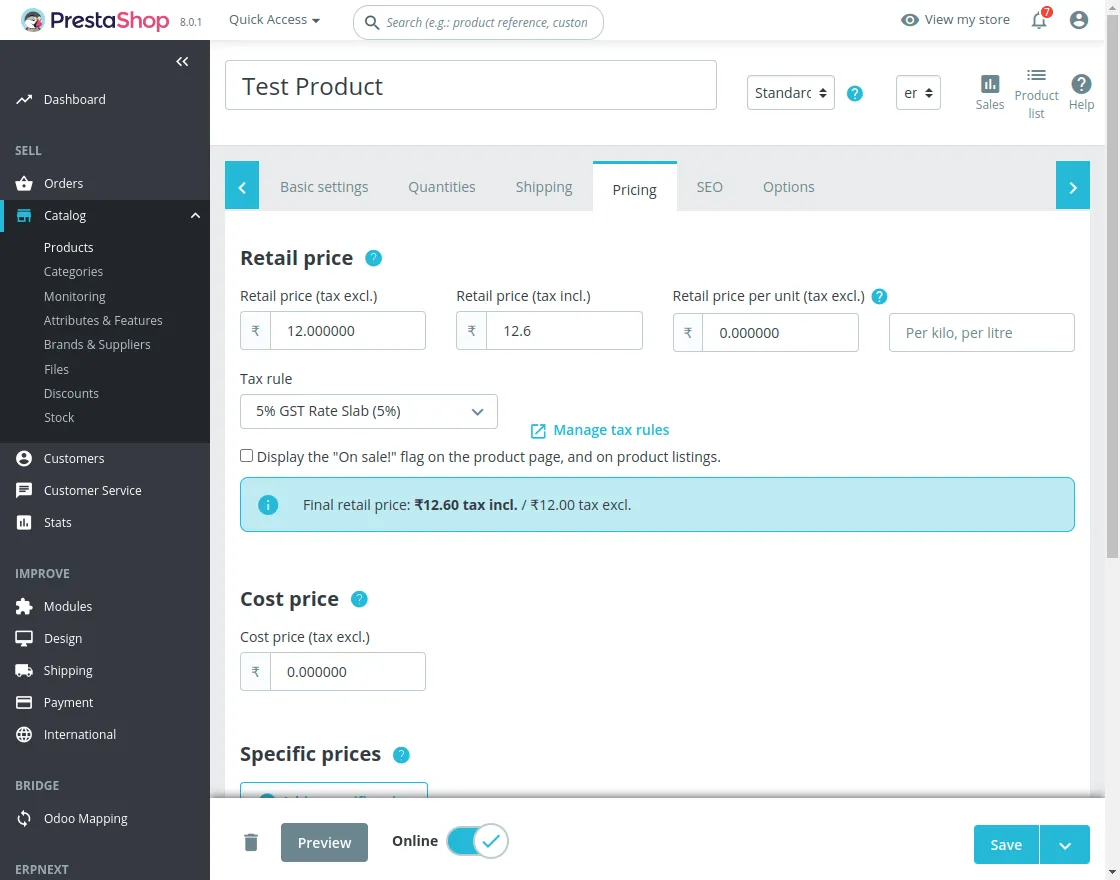
5. Now, click on the specific prices button, to add a special discount make a discount pricelist and click on save to apply it.
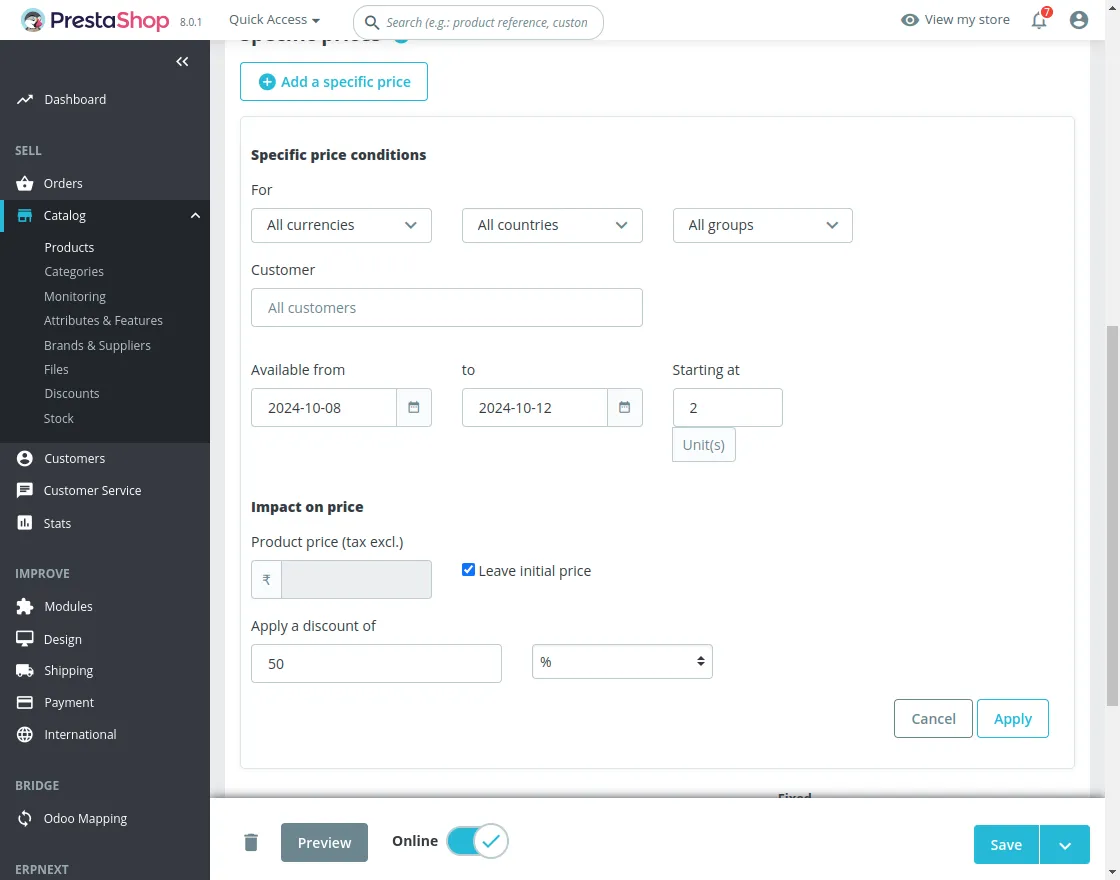
6. Once the specific price is configured, the next step is to export the discount pricelist from Prestashop to Odoo.
Navigate through Odoo Mapping >> Discount Pricelist >> Synchronize.

7. After the discount pricelist is exported, the next step is to check whether it is successfully exported to odoo. The exported pricelists can be checked at two places:
The discounted pricelists are shown in the extra prices section of the product. Navigate through products>>particular product>> extra prices

- Users can also check all the pricelists in a single place. Navigate through products>>pricelist.
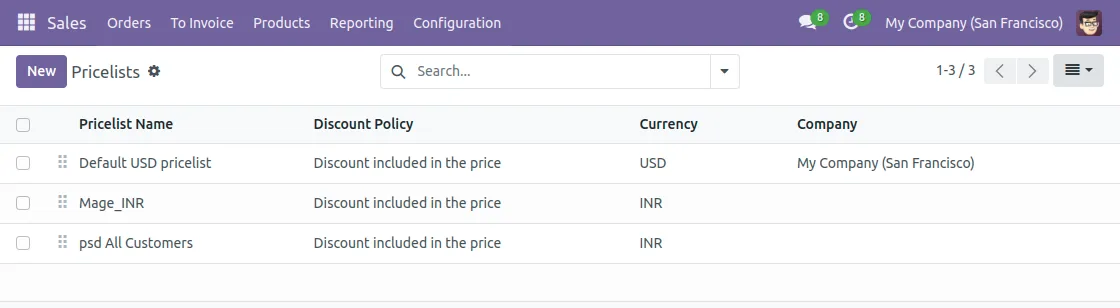
Synchronization from Odoo To Prestashop
8. Modify the discount pricelist from odoo and sync it back to Prestashop. Navigate through products>>product>>extra price >> new/update the existing.

9. Once the pricelist is modified, the last step is to synchronize the pricelist from Odoo to Prestashop.
Navigate through ecom odoo bridge >>bulk synchronization >> synchronize pricelists.

Need help?
Hope you find the guide helpful! Please feel free to share your feedback in the comments below.
If you still have any issues/queries regarding the same, please raise a ticket at the UV Desk.
I hope this helps. In case of any further queries, contact us at our support mail.
Thanks for paying attention!!
Current Product Version - 1.0.0
Supported Framework Version - PrestaShop 1.5.x.x 1.6.x.x 1.7.x.x & Odoo V7, V8, V9, V10, V11, V12, V13


Be the first to comment.