Left vertical menu displays your category menu in a very beautiful manner.
Installation Of Magento Vertical Menu
It’s pretty easy you just need to move all folder into Magento root that’s it.

After moving both the folder, flush the cache from Magento admin module. Under system > cache management.

And now your Magento Vertical Menu module has been installed.
Configuration Of Magento Vertical Menu
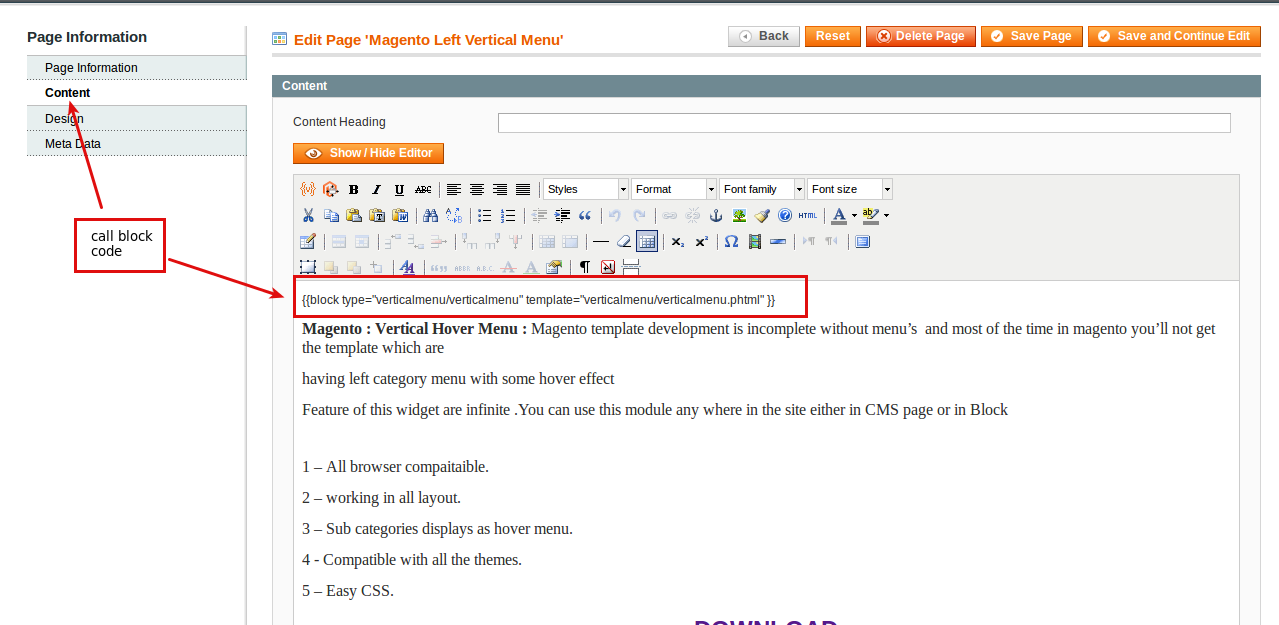
After successful installation of the module you need to go CMS -> Pages -> “Your Page”.
call block code
{{block type=”verticalmenu/verticalmenu” template=”verticalmenu/verticalmenu.phtml” }}
Magento Vertical Menu At Front-End
After inserting Block Code at CMS Page your Vertical Menu is ready to display.

That’s all for the Magento Vertical Menu, still have any issue feel free to add a ticket and let us know your views to make the module better webkul.uvdesk.com
Current Product Version - 1.0.0
Supported Framework Version - Magento 2.0.x, 2.1.x, 2.2.x,2.3.x, 2.4.x


Be the first to comment.