Magento Bulk Price Update module will help you to change and update the prices of thousands of product in just one click .
This module will change the base price of product rather than changing special price of product.
Features of Magento Bulk Price Update
- It is easy to install and suitable to use with all the magento version
- No coding is required to make changes in core magento.
- In this module store owner can increase or decrease the prices of many products according to their requirements in just one click.
- Prices can be updated on percentage or fixed rate at a time.
- It provides Interactive grid for multiple product selection.
Installation
Drag the app into Magento root directory as per the screenshot.
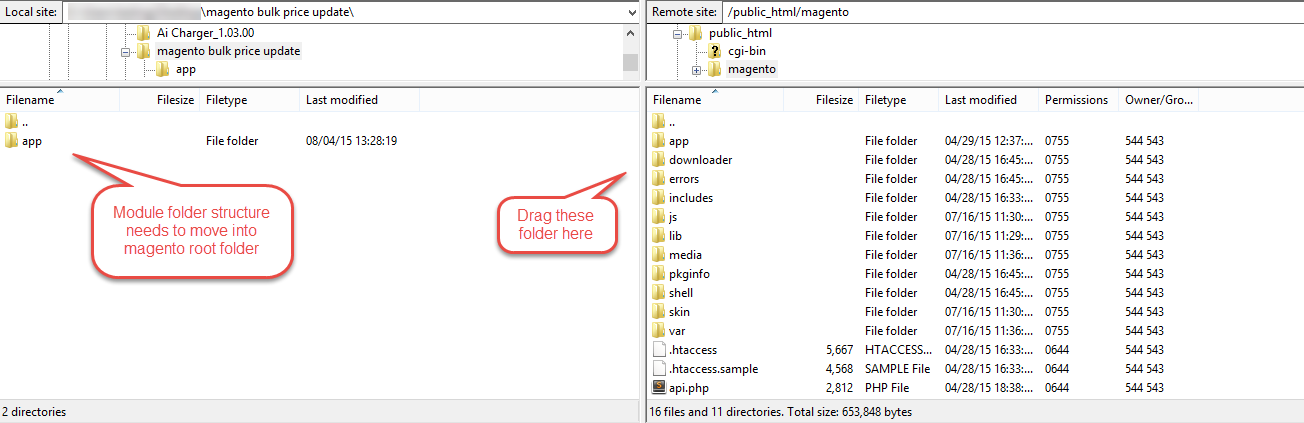
After this flush the cache from Magento admin module. Under system>Cache management.

After these primary step you just need to configure the module.
Configurations: Admin Permissions
On successfully installing the module, click on Mass product price updator and then select products to update the store information as shown in the screenshot:

Now admin can set the price with these options.


After these settings you just need to select the products where this action will apply.

That’s all for the Magento bulk price update, still have any issue feel free to add a ticket and let us know your views to make the module better webkul.uvdesk.com
Current Product Version - 1.0.0
Supported Framework Version - 1.6.x.x, 1.7.x.x, 1.8.x.x, 1.9.x.x


Be the first to comment.