Installation of Hyvä Themes in Magento 2.4.x
This installation process is only for the technology partners of the Hyvä Themes. If you don’t know what is Hyvä then please read this blog Hyvä Themes – The optimized theme for Magento 2
Requirements
- Magento CE 2.4.4-p9, 2.4.5-p8, 2.4.6-p7, 2.4.7-p1 or higher
- A valid license for Hyvä Themes, please view https://hyva.io/license
- For licensees: A Private Packagist Key
- For partners: Access to Hyvä Gitlab
- PHP 7.4, 8.1, 8.2, 8.3 or 8.4
System Requirements
- The system requirements depend on the versions of Magento and TailwindCSS in use
- A node version 16.0.0 + on development instance to run the tailwind compiler. I recommend creating the bundle on development or staging instance, not on production.
- The system requirements for Magento can be found in the devdocs.
For Licensees
Please refer to the following link
For Technology Partners
You need access to all Hyvä repositories at gitlab.hyva.io . If you don’t have access to the repo, then you have to contact the hyvä team to provide the access
Note: – Ensure your SSH key is set in your Hyvä Gitlab account, as well as on github.com. If you use Docker, check that you use the SSH key available in the PHP container running Composer.
Firstly Change the Magento mode to developer mode.
To configure and install Hyvä directly from Gitlab with composer, run these commands:
# hosted on private gitlab:
composer config repositories.hyva-themes/magento2-theme-module git git@gitlab.hyva.io:hyva-themes/magento2-theme-module.git
composer config repositories.hyva-themes/magento2-reset-theme git git@gitlab.hyva.io:hyva-themes/magento2-reset-theme.git
composer config repositories.hyva-themes/magento2-email-module git git@gitlab.hyva.io:hyva-themes/magento2-email-module.git
composer config repositories.hyva-themes/magento2-default-theme git git@gitlab.hyva.io:hyva-themes/magento2-default-theme.git
composer config repositories.hyva-themes/magento2-order-cancellation-webapi git git@gitlab.hyva.io:hyva-themes/magento2-order-cancellation-webapi.git
composer config repositories.hyva-themes/magento2-compat-module-fallback git git@gitlab.hyva.io:hyva-themes/magento2-compat-module-fallback.git
composer config repositories.hyva-themes/magento2-mollie-theme-bundle git git@gitlab.hyva.io:hyva-themes/hyva-compat/magento2-mollie-theme-bundle.git

# hosted on public github:
composer config repositories.hyva-themes/magento2-graphql-tokens git git@github.com:hyva-themes/magento2-graphql-tokens.git

composer require hyva-themes/magento2-default-theme --prefer-source
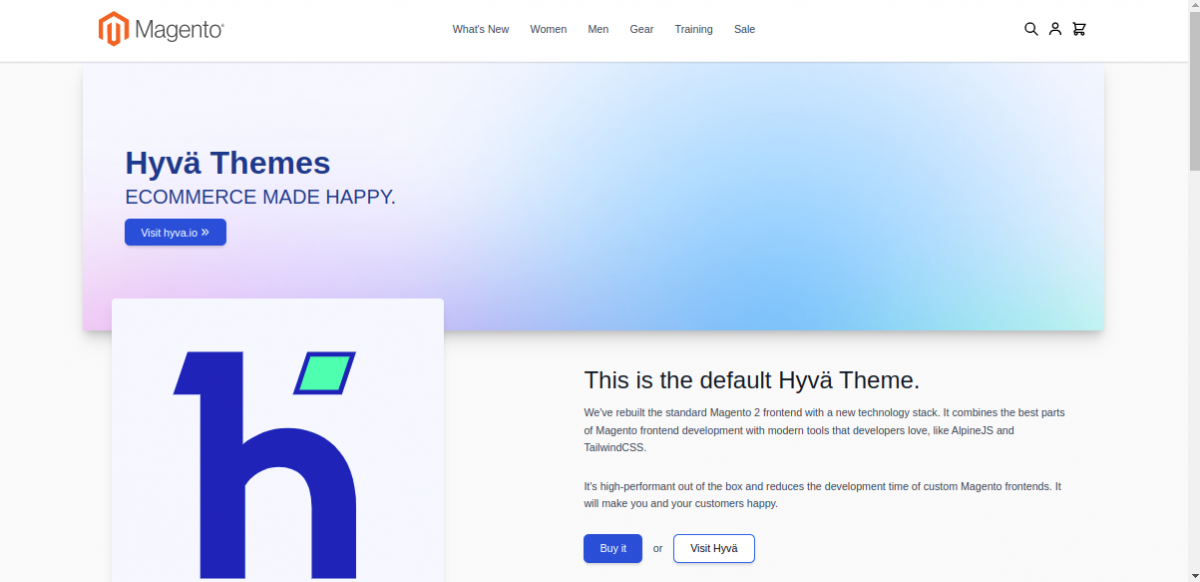
Next, run bin/magento setup:upgrade from your project’s root and navigate to the Content > Design > Configuration admin section and activate the hyva/default theme.


Next, you will see that the Hyvä theme store view looks similar to this

Additional Steps:-
Some of the bundled modules are not in use yet. You may want to disable them
To disable (Magento 2.4.3 and above):
bin/magento module:disable Dotdigitalgroup_Email Dotdigitalgroup_Chat Dotdigitalgroup_ChatGraphQl Dotdigitalgroup_EmailGraphQl Dotdigitalgroup_Sms
If you are running Adobe Commerce, also disable the Dotdigitalgroup_Enterprise module.
Hyvä theme doesn’t support the default captcha. Please disable the captcha, otherwise the form will not work:
bin/magento config:set customer/captcha/enable 0
Disabling the built-in minification and bundling
Hyvä generally recommends switching off the built-in minification and bundling of HTML, CSS and JS, as they don’t benefit Hyvä sites
bin/magento config:set dev/template/minify_html 0
bin/magento config:set dev/js/merge_files 0
bin/magento config:set dev/js/enable_js_bundling 0
bin/magento config:set dev/js/minify_files 0
bin/magento config:set dev/js/move_script_to_bottom 0
bin/magento config:set dev/css/merge_css_files 0
bin/magento config:set dev/css/minify_files 0
Ensure required GraphQL modules are enabled:
Please refer to GraphQL to see the modules. Additionally, you may also see Hyva Theme Extensions.
Previous Blog Hyvä Themes – The optimized theme for Magento 2
Next blog Working with AlpineJs in Hyvä Themes