WooCommerce ERP Integration
Table of Content
Running a WooCommerce store takes far more than a storefront, and the work behind it grows with every order.
Once volume climbs, the stock number on the site stops matching what actually sits on the warehouse shelf.
Handle that by hand and the familiar problems follow, from overselling to deliveries nobody can promise a date for.
This is where WooCommerce ERP Integration earns its place, closing the gap between storefront and back office.
Some teams connect an external ERP, while others add a WooCommerce ERP plugin that runs inside WordPress.
Either route moves the data on its own, so the warehouse and the storefront stop disagreeing about stock.
This guide covers what retail ERP is, why a growing store needs one, and how the integration reshapes daily work.
What is Retail ERP?
A Retail ERP (Enterprise Resource Planning) system is a centralized business management solution that connects and automates multiple departments, such as:
- Inventory Management
- Sales Management
- Purchase Management (PO)
- Warehouse Operations
- Order Fulfillment
- Finance & Accounting
- Customer Management
- Logistics & Shipping
- Manufacturing (if applicable)
Traditionally, businesses managed these operations using separate software solutions. However, this approach often resulted in disconnected data, manual work, and operational inefficiencies.

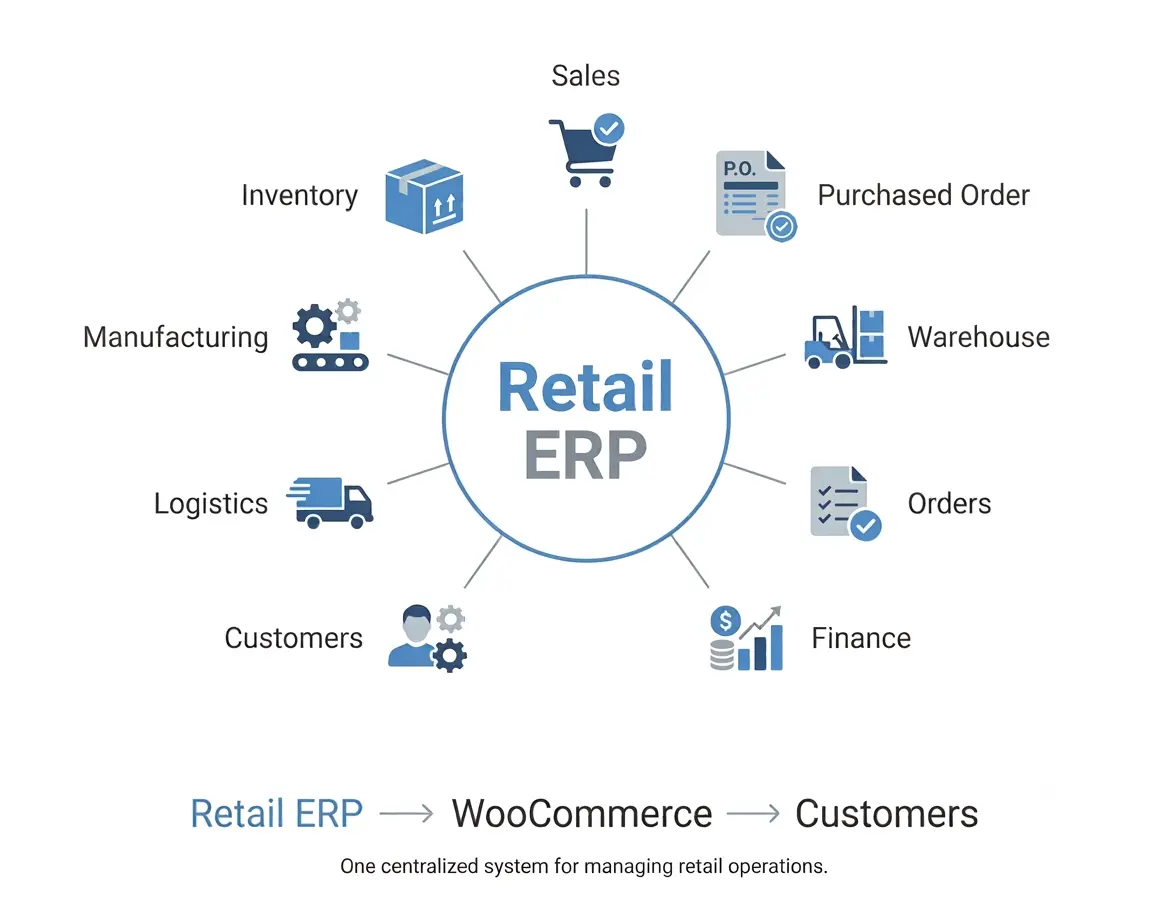
With an ERP system, all departments operate from a single source of truth, where business data flows seamlessly across functions.
Furthermore, ERP provides real-time visibility into business operations, allowing decision-makers to analyze performance and optimize workflows.
For WooCommerce merchants, ERP acts as the operational backbone, while WooCommerce continues to serve as the customer-facing sales channel.
As a result, businesses can focus on growth while the ERP manages complex operational processes behind the scenes.
Why Does an eCommerce Business Need ERP?
Many businesses begin with spreadsheets or disconnected applications to manage operations.
Initially, this approach may work for smaller operations. However, as the business expands, it introduces several operational challenges:
- Inventory mismatches across sales channels
- Manual order processing
- Delayed purchase planning
- Warehouse confusion
- Poor stock visibility
- Overselling products
- Difficulty managing multiple warehouses
- Time-consuming reporting
Therefore, an ERP solves these problems by automating workflows and ensuring every department works with synchronized data.
Benefits of WooCommerce ERP Integration
WooCommerce ERP Integration provides several advantages for growing businesses.
For example, it helps companies maintain accurate inventory, improve order processing, and reduce operational complexity.
- Centralized inventory management
- Real-time order synchronization
- Automated purchase management
- Better warehouse control
- Faster order fulfillment
- Accurate stock forecasting
- Reduced operational costs
- Improved customer satisfaction
- Scalability for business growth
Key Features of WooCommerce ERP Integration
1. Inventory Management
Inventory management for WooCommerce is the heart of every retail business. Therefore, maintaining accurate stock levels is critical for preventing sales issues.
With WooCommerce ERP Integration, inventory remains synchronized between WooCommerce and the ERP in real time.
Additionally, businesses can manage:
- Real-time stock synchronization
- Multi-location inventory visibility
- Automatic stock updates after sales
- Inventory adjustments
- Stock reservations
- Batch and lot tracking
- Serial number management
- Inventory valuation
As a result, businesses can prevent overselling, eliminate manual updates, and make better purchasing decisions.
Example:
A customer purchases five units from your WooCommerce store.
The ERP immediately deducts stock, updates warehouse availability, and reflects the remaining inventory on WooCommerce without manual intervention.
2. Sales Order Synchronization
Every order placed through WooCommerce can automatically flow into the ERP system. Therefore, businesses no longer need to manually enter order details, reducing processing time and human errors.
Moreover, automated order synchronization allows teams to manage the complete order lifecycle from a centralized platform.
Order Synchronization Includes
- Customer details
- Product information
- Taxes
- Discounts
- Shipping methods
- Payment status
- Order status
- Tracking information
Once the order reaches the ERP, it moves through a structured workflow:
Order Received → Order Confirmation → Warehouse Allocation → Picking → Packing → Shipping → Delivery
Furthermore, ERP-driven order processing provides several benefits:
- Faster order processing
- Reduced manual errors
- Real-time order visibility
- Improved customer experience
- Better fulfillment accuracy
Consequently, businesses can handle higher order volumes without increasing manual workload.
3. Purchase Order Management
Managing inventory availability is not only about tracking existing stock; instead, businesses must also ensure timely replenishment.
For this reason, ERP systems help automate Purchase Order for WooCommerce by monitoring inventory levels and generating purchase orders based on predefined reorder rules.
Additionally, businesses can manage suppliers, approvals, and purchasing workflows from a single platform.
Features
- Purchase Order generation
- Vendor management
- Supplier quotations
- Purchase approvals
- Goods receipt
- Invoice matching
- Vendor performance tracking
Example:
When a product reaches its minimum stock threshold, the ERP automatically creates a purchase order for the preferred supplier.
As a result, businesses can reduce stockouts, maintain inventory availability, and improve supplier coordination.
Moreover, automated purchasing helps companies avoid overstocking and unnecessary inventory costs.
4. Back Order Management
Running out of stock does not always mean losing a potential sale.
Instead, businesses can use ERP-powered backorder management to continue accepting customer orders while efficiently managing incoming inventory.
Furthermore, ERP systems help businesses maintain transparency by tracking unavailable products and expected replenishment timelines.
Backorder management features include:
- Accepting orders for out-of-stock products
- Reserving incoming inventory
- Automatic stock allocation
- Customer availability notifications
- Backorder prioritization
As a result, businesses can maintain customer trust while maximizing revenue opportunities.
Benefits include:
- Reduced lost sales
- Better customer communication
- Automatic order fulfillment after replenishment
- Improved inventory planning
Therefore, backorder management becomes an important feature for businesses handling high-demand products.
5. Multi-Warehouse Inventory Management
Many growing retailers operate multiple warehouses to reduce shipping costs and improve delivery speed. Because of this, centralized warehouse visibility becomes increasingly important.
With WooCommerce ERP Integration, businesses can manage inventory across different warehouse locations from one centralized system.
Moreover, ERP solutions can automatically identify the most suitable warehouse based on stock availability, customer location, and fulfillment rules.
As a result, businesses can reduce delivery times and improve operational efficiency.
Multi-warehouse capabilities include:
- Warehouse-wise inventory tracking
- Warehouse-specific stock allocation
- Regional fulfillment management
- Warehouse priority rules
- Location-based inventory reports
Example:
A business operates:
- New York Warehouse – Primary inventory location
- California Warehouse – Regional fulfillment center
- Texas Warehouse – Additional storage facility
In this scenario, the ERP automatically selects the warehouse with available stock that can fulfill the order most efficiently.
Consequently, businesses improve delivery performance while reducing unnecessary shipping expenses.
6. Internal Inventory Transfer
Inventory frequently needs to move between warehouses due to changing demand patterns. Therefore, ERP systems simplify internal stock transfers while maintaining accurate inventory records.
Instead of manually updating stock levels, businesses can create transfer requests and track inventory movement automatically.
Internal inventory transfer features include:
- Warehouse-to-warehouse transfers
- Transfer requests
- Approval workflows
- Shipment tracking
- Inventory reconciliation
Example:
Warehouse A has excess inventory, while Warehouse B requires additional stock.
In this case, the ERP creates an internal transfer request and updates inventory levels at both locations after completion.
As a result, businesses maintain balanced inventory distribution across all warehouses.
7. Warehousing Management
Warehouse Management for WooCommerce plays a crucial role in ensuring fast and accurate order fulfillment.
Therefore, businesses need efficient warehouse operations to manage increasing order volumes and customer expectations.
Unlike traditional inventory systems, ERP solutions do more than simply store product information.
Instead, they optimize warehouse processes by improving product movement, storage accuracy, and employee productivity.
Furthermore, ERP-based warehouse management provides complete visibility into product locations and warehouse activities.
Warehouse management features include:
- Bin location management
- Shelf management
- Zone management
- Barcode scanning
- Product put-away
- Stock counting
- Cycle counting
Additionally, warehouse operators can quickly identify product locations and follow optimized workflows.
As a result, businesses can reduce picking errors, improve warehouse efficiency, and process orders faster.
Ultimately, an ERP-powered warehouse system helps businesses create a more organized and scalable fulfillment environment.
8. Pick, Pack & Ship Process (Routing)
Once an order enters the warehouse, ERP guides employees through a structured fulfillment workflow. Therefore, businesses can ensure that every order moves efficiently from confirmation to delivery.
First, warehouse employees receive optimized picking instructions based on product locations and warehouse rules.
Next, after products are picked, employees can verify items, complete packaging, print invoices, and generate shipping labels directly through the ERP system.
Finally, ERP shipping integrations allow businesses to generate tracking numbers, update shipment statuses, and automatically share delivery updates with customers.
The complete fulfillment process includes:
Order Confirmation → Inventory Allocation → Picking → Packing → Shipping → Tracking → Delivery
Moreover, automated routing reduces unnecessary warehouse movement and minimizes fulfillment delays.
As a result, businesses can achieve faster deliveries, improved accuracy, and higher customer satisfaction.
Complete WooCommerce ERP Workflow
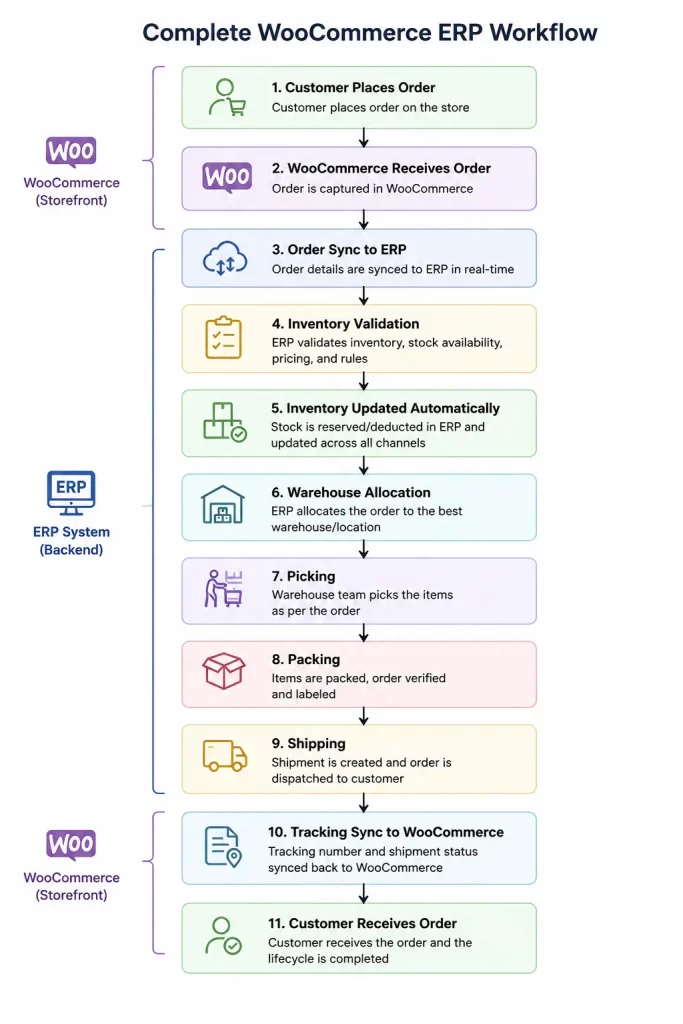
A complete WooCommerce ERP workflow connects every stage of the retail operation.
Initially, customers place orders through WooCommerce. Then, order information automatically synchronizes with the ERP system.
After that, the ERP verifies inventory availability, assigns warehouse locations, and manages fulfillment activities.
Meanwhile, purchasing teams can monitor stock levels and create purchase orders whenever replenishment is required.
Finally, shipping information is updated automatically, allowing customers to track their orders.
Consequently, businesses achieve complete operational visibility without relying on manual processes.

Advantages of WooCommerce ERP Integration
WooCommerce ERP Integration provides long-term benefits by improving efficiency, accuracy, and scalability.
Furthermore, businesses can build a stronger operational foundation by automating critical workflows.
Improved Operational Efficiency
Manual processes often consume valuable time and increase the possibility of errors. However, ERP integration automates repetitive tasks and creates structured workflows.
As a result, teams can focus more on strategic activities instead of spending time on manual data entry and operational management.
Better Inventory Accuracy
Real-time synchronization ensures stock levels remain consistent across WooCommerce and warehouse locations. As a result, businesses can maintain better inventory control.
Faster Order Fulfillment
Automated workflows reduce processing time. Consequently, customers receive their orders faster.
Reduced Operational Costs
Automation minimizes human errors, duplicate work, and unnecessary inventory holding costs.
Better Customer Experience
Customers benefit from accurate stock availability, faster deliveries, order tracking, and timely updates.
Scalable Business Operations
Whether operating a single warehouse or multiple fulfillment centers, ERP integration supports business growth without adding operational complexity.
Industries That Benefit from WooCommerce ERP Integration
WooCommerce ERP Integration is suitable for businesses across multiple industries.
Additionally, companies with complex inventory requirements and fulfillment processes can benefit significantly from ERP automation.
- Fashion & Apparel
- Electronics
- Grocery & FMCG
- Furniture
- Automotive Parts
- Pharmaceuticals
- Manufacturing
- Wholesale Distribution
- B2B Commerce
- Multi-vendor Marketplaces
For example, manufacturers can manage production and inventory, while retailers can optimize sales, warehouse operations, and fulfillment.
Therefore, ERP integration provides value across different business models and operational structures.
Top ERP Platforms for WooCommerce Integration
Choosing the right ERP depends on several factors, including business size, operational complexity, budget, and future growth requirements.
Therefore, businesses should evaluate ERP platforms based on their specific workflows rather than selecting a solution only based on popularity.
WooCommerce can integrate with several leading ERP platforms, including:
- Odoo ERP
- ERPNext
- AureusERP
Each platform provides unique capabilities for inventory management, purchasing, warehouse operations, accounting, manufacturing, and customer management.
Odoo ERP integration for WooCommerce
Odoo is one of the most comprehensive ERP platforms, offering a modular architecture that allows businesses to implement the applications they need.
This helps reduce manual effort, improve operational efficiency, and streamline your entire eCommerce workflow from a centralized Odoo ERP platform.
Odoo Integration for WooCommerce enables you to seamlessly connect your WooCommerce store with Odoo ERP.
Best suited for
- Small to Enterprise Businesses
- Retail & Wholesale
- Manufacturing
- Multi-company Businesses
Key Features
- Inventory & Warehouse Management
- Sales & CRM
- Purchase Management
- Manufacturing (MRP)
- Accounting
- Point of Sale (POS)
- Shipping Integrations
- Multi-Warehouse Support
- Barcode Operations
ERPNext Integration for WooCommerce
ERPNext is another popular open-source ERP known for its simplicity, flexibility, and lower implementation cost.
It is particularly attractive for growing businesses looking for enterprise capabilities without significant licensing expenses.
Best suited for
- Small & Medium Businesses
- Retail
- Wholesale Distribution
- Manufacturing
- Service-Based Businesses
Key Features
- Inventory Management
- Warehouse Management
- Purchasing
- CRM
- Accounting
- Manufacturing
- Project Management
AureusERP Integration for WooCommerce
AureusERP is a modern enterprise solution designed to simplify retail, distribution, and warehouse operations.
In addition, AureusERP helps businesses manage multiple sales channels by providing centralized control over inventory, purchasing, fulfillment, and order processing.
The AureusERP WooCommerce Connector enables seamless synchronization between AureusERP and WooCommerce.
As a result, products, orders, customers, and inventory can be efficiently synced, thereby streamlining store management and improving overall operational efficiency.
Best Suited For:
- Retail Businesses
- eCommerce & Marketplace Stores
- Multi-Warehouse Operations
- Wholesale Distribution
- Omnichannel Commerce
Key Features:
- Centralized Inventory Management
- Sales Order Processing
- Purchase Order Management
- Multi-Warehouse Management
- Internal Stock Transfers
- Pick-Pack-Ship Workflow
- Backorder Management
- Warehouse Routing
Furthermore, AureusERP focuses on simplifying retail operations while supporting business scalability.
ERP Comparison at a Glance
| Feature | Odoo | ERPNext | AureusERP |
| Inventory Management | ✓ | ✓ | ✓ |
| Sales Order Sync | ✓ | ✓ | ✓ |
| Purchase Orders | ✓ | ✓ | ✓ |
| Backorder Management | ✓ | ✓ | ✓ |
| Multi-Warehouse | ✓ | ✓ | ✓ |
| Internal Inventory Transfer | ✓ | ✓ | ✓ |
| Pick-Pack-Ship Workflow | ✓ | ✓ | ✓ |
| Warehouse Routing | ✓ | ✓ | ✓ |
| Manufacturing Support | ✓ | ✓ | Depends on deployment |
| Open Source | Yes (Community Edition) | Yes | Yes |
| Ideal For | SMBs to Enterprises | SMBs | SMBs & Retail Commerce |
Which ERP Should You Choose?
The ideal ERP depends on your operational needs:
- Choose Odoo if you need a highly modular ERP with extensive functionality across manufacturing, accounting, CRM, POS, and retail operations.
- Choose ERPNext if you’re looking for an affordable, open-source ERP with strong inventory, purchasing, and warehouse management capabilities.
- Choose AureusERP if your focus is retail, eCommerce, warehouse automation, omnichannel inventory management, and streamlined order fulfillment.
Regardless of the ERP platform you choose, integrating it with WooCommerce enables real-time synchronization of products, inventory, customers, orders, warehouses, and shipments.
This eliminates manual processes while improving operational efficiency across your business.
Why Choose WooCommerce ERP Integration?
WooCommerce is an excellent eCommerce platform. However, as businesses grow, managing complex operations only through the storefront becomes increasingly challenging.
Therefore, ERP integration provides the additional operational control required for scaling businesses.
An ERP system complements WooCommerce by managing:
- Inventory
- Purchasing
- Warehouses
- Fulfillment
- Orders
- Suppliers
- Customer data
- Reporting
Furthermore, businesses handling thousands of orders, multiple warehouses, or omnichannel operations can significantly benefit from ERP automation.
In addition, ERP integration provides better visibility, allowing businesses to make faster and more accurate decisions.
Ultimately, WooCommerce ERP Integration helps businesses achieve greater efficiency, improved customer experience, and sustainable growth.
Conclusion
WooCommerce ERP Integration is no longer just an optional improvement; instead, it has become a strategic investment for businesses planning long-term growth.
By connecting WooCommerce with an ERP system, businesses can automate inventory management, synchronize sales orders, and streamline purchasing.
They can also manage multiple warehouses and optimize fulfillment operations.
Furthermore, ERP integration reduces manual efforts, minimizes operational errors, and improves overall business visibility.
As eCommerce continues to evolve, businesses need scalable systems that can support increasing customer expectations and operational complexity.
Therefore, companies adopting WooCommerce ERP Integration can become more agile, data-driven, and customer-focused.
Ultimately, ERP integration enables businesses to build a stronger operational foundation and achieve sustainable success in the competitive eCommerce landscape.
Let’s Discuss Your Requirements
With respect to retail ERP solutions, our experts are here to assist you with implementation, customization, and digital transformation strategies tailored to your business needs.
- Email: sales@webkul.com
- Create a Ticket: https://webkul.uvdesk.com/en/customer/create-ticket/
- Connect with us: https://webkul.com/contacts/
Feel free to reach out — we’d be happy to discuss your vision and guide you with the right solution.