Prestashop Responsive Chroniker Theme
Choosing the right theme for your store is important to run your website. A good theme gives your website a distinct look and feels that sends out a positive impression to your users.
A well-structured theme also helps your website rank well on major search engines.
Prestashop Responsive Chroniker Theme does exactly the same. It allows you to change basic features on your layout and enhances the overall user experience of your store.
Features
- Fully responsive prestashop theme.
- Admin can add/remove items from the website homepage.
- Admin can add item title and description in multi language as well.
- Admin can easily edit added item.
- Completely redesigned homepage.
- Three types of product view options available on the category page i.e. grid view, list view and table view.
- Newly improvised filters option on the category page.
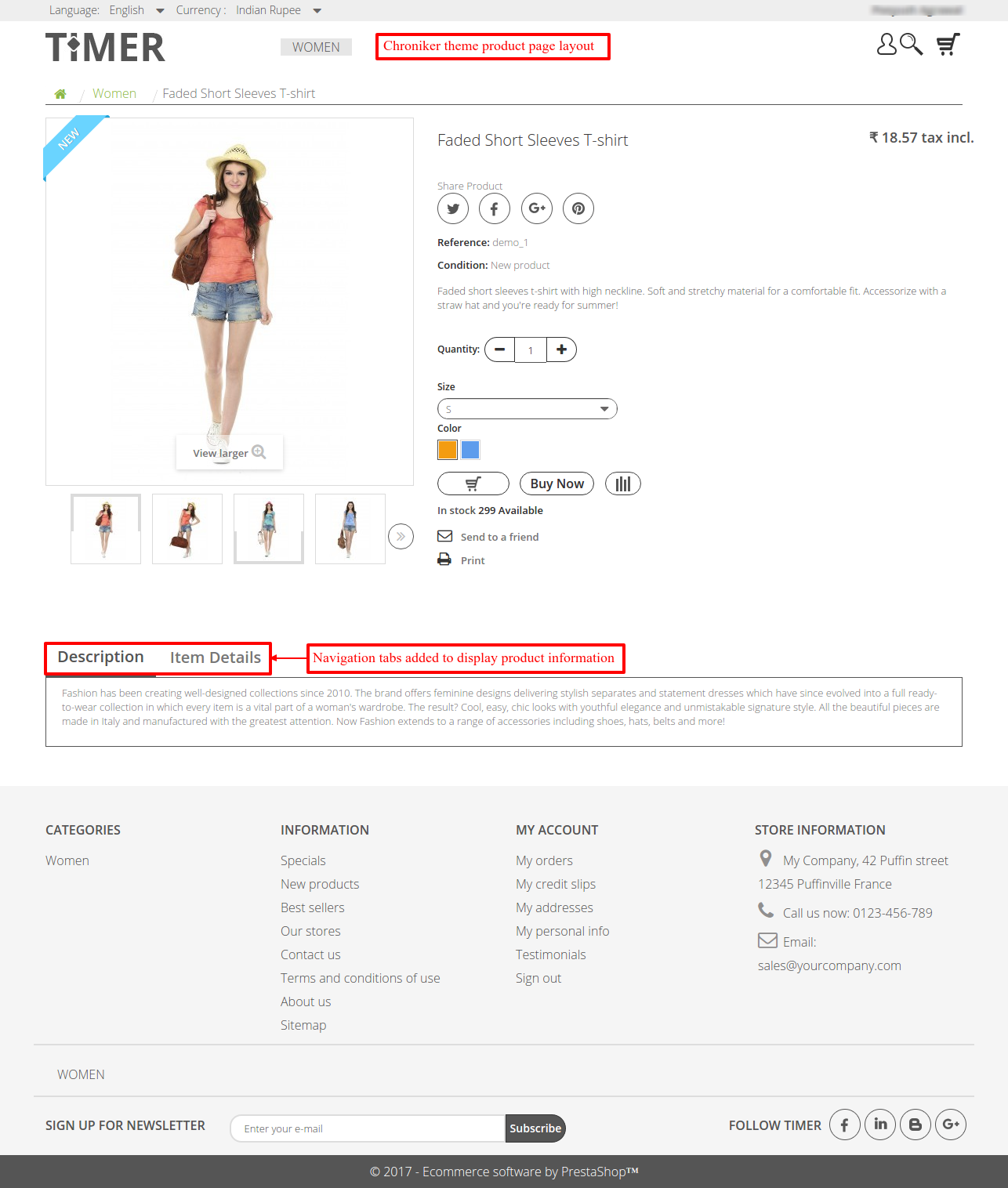
- New navigation tabs to display product information on the product page.
- New Blog and Testimonial section on the Homepage.
- Admin can add/edit/delete blogs for the homepage.
- Both admin can customers can write testimonials, to be displayed on the website home page.
- A new mid banner is available on the home page.
installation
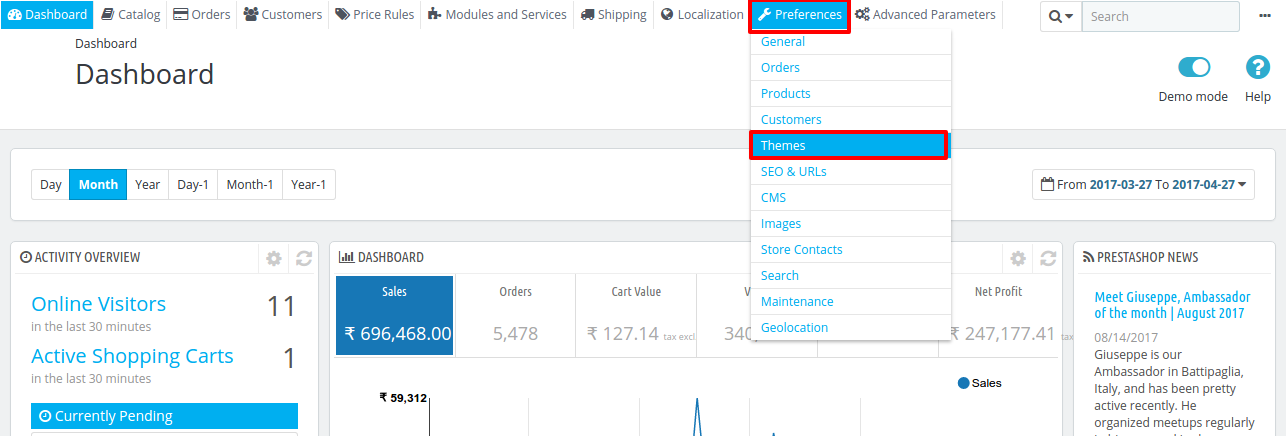
- Go to Back Office > Preferences > Themes
2. Add new theme > Upload the theme > Save


3. PrestaShop uploads the theme. Next, click “Use this theme” to install it.

You have now installed the theme successfully.
Theme Configurator
Once the theme is installed, search for Chroniker Theme configurator and click on configure.

From this section, admins can add homepage items with a title, image, and description. Additionally, they can provide titles and descriptions in multiple languages.
Once they save an item, they can edit or delete it whenever necessary.

To edit an item, click the edit button. It will display all the details saved for the item. Now admin can change the item details and images and save to apply the necessary changes.

Front End
Now that the live configurator is configured, lets take a look at the theme on the Front end.
On the homepage, visitors can see the items that admins add through the back office.
Additionally, admins can configure a mid banner, testimonials, and a blog section to make the homepage more engaging.

On the category page, visitors can use the improved filter menu. Moreover, they can switch between grid, list, and table views to browse products in their preferred layout.
Category Page : Grid View

Category Page : List View

Category Page : Table View

In addition to the updated layout, the theme provides new navigation tabs that organize product information.
Blog & Testimonial
The Chroniker theme includes blog and testimonial features. Through the back office, admins can add blog posts and testimonials to their store’s homepage.
As a result, they can keep visitors informed and showcase customer feedback.
Two new tabs are added in the back office Latest Blog and Manage Testimonials.

Using this feature, admins can publish blogs on the homepage. They can also create or edit blog posts whenever needed.
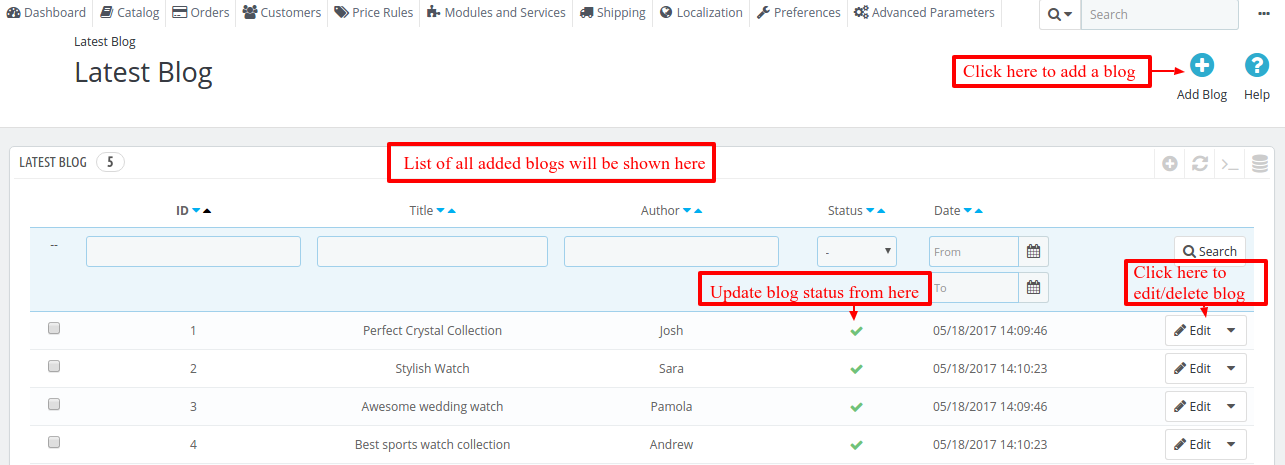
To create a blog post, click “Add Blog” and enter the required information. Next, click “Save” to create the post.

Admins can also edit existing posts whenever necessary.


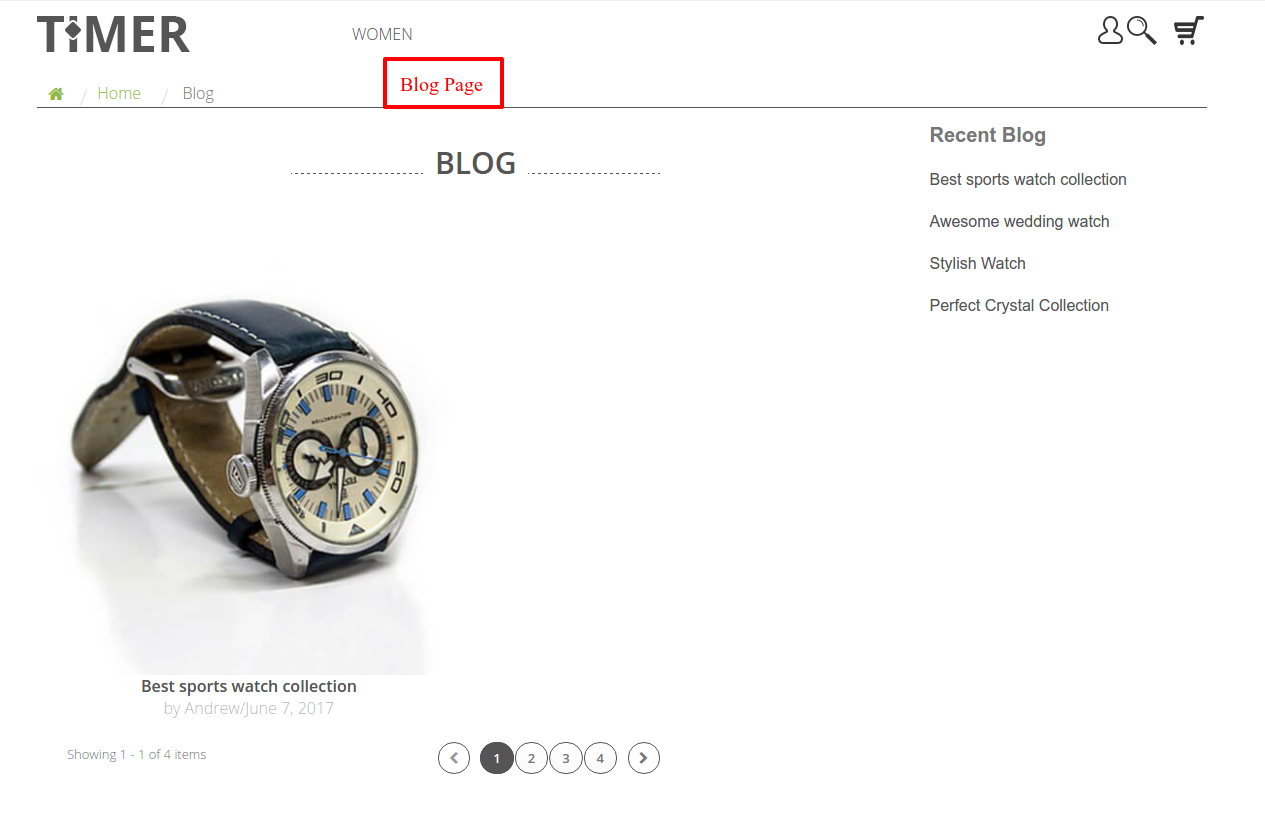
Users can view the blogs from here.
Both Admin and customers can add Testimonials on the Store. Admin can add Testimonials from the back office.
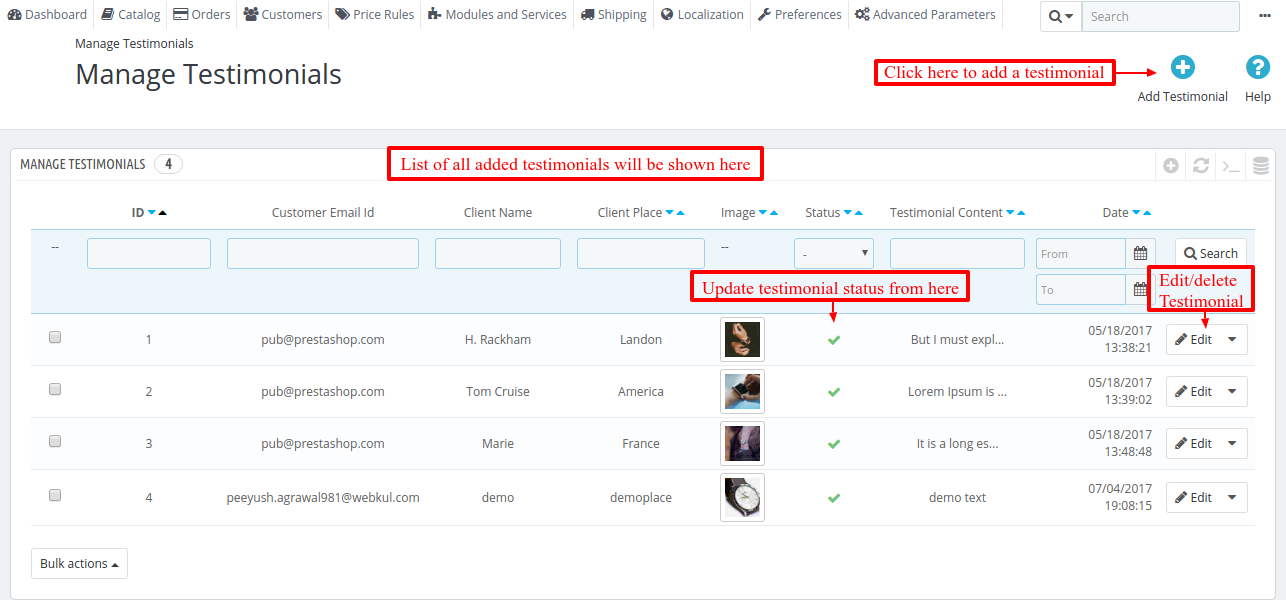
Admin can view the list of testimonials, update status, edit and delete any testimonial as well.

Admin can easily edit or delete any testimonial. 
Testimonial section will be displayed on the Homepage.
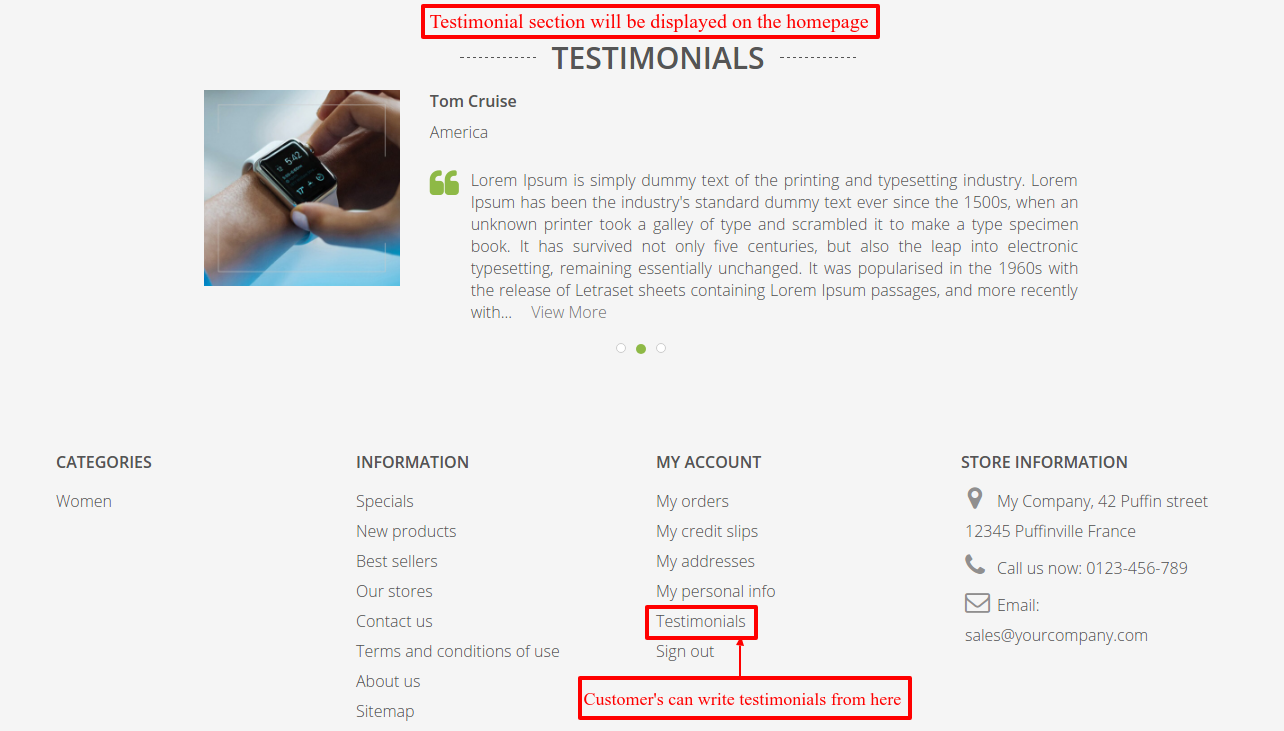
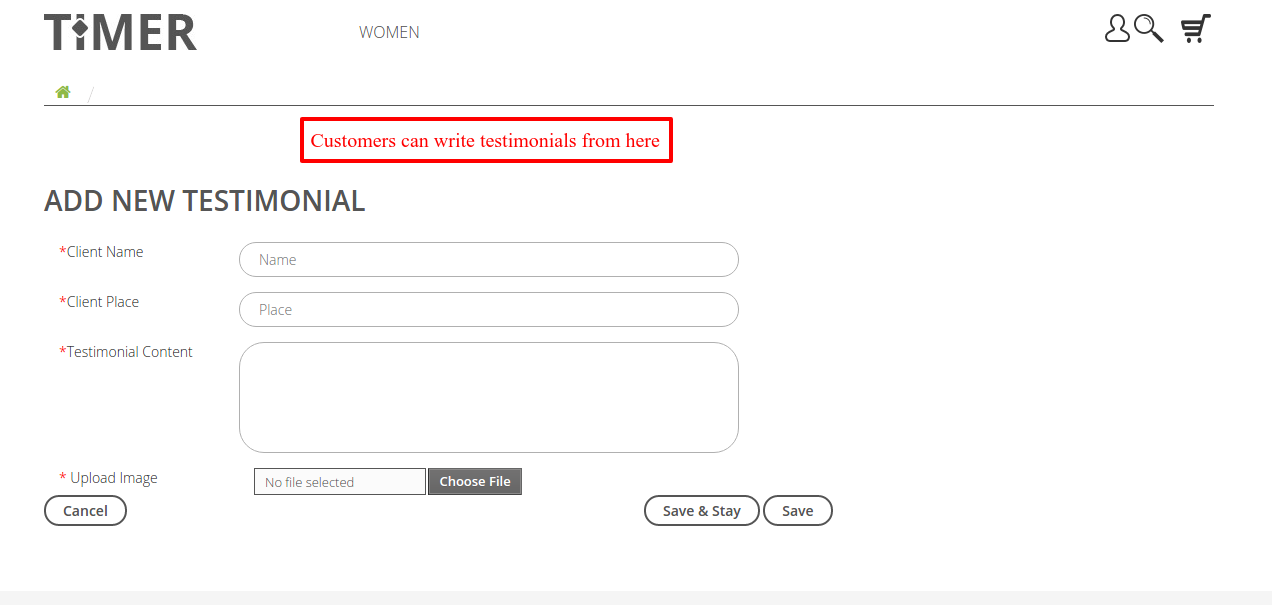
Customers can also write testimonials from the front end.

The admin can view customer testimonials along with their approval status. All the customer testimonials go to the admin for approval first.
Mid Banner
The Chroniker theme also includes an attractive mid banner. Admins can configure this banner through the back office to highlight featured images on the homepage.

Fill in the required information and image for the mid banner and click on save to apply.

Once applied, mid banner will be displayed to the user on the homepage.

This is how Prestashop Responsive Chroniker theme can change the look of your website and make it more attractive for your visitors.
Support
For any kind of technical assistance, just raise a ticket at : http://webkul.uvdesk.com and for any doubt contact us at support@webkul.com
Choosing the right theme for your store is important to run your website. A good theme gives your website a distinct look and feels that sends out a positive impression to your users.
A well-structured theme also helps your website rank well on major search engines.
Prestashop Responsive Chroniker Theme does exactly the same. It allows you to change basic features on your layout and enhances the overall user experience of your store.
Features
- Fully responsive prestashop theme.
- Admin can add/remove items from the website homepage.
- Admin can add item title and description in multi language as well.
- Admin can easily edit added item.
- Completely redesigned homepage.
- Three types of product view options available on the category page i.e. grid view, list view and table view.
- Newly improvised filters option on the category page.
- New navigation tabs to display product information on the product page.
- New Blog and Testimonial section on the Homepage.
- Admin can add/edit/delete blogs for the homepage.
- Both admin can customers can write testimonials, to be displayed on the website home page.
- A new mid banner is available on the home page.
installation
- Go to Back Office > Preferences > Themes
2. Add new theme > Upload the theme > Save
3. PrestaShop uploads the theme. Next, click “Use this theme” to install it.
You have now installed the theme successfully.
Theme Configurator
Once the theme is installed, search for Chroniker Theme configurator and click on configure.
From this section, admins can add homepage items with a title, image, and description. Additionally, they can provide titles and descriptions in multiple languages.
Once they save an item, they can edit or delete it whenever necessary.
To edit an item, click the edit button. It will display all the details saved for the item. Now admin can change the item details and images and save to apply the necessary changes.
Front End
Now that the live configurator is configured, lets take a look at the theme on the Front end.
On the homepage, visitors can see the items that admins add through the back office.
Additionally, admins can configure a mid banner, testimonials, and a blog section to make the homepage more engaging.
On the category page, visitors can use the improved filter menu. Moreover, they can switch between grid, list, and table views to browse products in their preferred layout.
Category Page : Grid View
Category Page : List View
Category Page : Table View
In addition to the updated layout, the theme provides new navigation tabs that organize product information.
Blog & Testimonial
The Chroniker theme includes blog and testimonial features. Through the back office, admins can add blog posts and testimonials to their store’s homepage.
As a result, they can keep visitors informed and showcase customer feedback.
Two new tabs are added in the back office Latest Blog and Manage Testimonials.
Using this feature, admins can publish blogs on the homepage. They can also create or edit blog posts whenever needed.
To create a blog post, click “Add Blog” and enter the required information. Next, click “Save” to create the post.
Admins can also edit existing posts whenever necessary.
Users can view the blogs from here.
Both Admin and customers can add Testimonials on the Store. Admin can add Testimonials from the back office.
Admin can view the list of testimonials, update status, edit and delete any testimonial as well.
Admin can easily edit or delete any testimonial.
Testimonial section will be displayed on the Homepage.
Customers can also write testimonials from the front end.
The admin can view customer testimonials along with their approval status. All the customer testimonials go to the admin for approval first.
Mid Banner
The Chroniker theme also includes an attractive mid banner. Admins can configure this banner through the back office to highlight featured images on the homepage.
Fill in the required information and image for the mid banner and click on save to apply.
Once applied, mid banner will be displayed to the user on the homepage.
This is how Prestashop Responsive Chroniker theme can change the look of your website and make it more attractive for your visitors.
Support
For any kind of technical assistance, just raise a ticket at : http://webkul.uvdesk.com and for any doubt contact us at support@webkul.com