Prestashop Instock Notifier
Prestashop Instock Notifier: Reduce abandonment caused due to stock unavailability and improve the online shopping experience by allowing customers to sign up for out-of-stock products.
- Notify the customers when the products are back in stock.
- Helps analyze the products which are in high demand.
- Auto or manually send email notifications.
- Allows both registered as well as guest users to subscribe for out-of-stock products.
- Improve customer satisfaction.
Features of Prestashop Instock Notifier
- Customers can subscribe to get notification for out-of-stock products.
- Email notification to customers when the product is back in stock.
- Customers can view a list of products for which they have subscribed for in-stock notifications from their accounts.
- Customers can also cancel the notification subscription.
- View a list of products for which customers have requested for notifications from the back office.
- View available product quantity for the subscribed products.
- View a list of customers subscribed for notifications product wise.
- Send custom mail to subscribers for stock availability.
- Send stock availability mail for multiple products at once.
- Allow only logged-in users to subscribe for the in-stock notifications.
- Instant notification to customers when stock in updated from product page.
- Instant notification to customers when stock is updated from stocks under catalog.
- Set cron to automatically send email to customers if product quantity is updated from ‘Stock’ tab.
Note: Prestashop Instock Notifier module is compatible with multi-store feature of PrestaShop.
How to Install Prestashop Instock Notifier
- Firstly, go to the module manager in the back office and click on “upload a module”.
- After that, drag and drop the module file or select the file from the system.
- In this way, the module installation will be successful.


Prestashop Instock Notifier Configuration
After the successful installation of the module, the admin needs to configure it.
General Settings
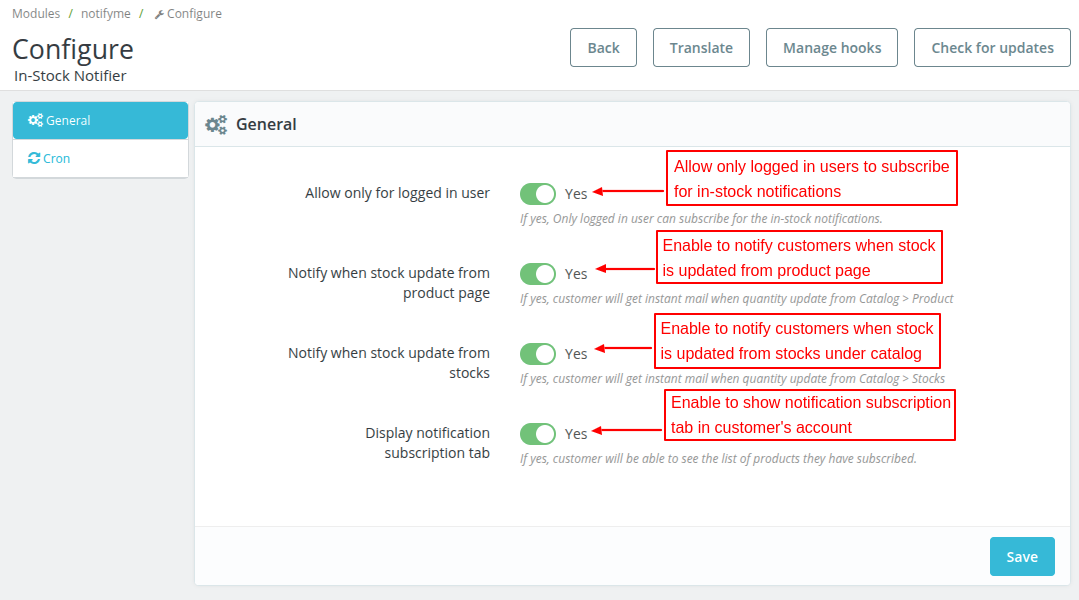
Under General Settings, the admin can choose to:
- Allow only logged in users to subscribe for the in-stock notifications.
- Notify the customers when the stock is updated from the product page under catalog.
- Notify the customers when the stock is updated from stocks under catalog.
- Show list of products that customers have subscribed for notifications in subscriptions tab in customer’s account.

Cron Setting
Set the cron job to send the notification email to customers automatically if product quantity getting updates from other than the catalog:

Customer End Flow
Once the module Instock Notifier is installed users can see a block on the product details page of out-of-stock products to enroll for the notification using their e-mail id.
If the product has multiple combinations and some of the combinations are out of stock, then the user can enroll for the particular combinations also.
Users will receive an e-mail when the product gets back in stock.


Notification Subscription
As enabled by the admin under general settings, a new tab gets available in customer’s account.

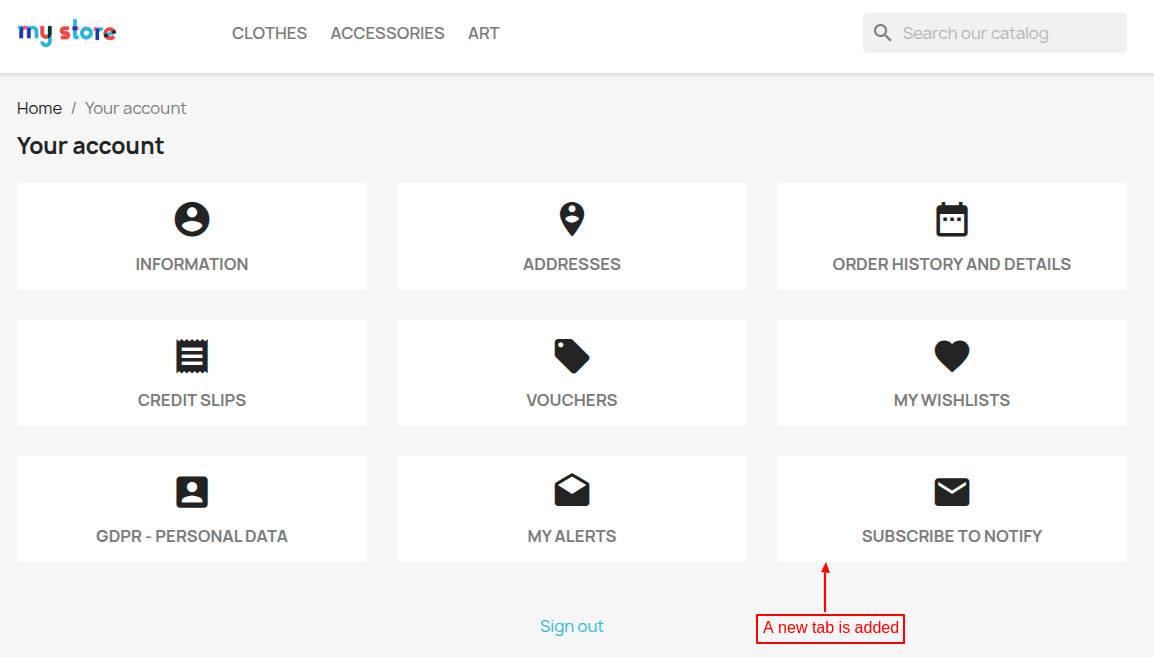
From this tab, customers can view a list of products for which they have subscribed for in-stock notification.

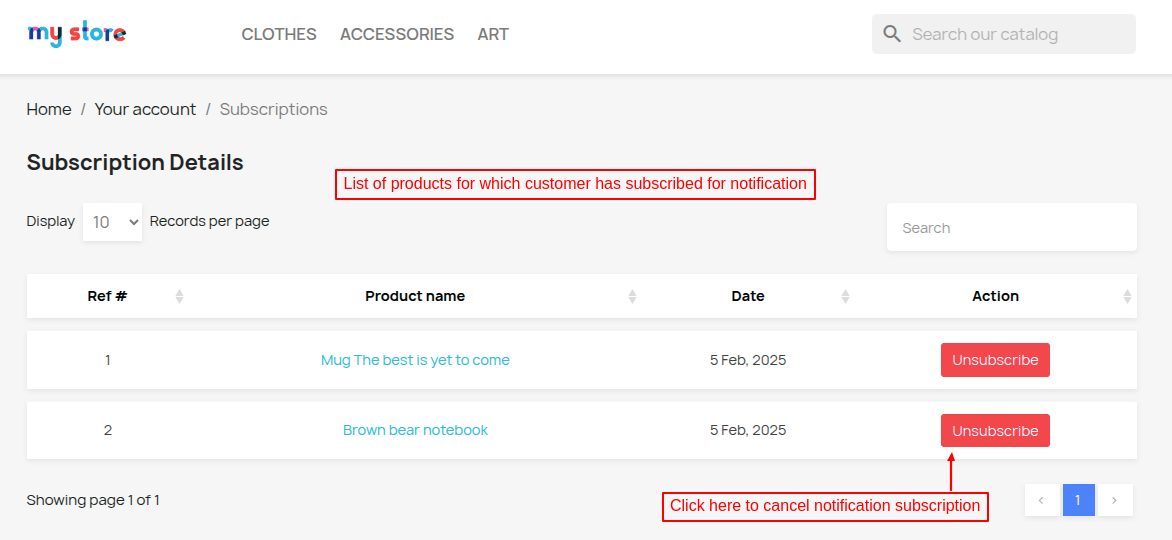
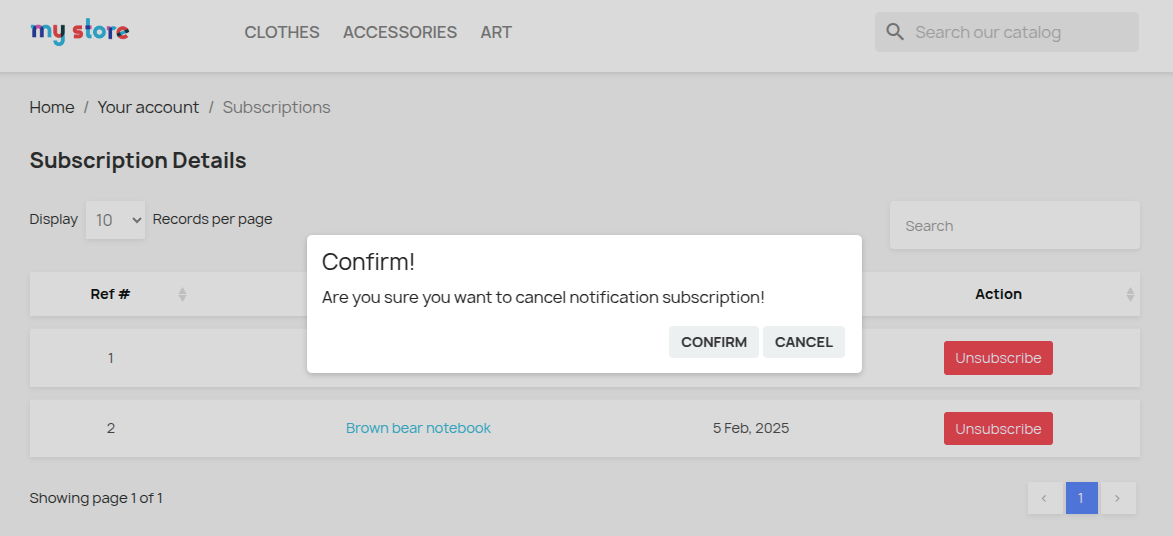
Customers can also cancel the subscription by clicking on the ‘unsubscribe’ button. On clicking the button, a popup appears on the page asking for confirmation to cancel notification subscription.

Admin End
At the back end a new tab named “In-stock Notifier” gets available under Catalog. Under this tab, the admin can see the list of all the products for which users have enrolled for instock notification.


In the Instock Notifier tab, a Product list will be displayed for which customers have requested notification.
The admin can select multiple products to send the in-stock alert notification in bulk to all the subscribers of the selected products.


Send Custom Email
After clicking on the “Write & Send” button a pop-up will be shown on the screen where the admin can enter the subject and a message to send the stock availability email to the subscribers.


View Subscribers list
Admin can view the list of all the users registered for the in-stock notification for any particular product by clicking the product.
When the product comes back in stock an e-mail will be sent to all the users to notify them about the availability of the product.
Also, the admin can send the mail only to the selected registered users by selecting them and clicking on the “Send quick mail” option.


In-stock email notification
After clicking on the “Send quick mail”, the subscribed users for that product will receive an email notification with the product link.


This was all about the Prestashop Instock Notifier module. I hope this document will help you in checking the functionality of the module in a better way.
Also, do let us know about your views in the comments.
Support
For any kind of technical assistance or query, please raise a ticket at http://webkul.uvdesk.com or send us a mail at support@webkul.com
Also, please explore our Prestashop development services and vast range of quality Prestashop addons.