Pagination in lightning component Salesforce
Table of Content
In this blog we will learn the implementation of pagination in lightning component, with the use of lightning bundle.
Pagination in Lightning Component
Goto Setup > Develop > Apex Classes > New
Write the following code in Apex Class:
Apex Controller-
public with sharing class pagination {

    /**
     * Webkul Software.
     *
     * @category  Webkul
     * @author    Webkul
     * @copyright Copyright (c) 2010-2016 Webkul Software Private Limited (https://webkul.com)
     * @license   https://store.webkul.com/license.html
     */

     @AuraEnabled
     public list<account> acc;

     @AuraEnabled
     public integer offst;

     @AuraEnabled
     public integer total;

     @AuraEnabled
     public boolean hasprev;

     @AuraEnabled
     public boolean hasnext;

     private static integer pagesize=8;
     private static integer offset;

     @AuraEnabled
     public static pagination getacc(boolean next,boolean prev,decimal off){
        offset = (integer)off;
        list<account> li = new list<account>();
        integer listlength = [Select count() from account where name!=null];
        if(!schema.sobjecttype.Account.isaccessible()){
            li = new list<account>();
        }else{
         if(next==false && prev==false){
         li = [Select id,name,accountSource,AccountNumber,Active__c from account LIMIT :pagesize OFFSET :offset];
         }else if(next==true && (offset+pagesize)<=listlength){
              offset=offset+pagesize;
          li = [Select id,name,accountSource,AccountNumber,Active__c from account LIMIT :pagesize OFFSET :offset];
         }else if(prev==true && offset>0){
          offset=offset-pagesize;
          li = [Select id,name,accountSource,AccountNumber,Active__c from account LIMIT :pagesize OFFSET :offset];
         }
         }
        pagination pg = new pagination();
        pg.acc = li;
        pg.offst = offset;
        pg.hasprev = hasprev(offset);
            pg.hasnext = hasnxt(offset,listlength,pagesize);

            return pg;
         }

         private static boolean hasprev(integer off){
            if(off>0)
                return false;
            return true;
        }
        private static boolean hasnxt(integer off,integer li,integer ps){
        if(off+ps<li)
            return false;
        return true;
    }
}
Open Devloper Console.
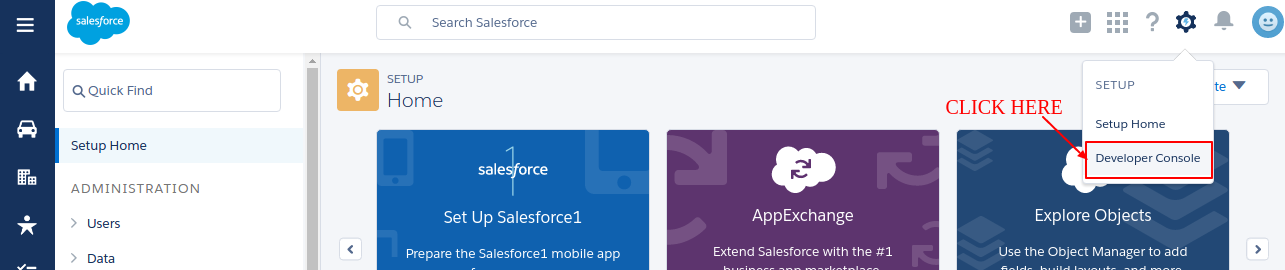
Create New Lightning Component for SVG. Go to File > New > Lightning Component. Name it SVG and write the following code:
<aura:component implements="force:appHostable"><!--implements="force:appHostable" allows to create lightning tabs-->

    <!--
    /**
     * Webkul Software.
     *
     * @category  Webkul
     * @author    Webkul
     * @copyright Copyright (c) 2010-2016 Webkul Software Private Limited (https://webkul.com)
     * @license   https://store.webkul.com/license.html
     */
     -->

    <aura:attribute name="class" type="String" description="CSS classname for the SVG element" />
    <aura:attribute name="xlinkHref" type="String" description="SLDS icon path. Ex: /assets/icons/utility-sprite/svg/symbols.svg#download" />
    <aura:attribute name="ariaHidden" type="String" default="true" description="aria-hidden true or false. defaults to true" />

</aura:component>
Now refer to right side of the column click Renderer. 
({

    /**
     * Webkul Software.
     *
     * @category  Webkul
     * @author    Webkul
     * @copyright Copyright (c) 2010-2016 Webkul Software Private Limited (https://webkul.com)
     * @license   https://store.webkul.com/license.html
     */

    render: function(component, helper) {
        //grab attributes from the component markup
        var classname = component.get("v.class");
        var xlinkhref = component.get("v.xlinkHref");
        var ariaHidden = component.get("v.ariaHidden");
        //return an svg element w/ the attributes
        var svg = document.createElementNS("http://www.w3.org/2000/svg", "svg");
        svg.setAttribute('class', classname);
        svg.setAttribute('aria-hidden', ariaHidden);
        svg.innerHTML = '<use xlink:href="'+xlinkhref+'"></use>';
        return svg;
    }
})
You can now use the SVG component wherever you need.
Create a new lightning Component. File > New > Lightning Component
Write the following Code in the Component:
Component-
<aura:component controller="pagination">

    <!--
    /**
     * Webkul Software.
     *
     * @category  Webkul
     * @author    Webkul
     * @copyright Copyright (c) 2010-2016 Webkul Software Private Limited (https://webkul.com)
     * @license   https://store.webkul.com/license.html
     */
     -->

    <ltng:require styles="{!$Resource.SLDS +
             '/assets/styles/salesforce-lightning-design-system-ltng.css'}" />
    <aura:attribute name="accounts" type="Account[]"/>
    <aura:handler name="init" value="{!this}" action="{!c.getAccounts}" />

    <aura:attribute name="offset" type="integer" />

    <aura:attribute name="next" type="boolean" />
    <aura:attribute name="prev" type="boolean" />

    <div class="wk_static">
        <div class="slds-page-header" role="banner">
            <div class="slds-grid">
                <div class="slds-col slds-has-flexi-truncate">
                    <div class="slds-media slds-media--center slds-no-space slds-grow">
                        <div class="slds-media__figure">
                            <span class="slds-icon_container slds-icon-standard-account">
                                <c:SVG class="slds-icon" xlinkHref="/resource/SLDS/assets/icons/standard-sprite/svg/symbols.svg#account" />
                                <span class="slds-assistive-text">Account Icon</span>
                            </span>
                        </div>
                        <div class="slds-media__body">
                            <h1 class="slds-page-header__title slds-m-right--small slds-truncate slds-align-middle" title="Accounts">Accounts</h1>
                        </div>
                    </div>
                </div>
            </div>
        </div>
        <table class="slds-table slds-table--bordered slds-max-medium-table--stacked-horizontal"><!--Table must be responsive-->
            <thead>
                <tr class="slds-text-heading--label ">
                    <th class="" scope="col">Account Name</th>
                    <th class="slds-is-sortable" scope="col">Account Number</th>
                    <th class="slds-is-sortable" scope="col">Account Source</th>
                    <th class="slds-is-sortable" scope="col">Active</th>
                </tr>
            </thead>
            <tbody>
                <aura:iteration items="{!v.accounts}" var="account">
                    <tr class="slds-hint-parent">
                        <td data-label="Account Name" >
                            <a href="{! '#/sObject/' + account.Id + '/view'}">{!account.Name}</a>
                        </td>
                        <td data-label="Account Number" >{!account.AccountNumber}</td>
                        <td data-label="Account Source" >{!account.AccountSource}</td>
                        <td data-label="Active">{!account.Active__c}</td>
                    </tr>
                </aura:iteration>
            </tbody>
        </table>
        <ui:button class="slds-button slds-button--neutral slds-p-horizontal--xx-small slds-m-right--x-small slds-float--right" press="{!c.Next}" disabled="{!v.next}" >
            <span class="slds-icon slds-icon-text-default">
                <c:SVG class="slds-button__icon slds-button__icon--large" xlinkHref="/resource/SLDS/assets/icons/utility-sprite/svg/symbols.svg#chevronright" />
                <span class="slds-assistive-text">Next</span>
            </span>
        </ui:button>
        <ui:button class="slds-button slds-button--neutral slds-p-horizontal--xx-small slds-m-right--x-small slds-float--right" press="{!c.Previous}" disabled="{!v.prev}">
            <span class="slds-icon slds-icon-text-default">
                <c:SVG class="slds-button__icon slds-button__icon--large" xlinkHref="/resource/SLDS/assets/icons/utility-sprite/svg/symbols.svg#chevronleft" />
                <span class="slds-assistive-text">Previous</span>
            </span>
        </ui:button>
    </div>
</aura:component>
Client-Side Controller-
({
    /**
    * Webkul Software.
    *
    * @category  Webkul
    * @author    Webkul
    * @copyright Copyright (c) 2010-2016 Webkul Software Private Limited (https://webkul.com)
    * @license   https://store.webkul.com/license.html
    */

    getAccounts : function(cmp, evt, helper) {
        var next = false;
        var prev = false;
        helper.getAccounts(cmp,next,prev);
    },
    Next:function(cmp,event,helper){
        var next = true;
        var prev = false;
        var offset = cmp.get("v.offset");
        helper.getAccounts(cmp,next,prev,offset);
    },
    Previous:function(cmp,event,helper){
        var next = false;
        var prev = true;
        var offset = cmp.get("v.offset");
        helper.getAccounts(cmp,next,prev,offset);
    },
})
Helper-
({
    /**
    * Webkul Software.
    *
    * @category  Webkul
    * @author    Webkul
    * @copyright Copyright (c) 2010-2016 Webkul Software Private Limited (https://webkul.com)
    * @license   https://store.webkul.com/license.html
    */

    getAccounts : function(cmp,next,prev,offset) {
        offset = offset || 0;
        var action = cmp.get("c.getacc");
        action.setParams({
            "next" : next,
            "prev" : prev,
            "off" : offset
        });
        action.setCallback(this,function(res){
            var state = res.getState();
            if(state=="SUCCESS"){
              var result = res.getReturnValue();
              cmp.set('v.offset',result.offst);
              cmp.set('v.accounts',result.acc);
              cmp.set('v.next',result.hasnext);
              cmp.set('v.prev',result.hasprev);
            }
        });
        $A.enqueueAction(action);
    }
})
Output
Here is the output:

Support
That’s all for implementation of pagination in lightning component, still if you have any further query or seek assistance to make your salesforce classic apps compatible with lightning experience, feel free to add a ticket, we will be happy to help you. https://webkul.uvdesk.com/en/customer/create-ticket/