How to Setup and Install Magento 2 PWA Studio
Table of Content
Setting up Magento 2 PWA Studio Setup can look simple in documentation, but in real projects you often face version issues, OpenSSL errors, and environment mismatches.
In this guide, I am sharing a practical, working method to set up Magento 2 PWA Studio using Venia storefront
What are Progressive Web Apps?
The popularity of PWA is growing at very fast in the field of e-commerce, business, online news portal and other fields because of its peculiar characteristics listed below follows:
1. Faster User Interface Support
Web developers can now load an entire website to a browser after just one pageview even on slow networks.
2. Home Screen Shortcut
Mobile users can install the PWA site on their home screen like a Native App.
3. Offline Support
Implementation of service workers makes it able to work offline. The website can now be accessible even to users who lost internet connectivity.
PWA sites cache content to ensure that some content can be served when a user is offline.
4. Background Processes
If the user facing poor connectivity or offline, the browser store all the form submission data and requests, When connectivity returns it re-sent all the data in the background.
5. Secure
PWA sites use HTTPS connections for enhanced security.
Why Use Magento 2 PWA Studio?
Magento PWA Studio helps you build a fast, headless, React-based storefront for Magento.
It improves:
- Page speed and performance
- Mobile experience
- SEO and Core Web Vitals
- User experience and scalability
Venia is the default reference storefront provided by Adobe.
System Requirements
For this Magento PWA Studio setup, the following versions were used:
- Node.js: 20.20.0
- NPM: 10.8.2
- Yarn: 1.22.22
Step 1: Clone the PWA Studio Repository
First, clone the official Magento PWA Studio repository from GitHub.
git clone https://github.com/magento/pwa-studio.git
This will download the complete PWA Studio workspace into your system.
Now move inside the project directory.
cd pwa-studio
Step 2: Install PWA Studio Dependencies
Install all required packages using Yarn.
yarn install
This step may take a few minutes depending on your internet speed and system performance.
After this, all node modules will be available locally.
Step 3: Generate SSL Certificate for Local Domain
Now generate a custom local SSL certificate for Venia.
yarn buildpack create-custom-origin packages/venia-concept
This command creates a secure local domain required by PWA Studio.
Common Error: OpenSSL Digital Envelope Issue
You may get this error:
error:0308010C:digital envelope routines::unsupported
This happens due to OpenSSL compatibility issues with Node 20+.
Solution for OpenSSL Error
export NODE_OPTIONS=--openssl-legacy-provider
This will fix the OpenSSL issue permanently for the session.
Step 4: Create the Environment File (.env)
Now generate the environment configuration file.
yarn buildpack create-env-file packages/venia-concept
This command will create the .env file inside the Venia package.
Step 5: Configure Magento Backend URL
Edit this file:
pwa-studio/packages/venia-concept/.env
Now set your Magento backend URL:
MAGENTO_BACKEND_URL=https://your-magento-domain.com/
Make sure:
- The URL is publicly accessible
- GraphQL works correctly on this domain
Step 6: Start the Venia Development Server
Build artifacts
Before starting the server, generate the Venia build artifacts by running the following command from the PWA Studio project root directory.
yarn run build
Run the server
Now start the PWA development server.
yarn watch:venia
This command will:
- Build the PWA storefront
- Start the local dev server
- Provide a dynamic frontend URL
Access Your Magento PWA Frontend
After the build finishes, the terminal will show a URL like:
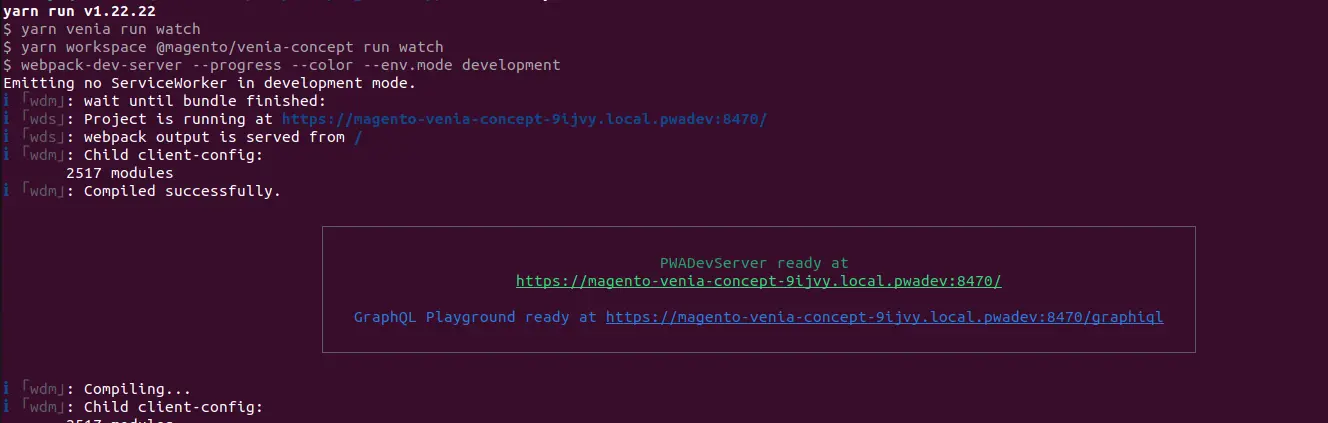

https://magento-venia-concept-9ijvy.local.pwadev:8470/
Open this URL in your browser to see the Venia storefront running.
Thank you for reading the dev doc article on how Magento 2 PWA Studio setup. If you need any help, please reach out to our team via a support ticket.
Find the complete range of Magento 2 extensions including PWA and Headless PWA.