JNE Shipping Method For CS-Cart
CS-Cart JNE Shipping Method : Integrate JNE shipping with CS-Cart and calculate shipping rates in real time with this magnificent add-on. JNE is a popular shipping service in Indonesia.
People trust JNE for their accurate and prompt delivery.
The speed and reliability of services consistently make JNE higher credible among customers.
Features
- Well integrated with CS-Cart Multi-Vendor.
- Functionality to calculate real time shipping rates.
- Supports below mentioned JNE Services:
1. Trucking, Trucking (motorcycle 250 cc) , Trucking (motorcycle below 150 cc) , Trucking (motorcycle below 250 cc)
2. Ongkos Kirim Ekonomis
3. Yakin Esok Sampai , CTC Yakin Esok Sampai
4. BOX 3kg , 5kg
5. POPBOX
6. PELICON
7. Regular
8. SPS - Easy to configure and manage at admin end.
- The codes are open to be further customized easily.
Note: Please note that live demo link is not available due to unavailability of sandbox credentials.
For a detailed process flow of the add-on, Please go through this blog post.
Video Tutorial

How To Upload and Install
After downloading the JNE Shipping Integration For CS-Cart, you will get a zip file and install.txt . Read the install.txt carefully and configure it accordingly.
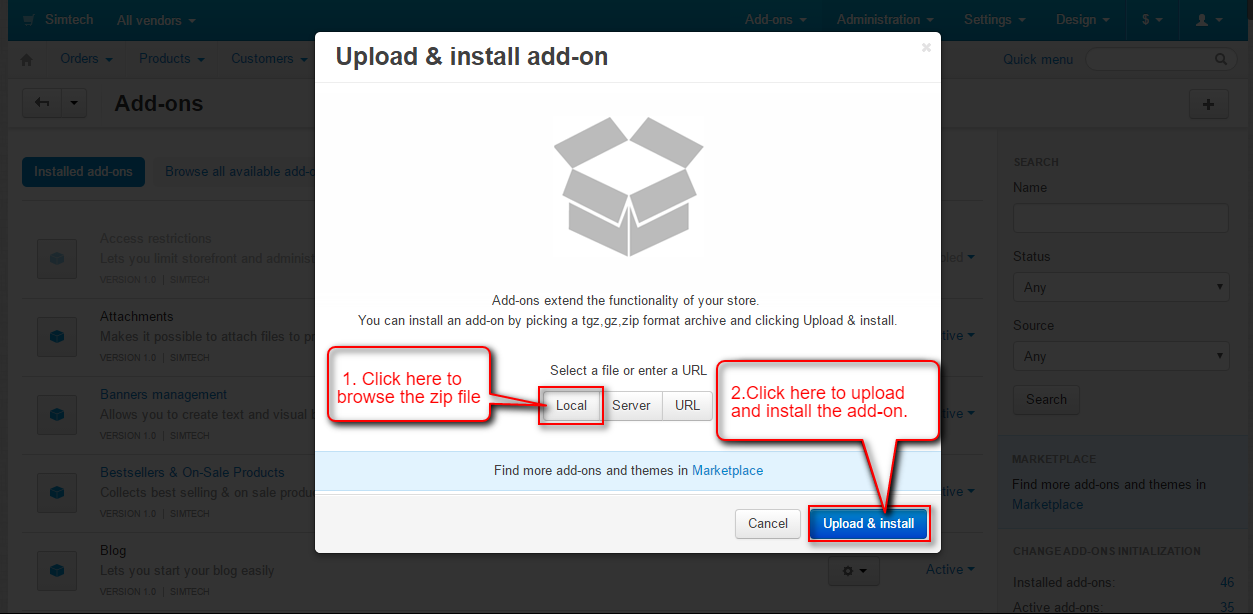
Go to “Manage add-ons”, click on “+” to upload and install the zip file as shown below.

Click on “Local” to browse the zip file and then click on “Upload & Install” as shown below in snapshot.

Back End View
Once JNE Shipping Integration For CS-Cart is installed successfully, A new Shipping Method for JNE need to be created. Here’s the flow :
1:
Go to Administration -> Shipping & taxes -> Shipping Methods as per the below screen shot.

Step2:
Click on + button to add a new shipping method.

Step 3 :
Set the following parameters to add shipping method.
- Enter the name and description of shipping method.
- Select for Realtime shipping rates calculation
- Choose JNE as a shipping carrier.
- Select the desired shipping service from the dropdown and fill all the other details accordingly and create shipping method.

Step 4 :
Once the shipping method is created, we need to configure it. Click on Configure tab and enter the JNE credentials and save the credentials as shown below.

Step 5 :
Set the additional shipping charges if required and save.

Front End View
Now you can see the JNE Shipping Method on front end checkout page as per the below screen shot. But if in case the delivery location specified by customer is not recognised by JNE, the shipping method then will not be available at front end.

Support
This is all about JNE Shipping Integration For CS-Cart. For further any query feel free to contact us at http://webkul.uvdesk.com.
Please explore our cs-cart Development Services and Quality cs-cart add-ons.