How to get response in Json, Xml, Html format from controller in Magento2
In this guide, we’ll walk through how to get response in JSON, XML, HTML format from controller in Magento 2 using clean and practical code examples.
We can change the response content type as per the requirement in magento.
We assume our module name is Webkul_Extension and front name is webext.
Step #1 = Get response in json format in magento 2.
Path = app/code/Webkul/Extension/Controller/Index/Json.php
<?php
namespace Webkul\Extension\Controller\Index;

class Json extends \Magento\Framework\App\Action\Action
{
	protected $_pageFactory;
    /**
     * @var \Magento\Framework\Controller\Result\JsonFactory
     */
    protected $resultJsonFactory;

	public function __construct(
		\Magento\Framework\App\Action\Context $context,
		\Magento\Framework\View\Result\PageFactory $pageFactory,
        \Magento\Framework\Controller\Result\JsonFactory $resultJsonFactory
    ) {
		$this->resultJsonFactory = $resultJsonFactory;
		return parent::__construct($context);
	}
	public function execute()
	{
        $result = $this->resultJsonFactory->create();
		// Response in json format
        $data = [
            'product' =>'Product Data',
            'profile' =>'Profile Data',
        ];
        $result->setData($data);
        return $result;
	}
}


Step #2 = Get response in HTML format in magento 2.
Path = app/code/Webkul/Extension/Controller/Index/Html.php
<?php
namespace Webkul\Extension\Controller\Index;

class Html extends \Magento\Framework\App\Action\Action
{
	protected $_pageFactory;
    /**
     * @var \Magento\Framework\Controller\Result\RawFactory
     */
    protected $resultRawFactory;

	public function __construct(
		\Magento\Framework\App\Action\Context $context,
		\Magento\Framework\View\Result\PageFactory $pageFactory,
        \Magento\Framework\Controller\Result\RawFactory $resultRawFactory,
    ) {
		$this->resultRawFactory = $resultRawFactory;
		return parent::__construct($context);
	}
	public function execute()
	{
        $result = $this->resultRawFactory->create();
        // $result->setHeader('Content-Type', 'text/xml');
        // Response in html format
        $content = '<h1>Webkul product</h1>
                    <p>Webkul product content goes here</p>';
        $result->setContents($content);

        return $result;
	}
}

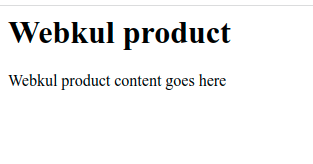
#2 = Get response in XML format in magento 2.
Path = app/code/Webkul/Extension/Controller/Index/Xml.php
<?php
namespace Webkul\Extension\Controller\Index;

class Xml extends \Magento\Framework\App\Action\Action
{
	protected $_pageFactory;
    /**
     * @var \Magento\Framework\Controller\Result\RawFactory
     */
    protected $resultRawFactory;

	public function __construct(
		\Magento\Framework\App\Action\Context $context,
		\Magento\Framework\View\Result\PageFactory $pageFactory,
        \Magento\Framework\Controller\Result\RawFactory $resultRawFactory,
    ) {
		$this->resultRawFactory = $resultRawFactory;
		return parent::__construct($context);
	}
	public function execute()
	{
        $result = $this->resultRawFactory->create();
        // Response in xml format
        $content = '<product>
                        <productData>Webkul product</productData>
                        <profileData>Webkul</profileData>
                    </product>';
        $result->setHeader('Content-Type', 'text/xml');
        $result->setContents($content);

        return $result;
	}
}


Categories:
Uncategorized
View Comments
Comment or Ask a Question
Quick Links