Optimisation with Fetch Priority in Magento 2
Fetch priority API helps in optimising the resource loading time. It can enable optimal loading and improve Core Web Vitals.
When web browser downloads the resource such as image, css and script, it assign the fetch priority (high or low) to them in order to load then in the most optimal order.
This blog describe the Fetch Priority API and the fetchpriority HTML attribute. By specifying fetchpriority attribute in resources it manages their priority.
Fetch priority prioritise the resources of the page and helps in the SEO performance. It dictate which webpage resources should be downloaded first to render.
When to use Fetch Priority
- Place resource tags such as
<script>and<link>depending on the order you want to download them. - Use async or defer to download scripts without blocking other resources.
- Use the preload resource hint to download necessary resources earlier
- Browser can use the available bandwidth for more critical by lazy loading the below-the-fold content.
Javascript fetch fetch() api use to fetch the recources asynchronously.
fetch() allows you to make network requests similar to XMLHttpRequest (XHR).
fetch() method start the process in fetching the resources from the server. fetch() method returns the promise that resolves the Response object.
fetch('./api/some.json')
    .then(
    function(response) {
        if (response.status !== 200) {
        console.log('Looks like there was a problem. Status Code: ' +
            response.status);
        return;
        }
        // Examine the text in the response
        response.json().then(function(data) {
        console.log(data);
        });
    })
    .catch(function(err) {
    console.log('Fetch Error :-S', err);
 });
Fetch Priority attributes
High: Browser will increase the priority of the resources with attribute high.
Low: Browser will lower the priority of the resources with attribute low.
Auto: This is the default value where you don’t have a preference and let the browser decide the appropriate priority.
Example of fetchpriority attribute:
<!-- We don't want a high priority for this above-the-fold image -->
<img src="/images/in_viewport_but_not_important.svg" fetchpriority="low" alt="I'm an unimportant image!">
<!-- We want to initiate an early fetch for a resource, but also deprioritize it -->
<link rel="preload" href="/js/script.js" as="script" fetchpriority="low"><script>
fetch('https://example.com/', {priority: 'low'})
.then(data => {
// Trigger a low priority fetch
});
</script>
Lower the priority of above-the-fold images
On using fetchpriority=”low” attribute can lower the priority of above-the-fold images that are not important.
<ul class="carousel">
  <img src="img/carousel-1.jpg" fetchpriority="high">
  <img src="img/carousel-2.jpg" fetchpriority="low">
  <img src="img/carousel-3.jpg" fetchpriority="low">
  <img src="img/carousel-4.jpg" fetchpriority="low">
</ul>
Increase the priority of the image
On specifying fetchpriority="high" will boost the priority of the LCP or other critical images like (jpeg, Webp, png) and improves the page speed.
<img src="lcp-image.jpg" fetchpriority="high">
Lower the priority of the resource
To stop preloaded resources from competing with other critical resources, you could provide a hint to reduce their priority. This can be done by:
<!-- Lower priority only for non-critical preloaded scripts -->
<link rel="preload" as="script" href="critical-script.js">
<link rel="preload" href="/js/script.js" as="script" fetchpriority="low">
<!-- Preload CSS without blocking other resources -->
<link rel="preload" as="style" href="theme.css" fetchpriority="low" onload="this.rel='stylesheet'">
Reprioritize scripts
Some scripts make the part of the pages interactive on using async attribute. But somehow effect or block other resources as well.
Using fetchpriority attribute with async prioritise the resources with mentioned priority.
<script src="async_but_important.js" async fetchpriority="high"></script>
Lower the priority of non-critical data fetches
Browser executes the fetch with high priority. If you have multiple fetch you can prioritise the fetch with low, high and auto attributes.
let authenticate = await fetch('/user');
let suggestedContent = await fetch('/content/suggested', {priority: 'low'});
Compatibility with browser
Fetch priority is only available in Chromium-based browsers.
Use in Magento 2
Developer can use the fetch priority to load the js and other resources on priroty.
Manage the priority of the images in carousel on low, high and auto.
Use the fetch api for ajax to get the resource and even prioritise them.
Use in js file
require([
    "jquery",
    'mage/url'
], function($, url) {
    var url = url.build('cms/index/index');
    fetch(url, {
        priority: 'low',
        method: 'post',
        headers: {
            "Content-type": "application/x-www-form-urlencoded; charset=UTF-8"
        },
        body: 'foo=bar&lorem=ipsum'
        })
        .then(function (data) {
        console.log('Request succeeded with JSON response', data);
        })
        .catch(function (error) {
        console.log('Request failed', error);
    });
});
Priority column signifies the priority of resources.

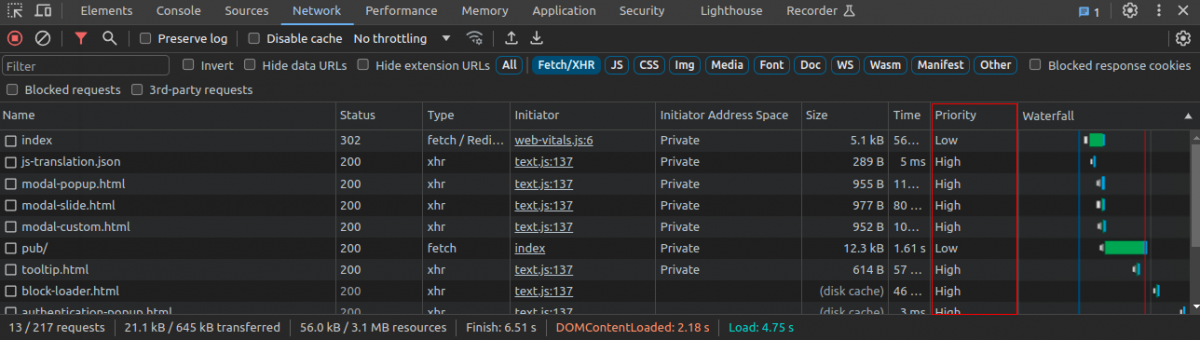
Fetch priority is a kind of speed optimisation service that manages the resources and improve the web vitals of the page.
Hope this will be helpful. Thanks