5 Best Odoo WooCommerce Connectors in 2026
Table of Content
Managing a WooCommerce store with Odoo becomes easier with the right connector to sync store data between both platforms.
Looking for the best Odoo WooCommerce Connector for your store? This guide compares Webkul, Emipro, VentorTech, Techspawn, and Cybrosys.
The comparison covers Odoo version support, key sync features, multi-store support, hosting options, and pricing.
Webkul Odoo WooCommerce Connector supports Odoo 20 and helps sync products, orders, customers, inventory, and other store data between WooCommerce and Odoo.
Webkul is also an Odoo partner, WooCommerce Marketplace Partner, and WooCommerce core contributor.

Odoo WooCommerce Connectors Comparison
Compare the main Odoo WooCommerce connectors by supported Odoo versions, sync features, multi-store support, hosting options, and pricing.
This table gives a quick view before reviewing each connector in detail.
| Connector | Odoo Versions | Odoo Online | Key Sync Areas | Stores | Listed Price* |
|---|---|---|---|---|---|
| Webkul Odoo WooCommerce Connector | 9–20 | Yes | Products, images, prices, categories, attributes, customers, orders with taxes and currency, stock, Refunds | Multiple | $220.00 |
| Emipro Odoo WooCommerce Connector | 8–19 | No | Products, stock, orders, customers, taxes, refunds, coupons | Multiple | $640.35 |
| VentorTech Odoo WooCommerce Connector PRO | 16–19 | No | Products, images, prices, stock, orders | Multiple | $582.03 one-timeor €499 per year |
| Techspawn Odoo WooCommerce Connector | 9–19 | Yes | Products, orders, customers, stock, coupons | Multiple | $201.14 |
| Cybrosys Odoo WooCommerce Connector | 13–18 | Yes | Products, customers, orders | Not stated | $90.27 |
*Prices were checked in September 2026 against each vendor’s own page and the Odoo Apps Store listing.
VentorTech also sells a yearly plan, so compare the licence type and not just the headline price.
Where features vary by Odoo version, the article refers to the current listing available for that version.

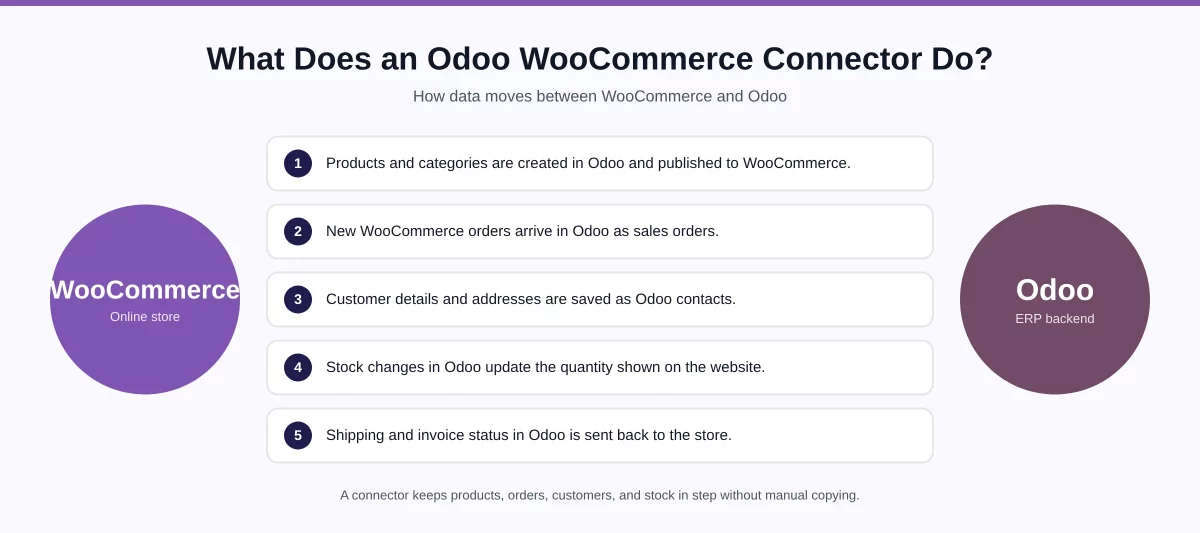
How We Compared These Odoo WooCommerce Connectors
We compared information published on vendor product pages and the Odoo Apps Store, including:
- Supported Odoo versions
- Product and category synchronization
- Inventory synchronization
- Order and customer synchronization
- Sync direction
- Multi-store support
- Webhook and automation options
- Hosting availability
- Partner status and platform certifications
- Support included with the licence
- Documentation and live demo availability
- Customization and source code availability
- Current listed price
Features can vary between Odoo versions, so businesses should confirm the exact feature set for their installed version before purchasing.
1. Webkul Odoo WooCommerce Connector
Best suited for: Businesses that need multi-store WooCommerce integration with broad Odoo version and deployment support.
Webkul Odoo WooCommerce Connector moves products, categories, customers, orders and stock between a WooCommerce store and Odoo.
Webkul is an Odoo Silver Partner, a WooCommerce Marketplace Partner and a WooCommerce core contributor.
This matters because the same team writes code on both sides of the link, not just the Odoo side.
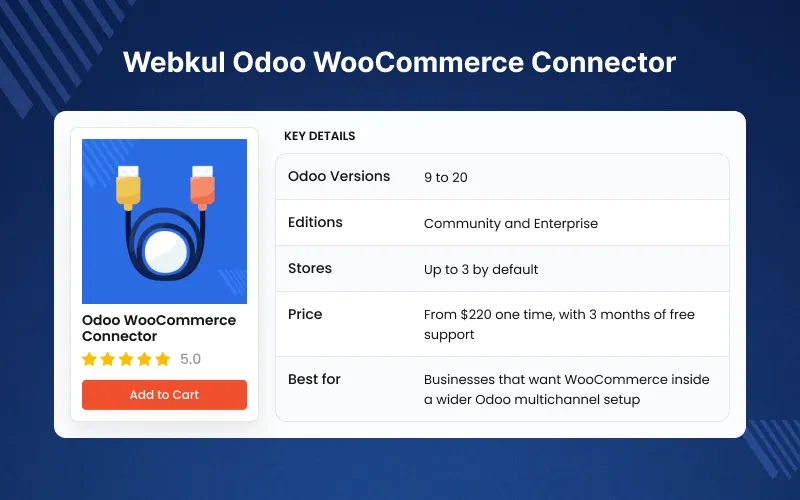
The connector currently supports Odoo 9 through Odoo 20 and is listed for Odoo Online, Odoo.sh, and On-Premise deployments.
One Odoo instance connects up to three WooCommerce stores by default, and Webkul support can raise that limit on request.
The module runs on the Odoo Multi Channel Sale framework, which you install before the connector itself.
Thanks to that shared framework, one Odoo database can also hold Shopify, Magento or PrestaShop channels.
Webhooks push a new product or order into Odoo as soon as the store creates it, so busy shops never wait for the next cron pass.
Key Features
- Supports Odoo 9 to 20 on Odoo Online, Odoo.sh and On-Premise, in both Community and Enterprise editions
- Runs on the Odoo Multi Channel Sale framework, so Shopify, Magento, PrestaShop and CS-Cart channels share one Odoo database
- Connects multiple WooCommerce stores to one Odoo instance, three by default and more after a support request
- Two-way sync: imports from WooCommerce, and exports Odoo product templates and categories back to the store
- Imports products with their images, prices, categories, attributes and values, and customers with billing and shipping addresses
- Imports orders with taxes, delivery method, payment method and currency, plus the Shipping Method object
- Filters any import by All, By ID or By Date, and caps reads per channel with an API record limit
- Maps every WooCommerce order status to an Odoo status, and sends cancel, shipment and invoice states back to the store
- Auto Stock pushes Odoo inventory changes to the connected store
- Real-time product and order sync through webhooks, with separate cron schedulers for customers, categories, products and orders
- Avoid Duplicity blocks repeat records by product code, and Test Connection confirms the API link before the first import
- Category, Attribute and Value mappings, updated by cron or created by hand
- Sync history, feeds and error logs for every run, with an Auto-Vacuum Scheduler that clears cleanly synced logs
- Reads WooCommerce API credentials automatically during channel setup
- Interactive dashboard with a donut chart, a line graph and clickable data cards
Pros
- Odoo Silver Partner, WooCommerce Marketplace Partner, and WooCommerce core contributor
- Supports Odoo 9–20
- Runs on Odoo Online, Odoo.sh and On-Premise, in Community and Enterprise
- Shared framework also connects Shopify, Magento, PrestaShop, and CS-Cart
- Two-way sync, including export from Odoo back to WooCommerce
- Real-time webhook synchronization
- Orders arrive with taxes, delivery method, payment method, and currency
- Duplicate protection, per-channel batch limits, and a Test Connection check
- Order-state mapping and Auto Stock updates
- Dashboard, mappings, and full sync history
- Three months of support included, with 6-month and 1-year extensions
- Live demo and a published user guide available before purchase
Cons
- Setup starts with the Odoo Multi Channel Sale base module
- Feature availability can vary between Odoo versions
Price
$220.00 one-time on the Webkul Store, and that price includes three months of support.
Installation is an optional $44 add-on, and Webkul’s Odoo developers take on custom work.
Before you buy, run the live demo or read the user guide to test it against your own workflow.
2. Emipro Odoo WooCommerce Connector
Best suited for: Businesses that need extensive WooCommerce-to-Odoo data synchronization and advanced connector workflows.
Emipro Odoo WooCommerce integration handles catalog, inventory, sales, and customer data between the two platforms.
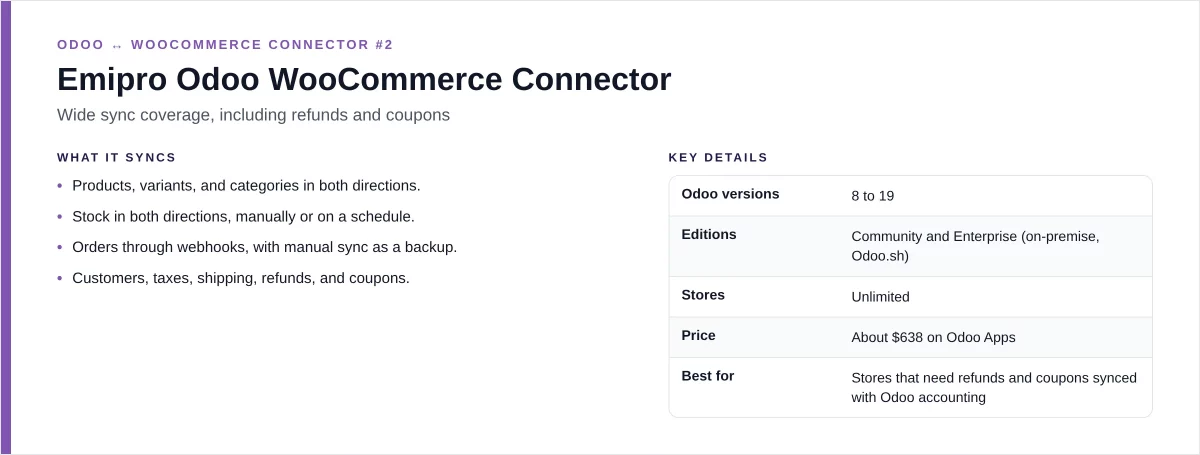
Its Odoo Apps listing currently supports Odoo versions 8 through 19. The Odoo 19 listing shows a price of $640.35.
The connector supports multiple WooCommerce instances and provides synchronization for products, inventory, orders, customers, and related store data.

Key Features
- Import and export WooCommerce products
- Synchronize product variants and inventory
- Import WooCommerce orders into Odoo
- Synchronize customer information
- Manage multiple WooCommerce instances
- Support automated synchronization workflows
- Map WooCommerce data with Odoo records
- Support order and fulfillment processes
The connector has been available across multiple Odoo generations, with its current listing covering versions 8 through 19.
Pros
- Wide Odoo version coverage
- Multi-store support
- Broad data synchronization
- Suitable for complex WooCommerce workflows
- Long-running product in the Odoo Apps ecosystem
Cons
- Higher listed price than the other connectors in this comparison
- Businesses should review the exact features available for their Odoo version
Price
$640.35 for the current Odoo 19 listing checked in September 2026.
3. VentorTech Odoo WooCommerce Connector PRO
Best suited for: Odoo.sh and On-Premise businesses that need two-way synchronization and detailed sync monitoring.
VentorTech Odoo WooCommerce Connector PRO synchronizes products, inventory, orders, customers, payments, shipping information, and other WooCommerce data with Odoo.
VentorTech currently lists support for Odoo 16 – 19, across Community and Enterprise editions. Odoo Online is not supported because third-party modules cannot run there.
The connector also supports multiple WooCommerce stores, with separate settings and synchronization rules for each store.

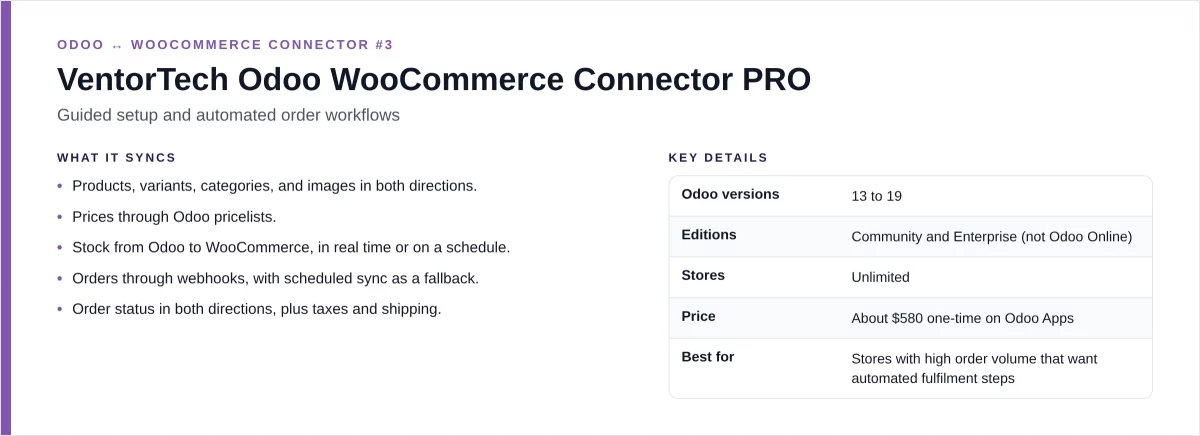
Key Features
- Two-way product synchronization
- Inventory and multi-warehouse support
- WooCommerce order import
- Customer and address synchronization
- Payment and coupon synchronization
- Fulfillment and tracking updates
- Multi-store configuration
- Sync logs and failed-job retry options
- Support for WPML and custom WooCommerce fields
VentorTech states that returns and refunds are currently marked as coming soon on its product page, so this should be checked before purchase if refund workflows are required.
Pros
- Supports Odoo 16–19
- Two-way synchronization
- Multi-store support
- Detailed logging and retry options
- Supports custom WooCommerce data
Cons
- Does not support Odoo Online
- Returns and refunds are currently listed as coming soon
- Subscription and one-time purchase options have different pricing
Price
The Odoo Apps listing shows about $582.03 one-time, while VentorTech sells a €499 yearly subscription.
4. Techspawn Odoo WooCommerce Connector
Best suited for: Businesses looking for a lower-cost connector with multi-store support and automated synchronization.
Techspawn Odoo WooCommerce Connector connects WooCommerce with Odoo and supports product, category, order, inventory, and customer operations.
The current Odoo Apps listing supports Odoo 9 through Odoo 19.
It also provides multiple WooCommerce store support, mapping tools, an interactive dashboard, sales reports, and scheduled cron-based synchronization.
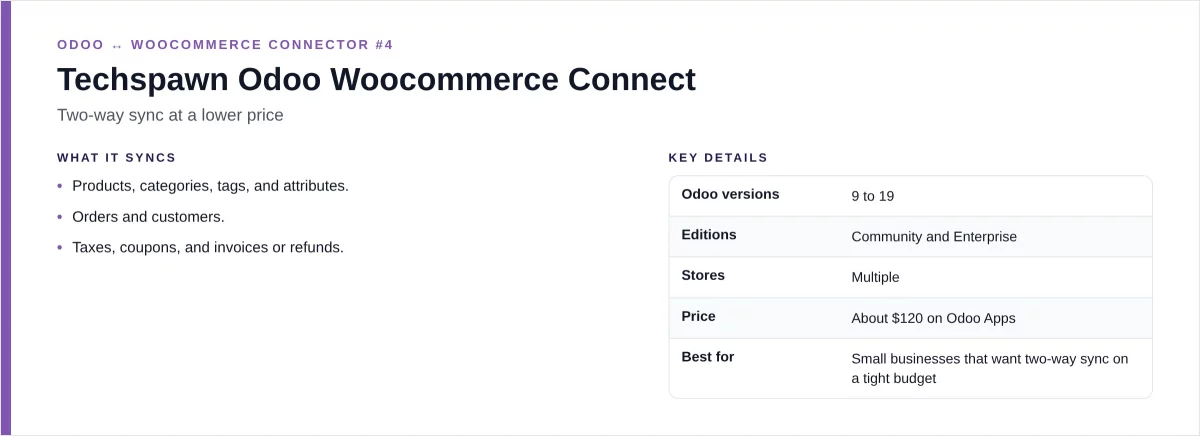
Key Features
- Import and export WooCommerce products
- Synchronize product categories and tags
- Import WooCommerce orders
- Update order status
- Synchronize inventory
- Manage multiple WooCommerce stores
- Use scheduled cron jobs
- View synchronization status
- Map WooCommerce and Odoo data
The connector is designed to handle common WooCommerce operations directly from Odoo, including order imports, stock updates, and product management.
Pros
- Supports Odoo 9–19
- Multi-store support
- Automated cron jobs
- Dashboard and reporting tools
- Lower listed price than several other options
Cons
- Advanced requirements may need additional configuration
- Exact feature availability should be checked for the selected Odoo version
Price
$201.14 for the current Odoo 19 listing checked in September 2026.
5. Cybrosys Odoo WooCommerce Connector
Best suited for: Businesses looking for a lower-priced connector for core WooCommerce product, customer, and order synchronization.
Cybrosys Odoo WooCommerce integration provides a connection between WooCommerce and Odoo for managing common store data.
Its current Odoo Apps listing supports Odoo 13 through Odoo 18. The Odoo 18 listing includes Community and Enterprise support and is listed at $90.27.
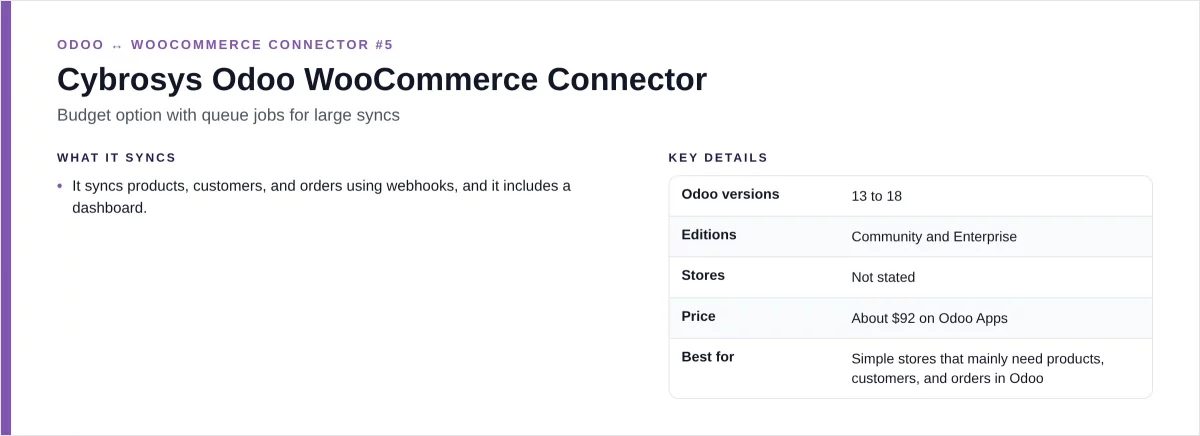
Key Features
- Import WooCommerce products into Odoo
- Synchronize customers
- Import WooCommerce orders
- Manage WooCommerce data from Odoo
- Support webhook-based synchronization
- Support Odoo Community and Enterprise
- Odoo.sh availability is listed
Pros
- Lower listed price
- Supports Odoo 13–18
- Covers common product, customer, and order workflows
- Community and Enterprise support
Cons
- Does not currently list Odoo 19
- Some advanced features are not clearly documented on the current listing
- Multi-store and refund capabilities should be confirmed before purchase
Price
$90.27 for the Odoo 18 listing checked in September 2026.

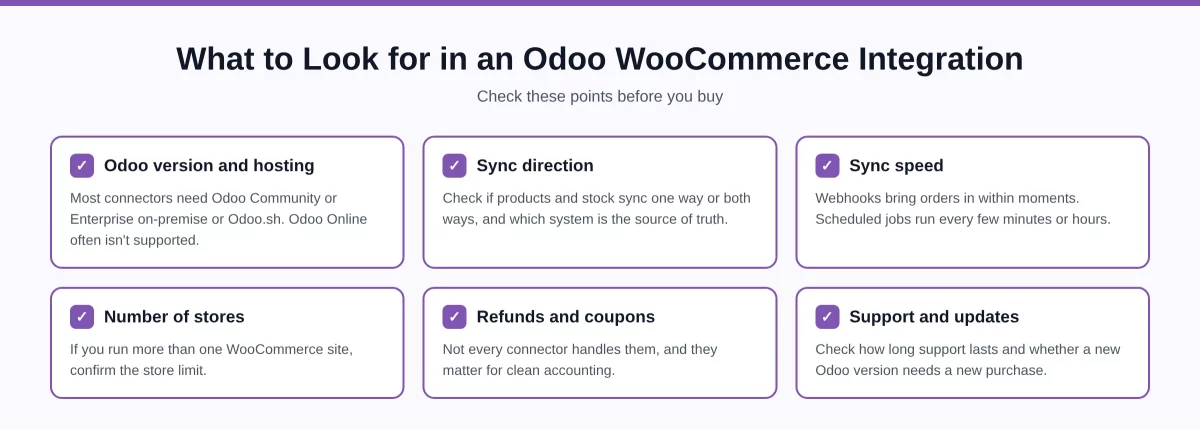
Odoo WooCommerce Connector: Which Features Should You Check?
The right connector depends on how your WooCommerce store operates.
Odoo Version
First, check whether the connector supports your exact Odoo version.
For example, Webkul and Techspawn currently list support through Odoo 19, while Cybrosys currently lists versions through Odoo 18.
Product and Inventory Sync
If Odoo is your main inventory system, check how the connector handles:
- Product creation
- Product updates
- Variants
- SKUs
- Prices
- Images
- Stock levels
- Warehouses
Order Sync
Order synchronization is important when WooCommerce is the main sales channel.
Check whether orders are imported automatically and how the connector handles order status, invoices, payments, shipping, and cancellations.
Multi-Store Support
Businesses operating several WooCommerce stores should check whether one Odoo database can connect to multiple stores.
The connectors compared here offer different approaches to multi-store management, so the exact store limit and configuration should be confirmed before purchase.
Hosting Support
Hosting can affect which connector you can install.
For example, Webkul currently lists Odoo Online, Odoo.sh, and On-Premise availability, while VentorTech states that its connector does not support Odoo Online.
Price
Price should be checked against the Odoo version you plan to use.
The listed prices in this comparison range from around $90 for Cybrosys to more than $600 for Emipro, while some vendors also offer subscription or separate licensing options.
Benefits of Connecting WooCommerce With Odoo
An Odoo WooCommerce integration gives a business tighter control over its daily e-commerce work.
Reduce Manual Data Entry
Product, customer, and order information can move between WooCommerce and Odoo instead of being entered manually.
Keep Inventory Updated
Inventory synchronization can help keep WooCommerce stock aligned with Odoo inventory records.
Manage Orders From Odoo
Orders imported from WooCommerce can be processed through Odoo’s sales, inventory, invoicing, and fulfillment workflows.
Support Multiple Stores
Multi-store connectors allow businesses to manage several WooCommerce stores from one Odoo environment.
Automate Routine Tasks
Scheduled jobs, webhooks, and automated workflows can reduce repetitive synchronization work.
Frequently Asked Questions
What is an Odoo WooCommerce Connector?
An Odoo WooCommerce Connector is an integration module that connects WooCommerce with Odoo and synchronizes data such as products, customers, orders, and inventory.
Does Odoo have a WooCommerce integration?
Odoo does not publish a WooCommerce module of its own, so every connector on the Odoo Apps Store comes from an outside vendor.
Webkul is one of those vendors, and its connector is listed for Odoo 9 through Odoo 20.
Can I connect multiple WooCommerce stores with Odoo?
Yes, several connectors support multiple WooCommerce stores, with store limits and configuration options varying between different modules.
Do Odoo WooCommerce connectors work with Odoo Online?
Support depends on the connector. Webkul lists Odoo Online support, while VentorTech does not support Odoo Online deployments.
Can WooCommerce inventory sync with Odoo?
Yes, several connectors sync WooCommerce inventory with Odoo, though sync direction, warehouses, and update methods vary between modules.
Can WooCommerce orders be imported into Odoo?
Yes, the connectors compared in this article support importing WooCommerce orders into Odoo for further sales and fulfillment processing.
Is there a free Odoo WooCommerce Connector?
Yes, free and open-source options exist, but their features, maintenance, compatibility, and support can differ from paid connectors.
How much does an Odoo WooCommerce Connector cost?
Prices vary by provider and Odoo version, with the connectors compared here ranging from around $90 to over $600.
What should I check before buying a connector?
Check Odoo version, hosting, sync features, multi-store support, automation, refunds, pricing, compatibility, documentation, and vendor support before purchasing.
Summary
An Odoo WooCommerce Connector can connect your online store with Odoo for product, order, customer, and inventory workflows.
The five connectors compared here differ mainly in supported Odoo versions, hosting, synchronization depth, multi-store capabilities, automation, and pricing.
Before selecting a connector, test the features against your actual WooCommerce workflow. Also confirm the current price and feature availability for your specific Odoo version.
If Odoo Online support and multi-channel selling both matter, the Webkul Odoo WooCommerce Connector is the one to shortlist.
Its live demo runs on a real Odoo instance, so you can test a sync before spending anything.