WooCommerce Marketplace – Features and What’s New in 7.0.0
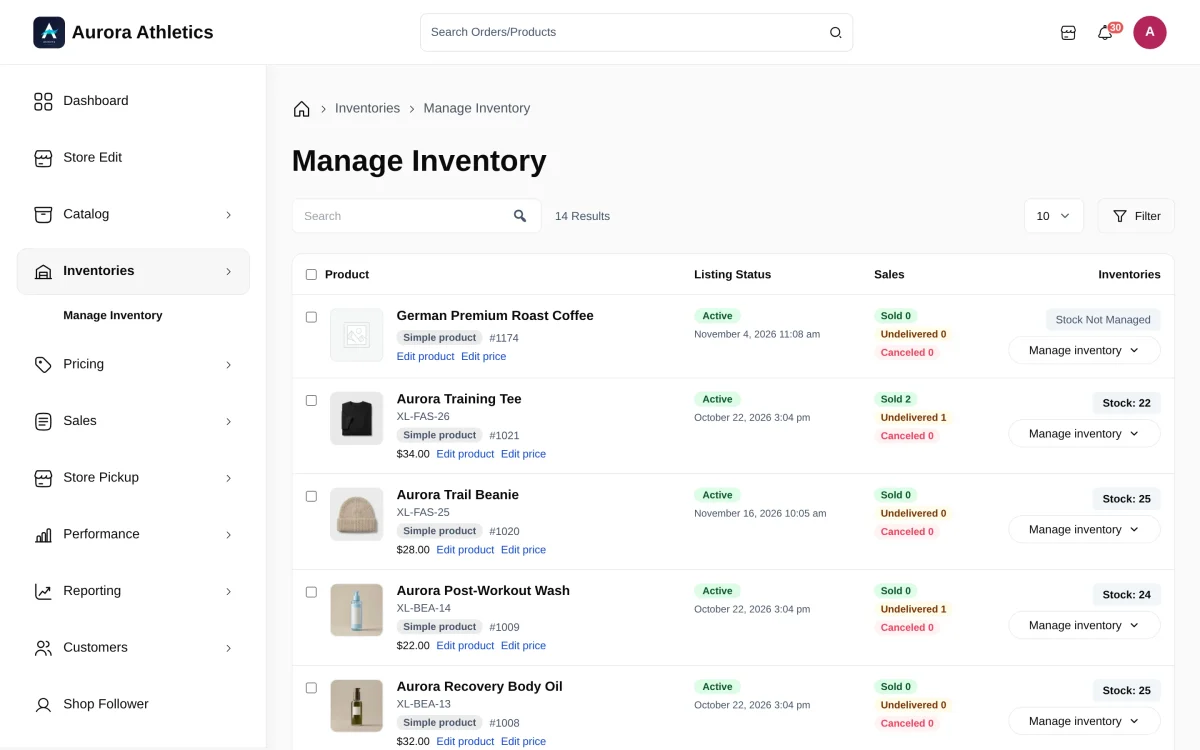
Webkul’s WooCommerce Multi Vendor Marketplace 7.0.0 lets several vendors sell the same product from one page. With Select & Sell, two shops can offer the same bottle for $22 and $24. Each manages its own stock, and the buyer chooses a seller.

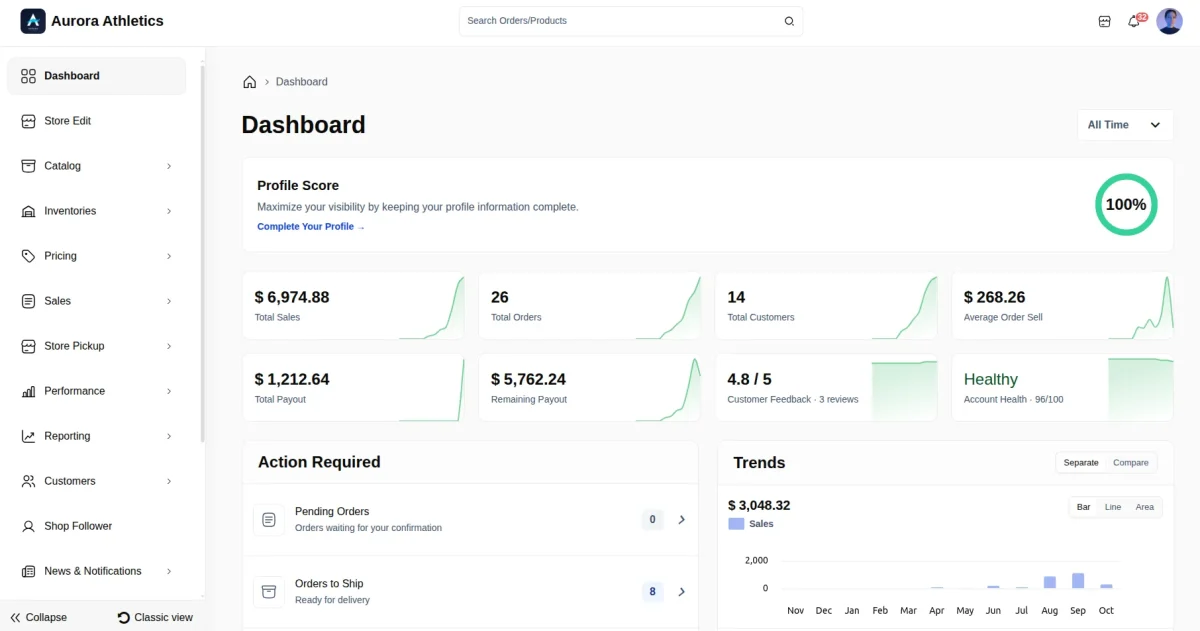
The update also gives vendors a new seller dashboard, CSV uploads for products and offers, and Magic AI for drafting listings and enhancing photos. Vendors can track orders through shipment or verify an emailed code when a buyer collects an order. Read the 7.0.0 changelog
View the complete WooCommerce Multi Vendor Marketplace feature list
Vendor Registration and Management
- Set Seller Central banners and logos, then change signup labels, field hints, and button text.
- Accept vendor signups with live shop URL checks and auto or manual approval.
- Let buyers become vendors, or add seller accounts from the admin and assign products in bulk.
- Approve or disapprove vendors in bulk and edit their profile, billing, and shipping details.
- Let vendors update their personal details, shop information, and profile settings.
- Set KYC document types, file formats, and upload limits. Approve or reject documents and send sellers an email.
- Let vendors add staff accounts and grant task access within the rules set by the admin.


Product Catalog and Bulk Upload
- Let vendors create simple, variable, grouped, external or affiliate, and downloadable products. Vendors can edit or delete their products; admins can edit or delete any vendor product.
- Set allowed product types globally or per vendor, with vendor category limits, SKU prefixes, and product approval rules.
- Review new products, edits, and Select & Sell offers before they go live. Give a reason when rejecting them.
- Guide product setup with steps and checks for missing details. Choose Horizontal Tabs, Vertical Tabs, or Stacked Form layouts.
- Create and update products and Select & Sell offers through CSV bulk uploads.
- Let vendors sell admin catalog products with their own price and stock through Select & Sell.
- Manage product images, attributes, tags, brands, upsells, and cross-sells from vendor product forms.
Magic AI Product Tools
- Let admins and vendors generate product content with Magic AI.
- Let vendors use Create Product with AI to prepare new product listings.
- Let admins and vendors enhance product images with Magic AI.
- Create product and category images from the admin with Magic AI.
- Use OpenAI, Anthropic, Gemini, xAI, Groq, DeepSeek, Mistral, Ollama, or WordPress AI Connectors.
- Set limits on how much AI content each vendor can create.
Pricing Inventory and Barcodes
- Set regular prices, sale prices, and sale start and end dates for vendor products.
- Update prices and sale dates for products and variations from one pricing screen.
- Manage stock, SKU, and GTIN fields for products and variations, with bulk stock updates.
- Set low stock thresholds, receive stock alerts, and choose whether to accept backorders.
- Generate Code 128, EAN-13, and UPC-A barcodes for products and variations, with PDF printing.
- Download barcode images as PNG files and match SKU-based barcodes to their products.

Orders Shipping and Store Pickup
- Let buyers add products from more than one vendor and pay in one checkout.
- Let vendors change order status, print invoices, and handle refunds within the rules set by the admin. View buyer billing and shipping details when the admin allows access.
- Set vendor shipping zones, methods, costs, taxes, and shipping classes from the seller account.
- Manage store pickup orders and locations, and check the buyer pickup code before handing over goods.
- Use listed carriers or Self Ship, send tracking details, and review shipments against orders.
- Set weekly store hours and closing notices, with the choice to block sales while closed.
- Set vacation dates and shop notices, choose whether to block sales, and track Active and Expired breaks.
Commissions Payouts and Transactions
- Set a global commission rate or choose a different rate for each vendor.
- Show the applied commission rate in the vendor profile.
- Accept manual withdrawal requests or generate monthly requests, with minimum limits, payment methods, and charges.
- Filter payout requests, use Pay Now or bulk Mark as Paid, and export records to CSV.
- Let vendors check transactions and earnings, track unpaid amounts, and request payment for completed orders.
- Extend commission rules with the separate Advanced Commission add-on for product and category rates.
Vendor Dashboard Reports and Performance
- Use the seller panel to manage shop settings, search and filter products, orders, and buyers, or switch to Classic view. Admins can enable a separate admin-style vendor dashboard.
- Track sales, orders, buyers, payouts, Profile Score, and Customer Feedback from the dashboard.
- Check Action Required for pending orders, orders to ship, low stock products, and alerts.
- View Sales, Products, and Customers reports with tax, refunds, and payment details. Export them as CSV or PDF.
- Compare trends, switch chart views, and set colours for dashboard, report, transaction, performance, and product graphs.
- Check Account Health from orders, reviews, and flags. Choose a date range and see how the score works.
- Search buyers and check their spend, order counts, last order dates, and guest or account status.
Vendor Storefronts SEO and Marketing
- Build vendor profiles with shop logos, banners, and product collections. Choose Storefront or Spotlight layouts and check the preview.
- Show vendor names and store links on product pages so buyers can see who sells each item.
- Set vendor meta titles, keywords, and descriptions with a search preview. Use search-friendly store URLs.
- Create and assign vendor badges with images, ranks, and enabled or disabled status.
- Let buyers review vendors and products, with admin controls to approve vendor reviews.
- Let buyers follow favourite vendors and get shop news or alerts about new discounts.
- Show vendor social profile links and search or sort shop followers. Remove followers or send them news.
Marketplace Controls and Communication
- Post admin news in vendor accounts and let sellers ask questions with replies in a chat-style thread.
- Send order, product, review, and follower alerts with the default WooCommerce email templates. Notify admins when vendors add or edit products for review.
- Let buyers flag vendors or products, with preset reasons, guest access, and fields they must fill.
- Hide buyer details from vendors and choose which seller contact details and Sold by links to show.
- Set allowed file types, sizes, and dimensions for vendor image uploads.
- Set names and links for seller account pages, hide dashboard sections, and clear data when a vendor account is deleted.
- Set order approval rules, minimum order amounts, and maximum purchase quantities for vendor products.
Integrations and Compatibility
- Support HPOS order storage and WooCommerce Cart and Checkout blocks.
- Translate vendor products and variations with WPML and WooCommerce Multilingual installed.
- Support Arabic and RTL layouts, alongside standard WooCommerce themes.
Additional capabilities in the feature documentation
- Seller Central and staff. Support unlimited vendors through WooCommerce registration or a dedicated Seller Central page that showcases seller benefits. Admins can block sellers, define available staff permissions, view all vendor staff, edit names and permissions, and delete staff accounts individually or in bulk.
- Vendor profiles and policies. Vendors can use the TinyMCE editor, automatic shop names, custom slugs, an About section, and return, shipping, and privacy policies. Store pages show product collections, reviews, and ratings.
- Catalog administration. Admins can highlight featured products and transfer ownership between vendors. Vendors can use admin-created global attributes, create attribute terms, edit product permalinks, and enter GTIN, UPC, EAN, or ISBN identifiers on products and variations.
- Product entry and imports. Vendors can use a three-step product form with product type cards. CSV templates, export and re-import, SKU matching, column mapping, validation, import counts, and downloadable error reports support bulk work. Vendors receive an email when an admin approves or rejects newly imported products.
- Prices, inventory, and labels. Bulk pricing accepts a replacement price or a fixed or percentage increase or decrease on regular prices, sale prices, or both. Vendors can increase or decrease stock, set sold-individually rules and purchase limits, and print barcodes in bulk or by variation. Staff permissions govern barcode access.
- Product and order filters. Product filters cover name, SKU, status, approval, draft status, type, category, price range, stock or sale status, product or variation number, ID, and barcode. Order filters cover ID, date, status (including pending, completed, and refunded), customer, email, items, earnings, payment, shipment, gross amount, discount, and commission. The filter drawers show an active filter count and a Clear filters action.
- Invoices and fulfilment. Vendors can upload custom invoices, include product images, attach invoices to emails, and set orders per page. Admins configure fulfilment carriers for Free Shipping and Flat Rate Shipping. The shipment record shows the carrier, items, and tracking number. Pickup details appear in order emails. Vendors can display fulfilment badges and delivery branding.
- Refunds, commission, coupons, and tax. Vendors can initiate refunds, track refunded amounts, and restock items. Commission models include fixed fees, percentages, and a combination of both. Admins can assign coupon costs to the vendor, the admin, or both. The tax amount on all orders, including vendor orders, is credited to the admin account.
- Dashboard and graph settings. The grouped menu covers Catalog, Sales, Inventories, Reporting, Performance, and Settings. Date filters, order status, recent orders, and the five top-selling products complement sales, order, and customer charts. Vendors can choose bar, line, area, doughnut, or pie charts, set defaults, reset a section, and use separate or comparison trend views with interactive legends. Graph settings support staff permissions.
- Transactions and reporting. Admins can transfer earnings and track payouts. Vendors can check earnings summary cards and request payment subject to withdrawal settings. Reports include commissions, tax rates, payment methods, and top products and customers.
- Account health and reviews. A score out of 100 has Healthy, At Risk, and Unhealthy bands. Sellers can inspect cancellations, customer feedback, flags, refund rates, product reviews, and time from payment to completion. A guide and live calculator explain how the score works. Seller reviews include price, value, and quality ratings and moderation status. Vendors can search, sort, and filter reviews by customer, email, rating, text, status, or date and identify verified-owner product reviews.
- Communications and purchase controls. Admins can brand marketplace emails, customize shipping email titles, and send vendor order notifications. Sellers can read announcements in News & Notifications and revisit their query history. Marketplace owners can prevent vendors from buying their own products.
- Analytics, maps, and multisite. Google Analytics integration and GA4 events cover product views, purchases, and conversions. Google Map integration displays sales geography and top billing countries. The plugin supports WordPress Multisite networks.
Categories:
WooCommerce
View Comments
Comment or Ask a Question
Quick Links