Magento Category Page Image Transition
Features Of Magento Category Page Image Transition
- Working well with all browser like chrome,firefox,ie etc.
- Enable/disable image transition from admin for particular product.
- Enable Product or External images for the transition from admin config.
- Admin can add custom transition images for individual product.
Installation Of Magento Category Page Image Transition
Installation of the module is super easy you need to move the app and skin folder into Magento root directory.

After moving both the folder flush the cache from Magento admin module. Under system > cache management.

After those primary steps, you just need to configure the module.
How To Use Magento Category Page Image Transition
After the installation of the Magento Category Page Image Transition, you just need to follow the given steps:
1.Magento Category Page Image Transition is fully managed by admin, for applying image transition effect on products, just go to path admin panel->catalog->Manage Product->product->edit like in given screenshot.

2.Now in product edit page, can set enable/disable status for showing category product image transition like.

3. Now for image transition, need to add custom transition images from catalog product edit page like.

4. Enable/Disable Quick View option from here and select Product image or External image option to transition images on the front end.

Magento Category Page Image Transition At Front End
Now category product image transition settings are completed now can see transition on mouse hovering on that product in category product page like

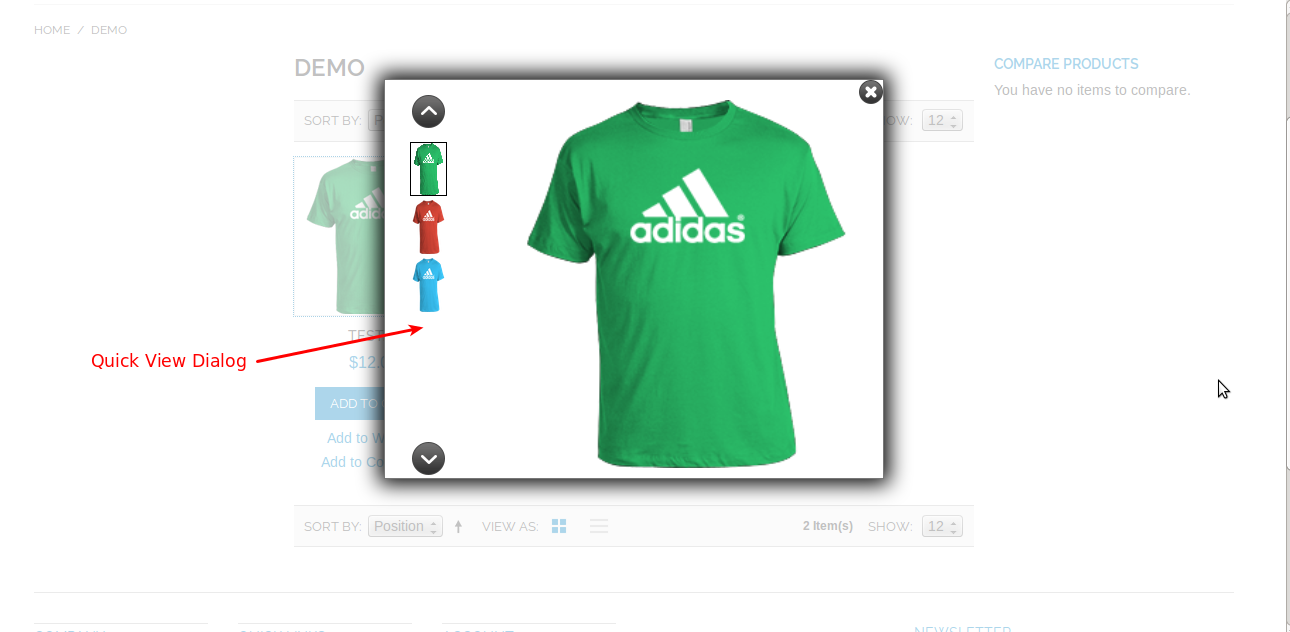
To open Quick View dialog, click on quick view link.
That’s all for the base Magento Category Page Image Transition, still have any issue feel free to add a ticket and let us know your views to make the module better webkul.uvdesk.com