Magento 2 Headless Best Practices with Next.js 16
Magento 2 Headless Best Practices help create faster, scalable storefronts by combining Magento’s commerce features with a modern headless architecture.
By decoupling the frontend, teams can build modern Next.js experiences while Magento manages products, pricing, inventory, and checkout.
But here is the catch. A Next.js storefront can only be as fast as the systems behind it.
Many teams polish the frontend and overlook the API (Application Programming Interface), caching, and infrastructure layers. In production, that is exactly where the bottlenecks appear.
In this article, we will walk through how to scale a Magento 2 headless storefront using Next.js 16 App Router, Apollo Client, Redis, and a properly configured CDN.
Magento 2 Headless Best Practices: Architecture Overview
A scalable Magento headless setup is designed around one goal: serve as many requests as possible before they ever reach Magento.
Here is the request flow from the customer down to the database:
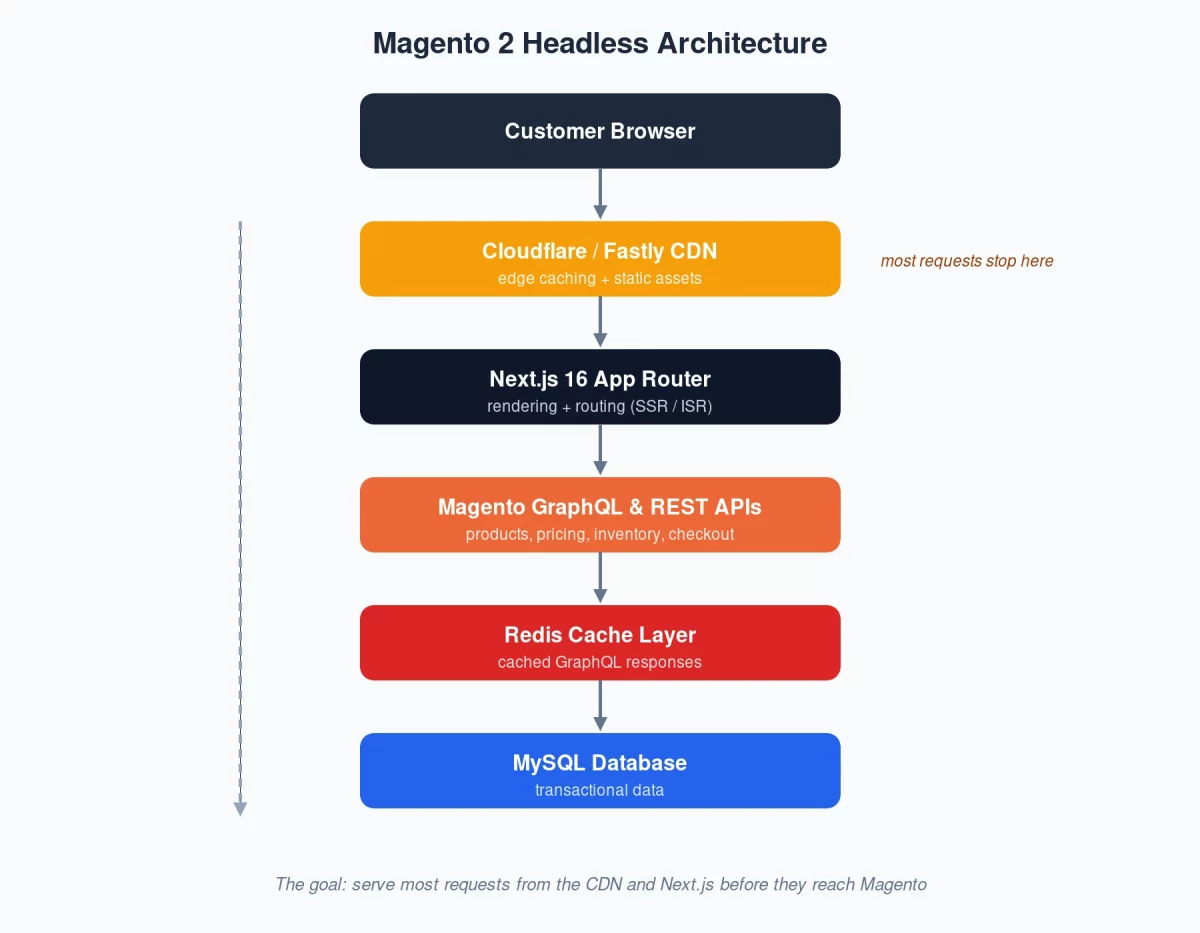
Each layer has one clear job:
- CDN — edge caching and static assets.
- Next.js — rendering and routing.
- Magento — products, pricing, inventory, and checkout.
- Redis — fast caching for repeated queries.
- MySQL — transactional data storage.
The architecture succeeds when most requests are answered by the CDN and Next.js, not Magento.
Why Next.js 16 App Router?
The App Router brings several features that fit a Magento storefront perfectly:
- Server Components
- Streaming
- Route-level caching
- Improved SEO
- Less client-side JavaScript
Most catalog pages can be rendered as Server Components, moving data fetching from the browser to the server.
The result: less JavaScript shipped to users, faster initial loads, and better Core Web Vitals scores.
GraphQL vs REST: Use Each Where It Fits
Magento offers both GraphQL and REST APIs, and both have a place in a headless build.
GraphQL for Catalog Content
GraphQL is best for product pages, category pages, search results, CMS content, and navigation menus.
Here is a typical product query that fetches only the fields the page needs:
query Product($urlKey: String!) {
  products(filter: { url_key: { eq: $urlKey } }) {
    items {
      sku
      name
      thumbnail {
        url
      }
      price_range {
        minimum_price {
          final_price {
            value
          }
        }
      }
    }
  }
}
REST for Transactional Workflows
REST works better for add to cart, customer authentication, checkout, and order placement.
For example, adding an item to the cart is a simple REST call:
POST /rest/V1/carts/mine/items
In most production builds, GraphQL powers the catalog while REST handles transactions.
Magento 2 Headless Best Practices for SSR and ISR
The rendering strategy you pick has a direct impact on performance and backend load.
SSR renders the page on every request. Use it for customer-specific pages like cart and checkout:
export const dynamic = "force-dynamic";
ISR renders the page once and refreshes it on a timer. It is ideal for catalog content:
export const revalidate = 300; // refresh every 5 minutes
Here is a strategy that works well for most Magento stores:
| Page Type | Strategy | Cache Time |
|---|---|---|
| Homepage | ISR | 5 minutes |
| Category pages | ISR | 10 minutes |
| Product pages | ISR | 1 minute |
| CMS pages | Static | 24 hours |
| Cart | SSR | No cache |
| Checkout | SSR | No cache |
Most traffic hits product, category, and CMS pages — and these change far less often than carts.
Using ISR for those routes cuts backend load dramatically, while SSR stays reserved for real-time customer data.
Setting Up Apollo Client
Apollo Client manages the GraphQL communication between Next.js and Magento.
A minimal setup looks like this:
import { ApolloClient, HttpLink, InMemoryCache } from "@apollo/client";

export const apolloClient = new ApolloClient({
  link: new HttpLink({
    uri: process.env.NEXT_PUBLIC_MAGENTO_GRAPHQL_URL,
  }),
  cache: new InMemoryCache(),
});
This gives you caching, request deduplication, and centralized error handling out of the box.
Building Product Pages with Server Components
With the App Router, Magento data can be fetched directly inside a Server Component.
import { apolloClient } from "@/lib/apollo/client";
import { PRODUCT_QUERY } from "@/graphql/product";

export const revalidate = 60;

export default async function ProductPage({ params }) {
  const { slug } = await params;

  const { data } = await apolloClient.query({
    query: PRODUCT_QUERY,
    variables: { urlKey: slug },
  });

  return <h1>{data.products.items[0].name}</h1>;
}
This page fetches product data on the server, caches it for 60 seconds, and minimizes client-side JavaScript.
Dynamic SEO Metadata
The App Router can also generate page titles and descriptions straight from Magento product data.
export async function generateMetadata({ params }) {
  const product = await getProduct(params.slug);

  return {
    title: product.name,
    description: product.meta_description,
  };
}
This keeps SEO metadata in sync with the catalog — no manual updates, no stale titles in search results.
Redis-Based GraphQL Caching
Magento should never execute the same GraphQL query twice in a row. Redis prevents that.
A production setup builds the cache key from everything that changes the response:
graphql:{store_view}:{currency}:{customer_group}:{query_hash}
The payoff is faster API responses, a lighter database, and much better scalability under load.
Magento 2 Headless CDN Best Practices
Treat the CDN as your first layer of performance, not an afterthought.
Static assets, catalog content, and public API responses should all be served from the edge:
| Resource | Cache TTL |
|---|---|
| Homepage | 5 minutes |
| Categories | 10 minutes |
| Products | 1 minute |
| CMS pages | 24 hours |
| Static assets | 1 year |
A well-configured CDN absorbs the majority of storefront traffic before it ever reaches Magento.
Cache Invalidation Done Right
The hardest part of caching is not storing data — it is knowing when to clear it.
When a price or stock level changes, purge only the affected pages, never the whole cache.

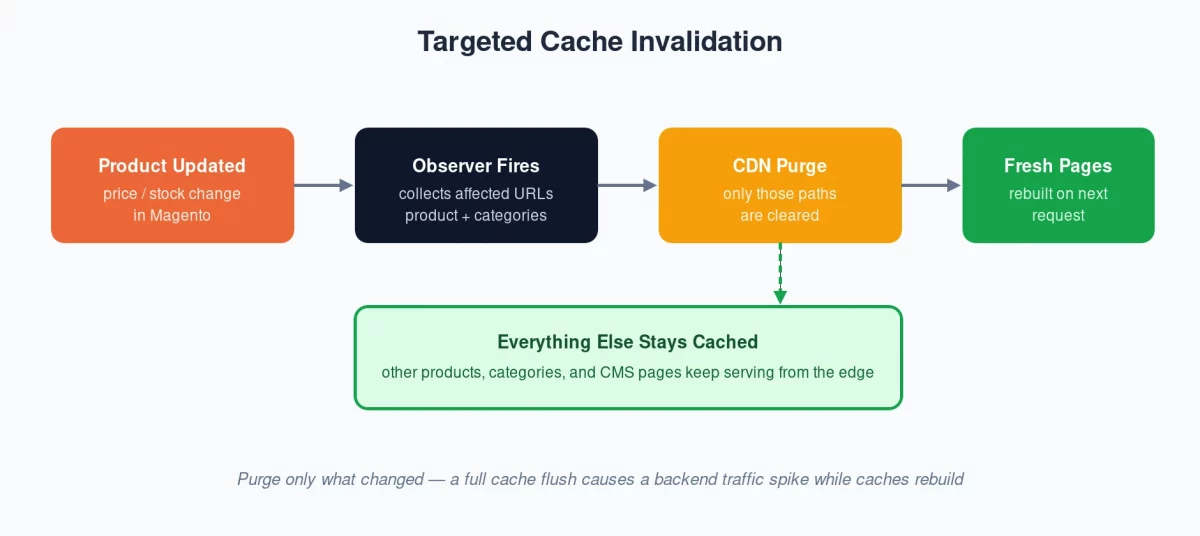
A Magento observer can handle this automatically:
public function execute( Observer $observer ): void
{
    $product = $observer->getProduct();

    $urls = $this->urlCollector->getAffectedUrls( $product );

    $this->cloudflareClient->purgePaths( $urls );
}
This observer collects the URLs touched by a product update and purges only those paths from the CDN.
A full cache flush feels simpler, but it triggers a traffic spike on the backend while every cache rebuilds.
API Rate Limiting
Headless APIs are more exposed than a traditional Magento storefront.
Without limits, bots and scrapers can hammer your GraphQL endpoints and slow things down for real customers.
A simple, effective starting point:
| Consumer | Rate Limit |
|---|---|
| Public visitors | 60 / min |
| Logged-in customers | 600 / min |
| Internal services | Unlimited |
Combined with CDN protection and bot filtering, rate limiting keeps API response times stable as traffic grows.
Monitoring Performance
You cannot improve what you do not measure. These are the metrics worth watching:
- P50 response time — the typical experience for most users.
- P95 response time — slower requests that still affect a meaningful share of users.
- P99 response time — extreme outliers that point to backend bottlenecks.
- Cache hit rate — how well your CDN and Redis layers are actually working.
- GraphQL payload size — oversized responses quietly hurt page load times.
Averages look fine on most dashboards. It is usually P95 and P99 that reveal the problems hurting conversions.
Wrapping Up
Scaling Magento 2 headless is not just about adopting React or Next.js.
The real gains come from rendering strategies, GraphQL optimization, Redis caching, CDN configuration, and smart cache invalidation.
When configured correctly, most requests never reach Magento, resulting in faster pages and better Core Web Vitals.
Get the layers behind your storefront right, and the frontend speed takes care of itself.