Laravel eCommerce SaaS Aramex Shipping
Table of Content
The Laravel eCommerce SaaS Aramex Shipping extension connects Aramex with Bagisto SaaS.
It lets super admins and tenants offer Aramex shipping rates, create shipments, and track deliveries.
It also works with the Laravel Multi Company SaaS module.
Table of Contents
- Features
- Installation
- Super Admin Configuration
- Tenant Configuration
- Origin Configuration
- Shipping Method Configuration
- Checkout Experience
- Order Management
- Shipment Tracking
- Support
Features
- Real-time Shipping Rates — Fetch live rates from the Aramex Rates Calculator SOAP API. The API uses the origin, destination, weight, and service type.
- Mock Mode — Test the integration with fixed mock rates. This mode works well for development and staging environments.
- Sandbox & Live Modes — Use the Aramex Sandbox endpoint for testing. Switch to the Live endpoint when you move to production.
- Domestic & International Services — Select domestic services such as OND, ONP, and BLK. You can also select international services such as PDX, PPX, DPX, EPX, GDX, and GPX.
- Channel & Country Restrictions — Limit Aramex shipping to selected channels or destination countries.
- Cash on Delivery (COD) — Enable COD for eligible parcel services. The extension hides COD for document services such as OND, PDX, and GDX.
- Weight Unit Support — Select Kilograms or Pounds. The extension converts the value to the required Aramex SOAP unit.
- Tax Calculation — Enable this option to calculate tax on Aramex shipping charges.
- Shipment Tracking — Track Aramex waybills from the admin panel. The extension supports live and mock tracking data.
- Multi-Channel & Multi-Locale — Configure the shipping title and description for each channel and locale.
- Super Admin Version Info — Super admins can view the module version and description from the company configuration.
Installation
The extension uses two packages.
packages/Webkul/Aramex— Provides Aramex shipping, rates, tracking, and COD logic.packages/Webkul/AramexSaas— Adds SaaS integration, super admin settings, and tenant repositories.
Both packages use Composer path repositories.
Therefore, you do not need to edit composer.json or config/app.php.
Bagisto discovers the packages through its Concord module system.
Installation Steps
- Place the
AramexandAramexSaasdirectories insidepackages/Webkul/. - Run the installation command.
php artisan aramex:install
This command clears the required caches.
It also displays the next steps for activating the carrier.
- Log in to the admin panel.
- Go to Configuration → Sales → Shipping Methods → Aramex Shipping.
- Set Status to Active and save the configuration.
- Configure the remaining settings in the sections below.
No extra vendor:publish command is required.
You also do not need to run composer dump-autoload.
The install command clears the cache, while Bagisto handles package autoloading.
Super Admin Configuration
The super admin can access a simple Aramex configuration panel.
This panel shows the module version and description.
However, it does not contain the main Aramex shipping settings.
Tenants manage those settings at the channel level.

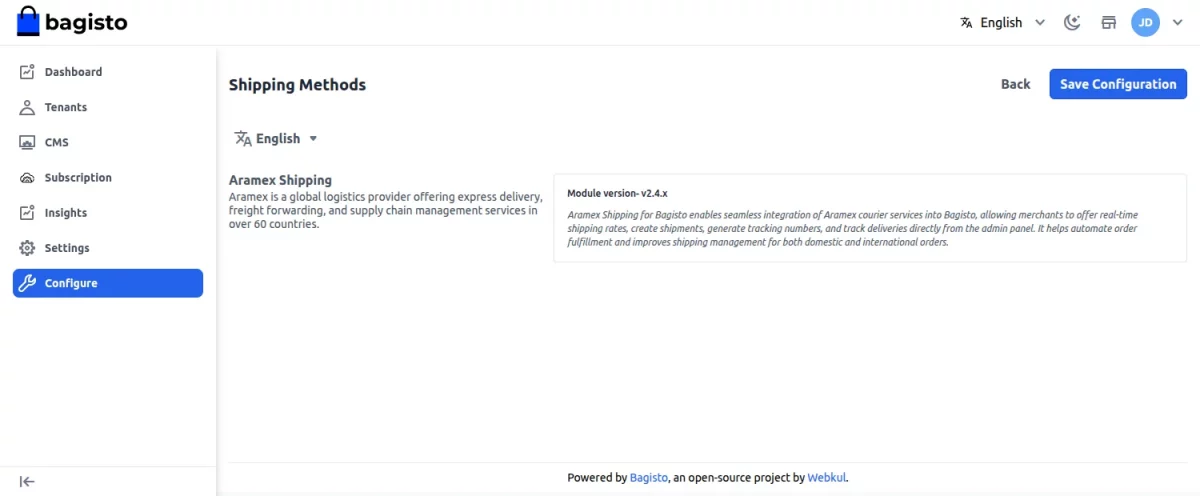
Navigation: Super Admin Panel → Configure → Sales → Aramex Shipping
The panel shows the following details.
- Module Name: Aramex Shipping
- Version: Module version v2.4.x
- Description: Aramex Shipping connects Aramex services with Bagisto. It lets merchants get rates, create shipments, generate tracking numbers, and track deliveries.
Tenant Configuration
Tenants configure Aramex settings for each channel.
To access these settings, go to Configuration → Sales → Shipping Methods → Aramex Shipping.
General Settings
- Status (Active/Inactive): Enable or disable the Aramex carrier.
- Title: Set the shipping method name shown at checkout.
- Description: Add the description shown at checkout.
The title and description can vary by channel and locale.
Mock Mode
Mock Mode provides a simple way to test the integration.
When enabled, the carrier uses fixed rates from MockHelper.
It does not send requests to the Aramex API.
Also, the extension hides the credential fields in this mode.
When you disable Mock Mode, the credential fields become available.
You must then enter valid Aramex credentials.
Mock rates are available for each service type.
- OND (Overnight Document): $5.00
- ONP (Overnight Parcel): $7.00
- BLK (Bulk Service): $3.50
- PDX (Priority Document Express): $25.00
- PPX (Priority Parcel Express): $30.00
- DPX (Deferred Parcel Express): $20.00
- EPX (Economy Express Parcel): $15.00
- GDX (Ground Document Express): $18.00
- GPX (Ground Parcel Express): $22.00

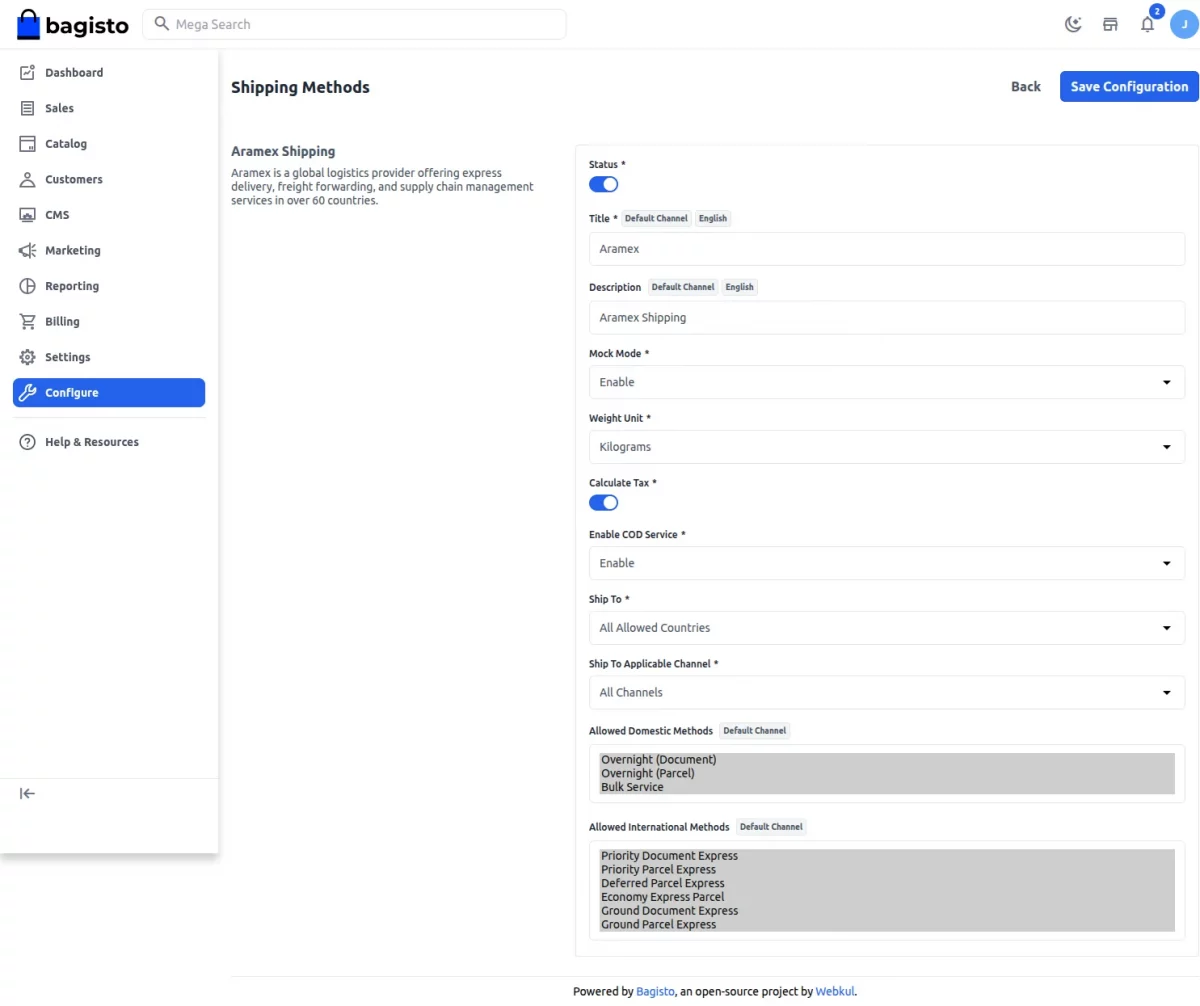
Sandbox Mode
Sandbox Mode appears when Mock Mode is disabled.
Enable it to use the Aramex Sandbox WSDL endpoints for testing.
Disable it to use the Aramex Live endpoints for production.
Aramex Credentials
The credential fields appear when Mock Mode is disabled.
Each channel stores its own Aramex credentials.

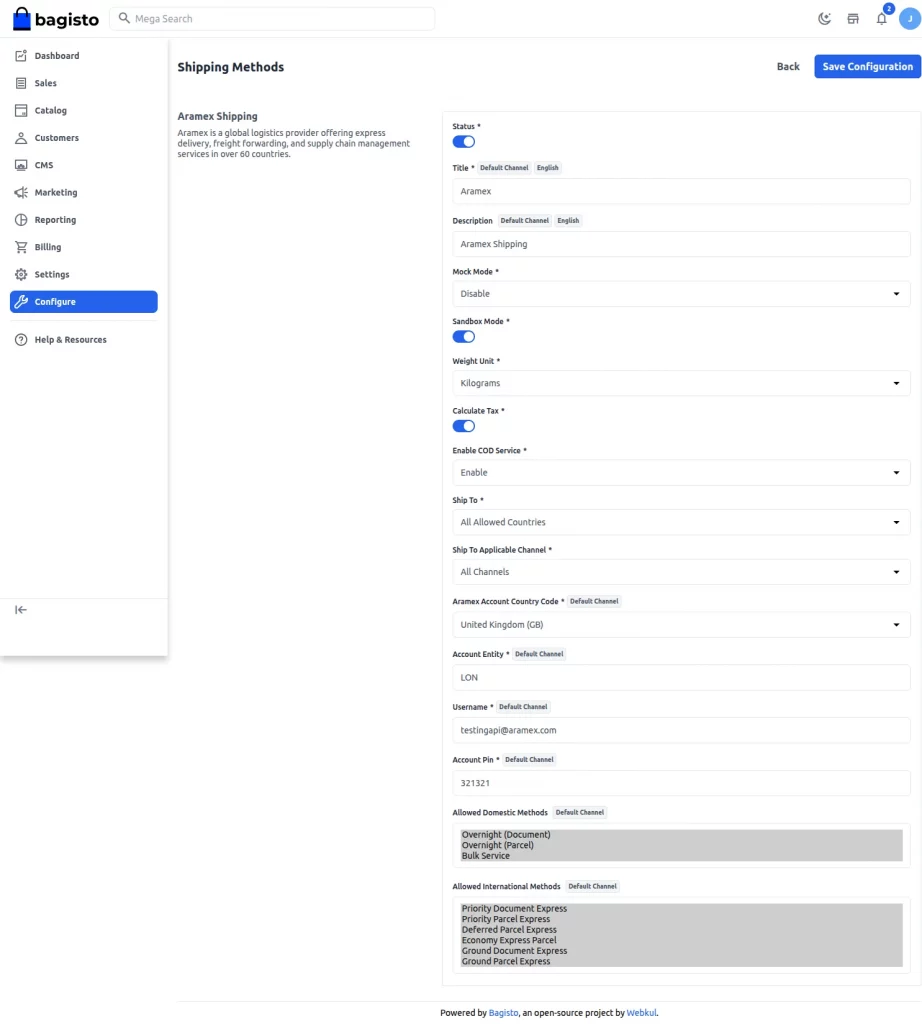
- Aramex Account Country Code: Enter the two-letter country code for your Aramex account, such as GB, US, or AE.
- Account Entity: Enter the account identification code provided by Aramex, such as LON.
- Account Number: Enter your Aramex customer account number.
- Username: Enter your Aramex API username.
- Password: Enter your Aramex API password.
- Account Pin: Enter the PIN linked to your Aramex account.
Shipping Options
- Weight Unit: Select Kilograms or Pounds. The extension converts the value to the Aramex SOAP unit.
- Calculate Tax: Enable this option to calculate tax on Aramex shipping charges.
- Enable COD Service: Enable COD for eligible parcel services. Document services do not show COD.
- Ship To Applicable Countries: Choose All Allowed Countries or Specified Countries.
- Ship To Countries: Select destination country codes when you choose Specified Countries.
- Ship To Applicable Channel: Choose All Channels or Specified Channels.
- Ship To Channels: Select channel IDs when you choose Specified Channels.
Service Methods
Select the Aramex services that you want to offer.
The extension groups services into domestic and international methods.
At checkout, it checks the origin and destination countries.
It then selects the relevant service group.
- Allowed Domestic Methods: OND, ONP, and BLK.
- Allowed International Methods: PDX, PPX, DPX, EPX, GDX, and GPX.
In Mock Mode, the extension quotes all configured methods.
This applies regardless of the destination country.
In Live or Sandbox Mode, it selects the relevant service group.
Origin Configuration
Aramex needs the shipping origin to calculate rates.
Configure the origin at Configuration → Sales → Shipping → Origin.

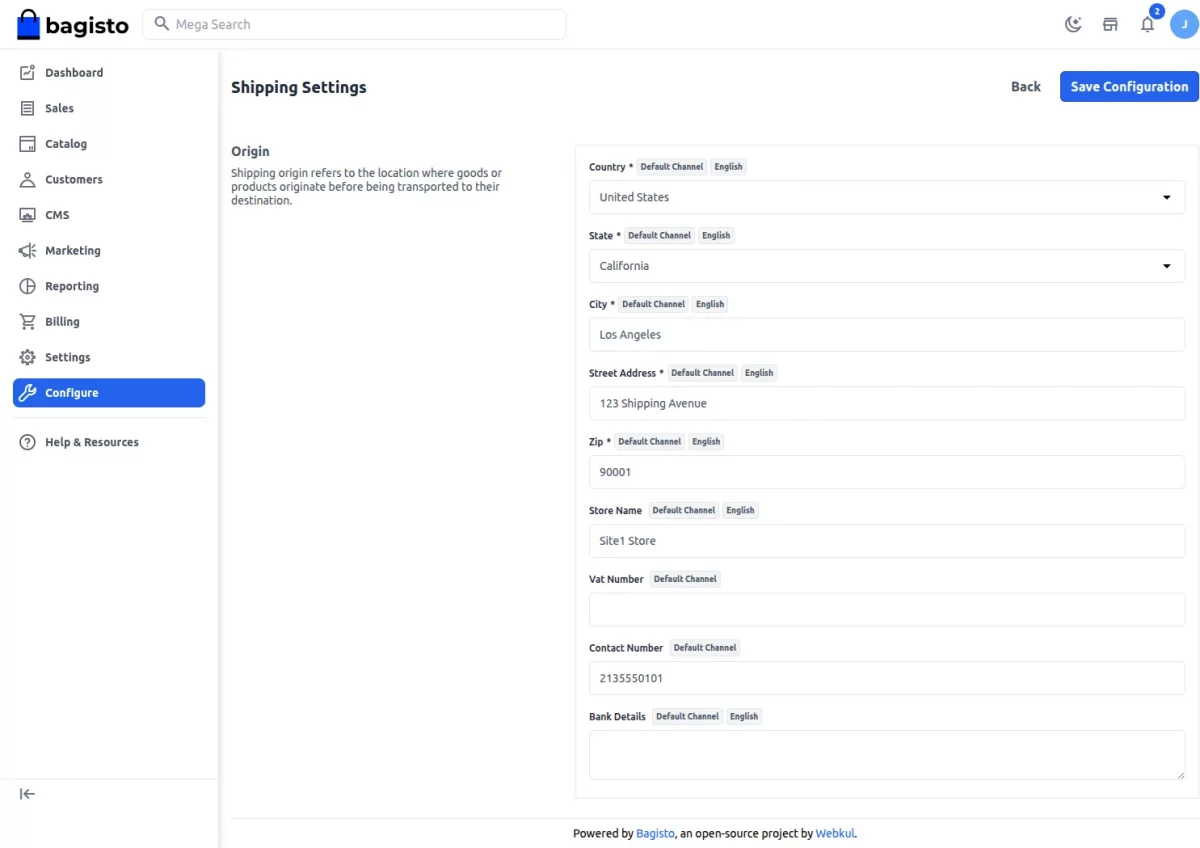
- Country: Select the origin country.
- State: Enter the origin state or province.
- City: Enter the origin city.
- Street Address: Enter the origin street address.
- Zip/Postal Code: Enter the origin postal code.
- Store Name: Enter the store or origin name.
- Contact Number: Enter the origin contact number.
- VAT Number: Add the VAT number if required.
- Bank Details: Add bank details if required.
The origin address helps determine the shipment type.
The extension also sends this address to Aramex with the rate request.
Shipping Method Configuration
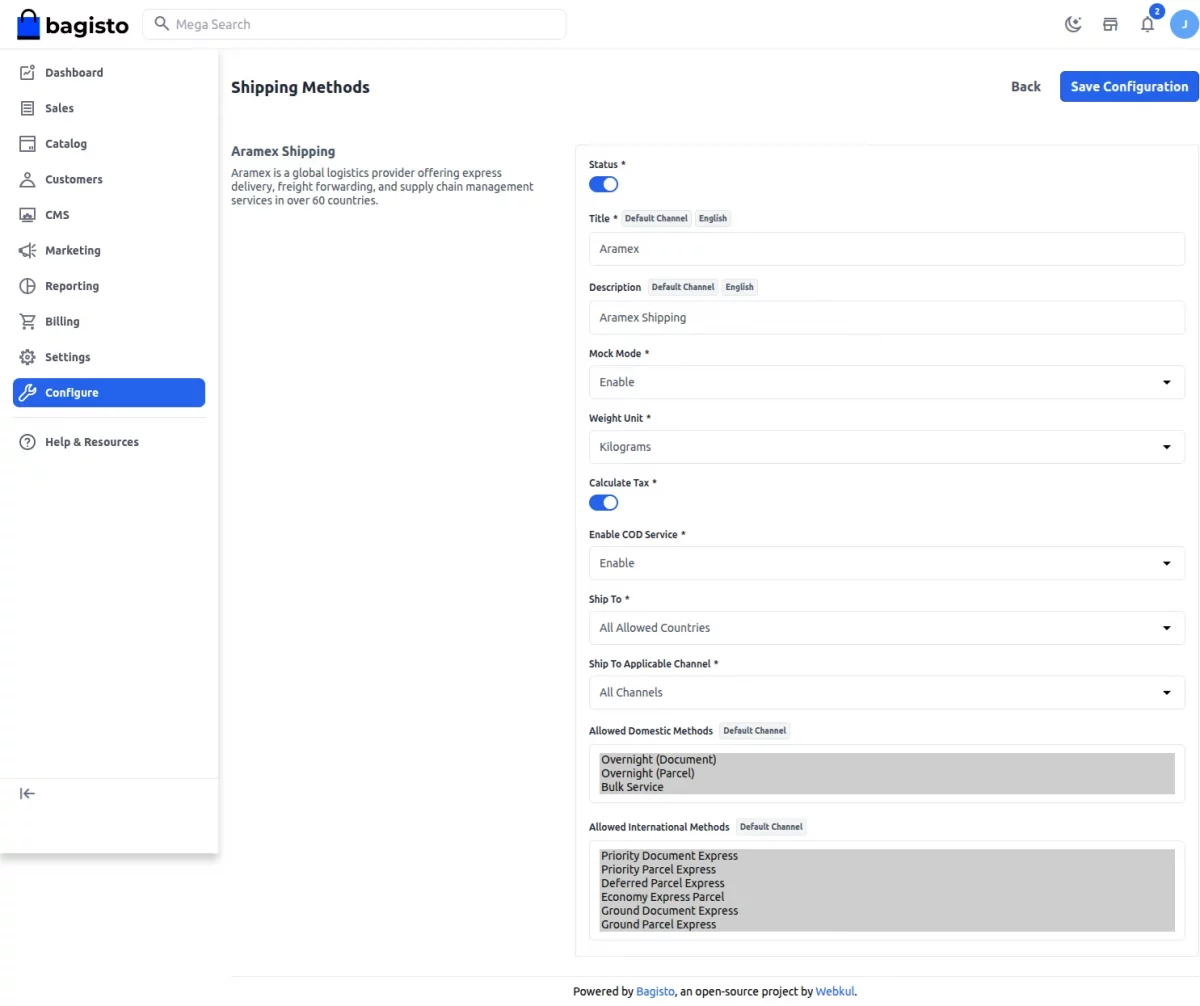
Open Configuration → Sales → Shipping Methods → Aramex Shipping to manage the carrier.
This page contains the Aramex settings described in the tenant configuration section.
The screenshot below shows the complete configuration form.
It shows Mock Mode enabled and all service methods selected.
Checkout Experience
Customers see Aramex shipping methods during checkout.
The extension displays translated service names instead of raw service codes.
For example, customers may see “Aramex (Priority Parcel Express)”.
The available methods depend on several configuration settings.
- Domestic or international shipment type.
- Enabled domestic or international services.
- Allowed destination country and channel.
- Mock, Sandbox, or Live mode.
Shipping Method Selection

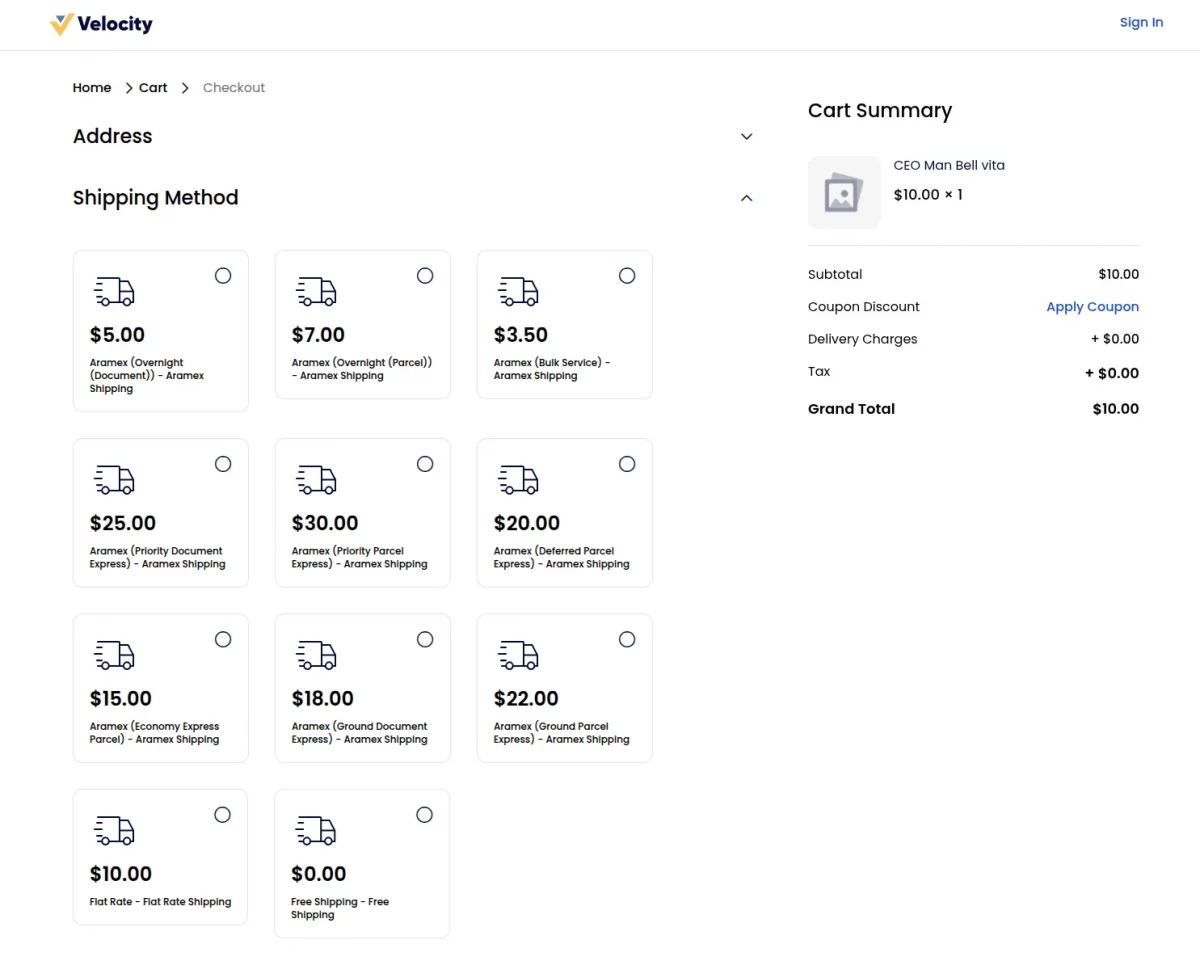
Each method uses the format Title (Service Name).
For example, checkout can show “Aramex (Priority Parcel Express)”.
The configured description appears below the shipping method.
Cash on Delivery Behavior
The extension follows separate COD rules for document and parcel services.
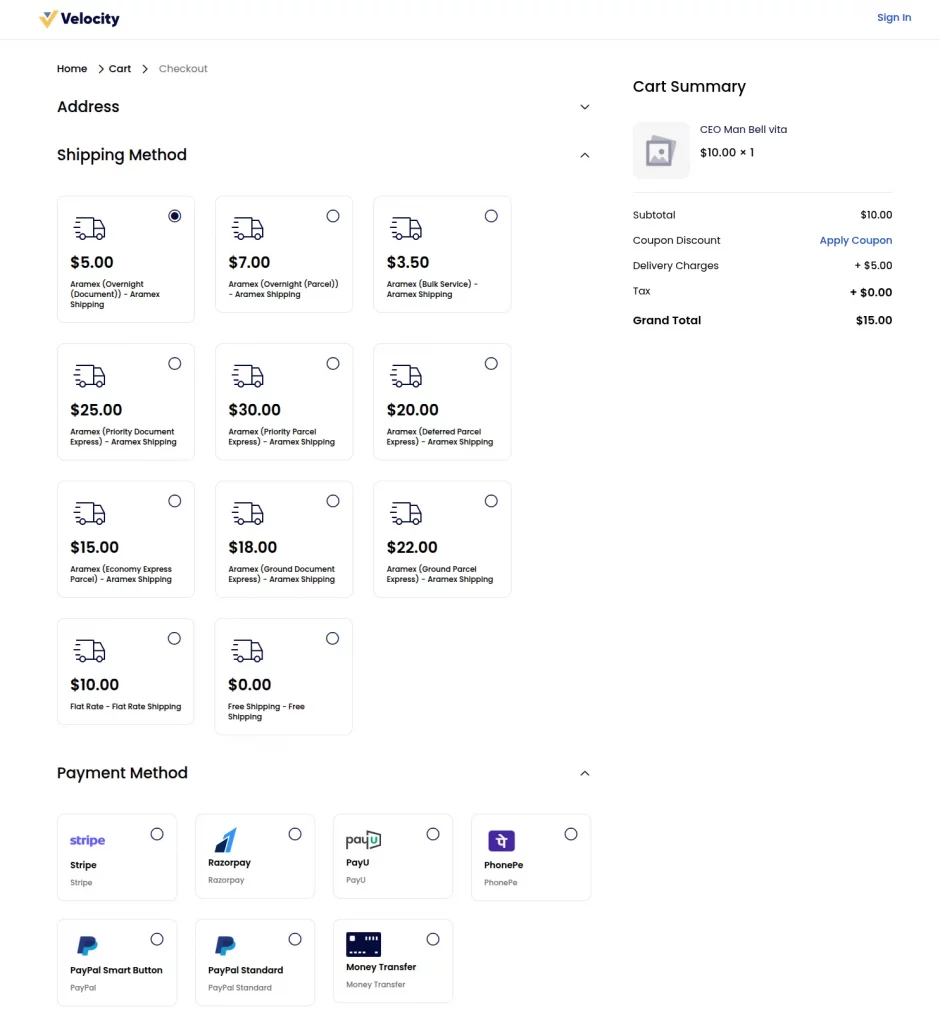
- Document services (OND, PDX, GDX): The extension never shows COD for these services.
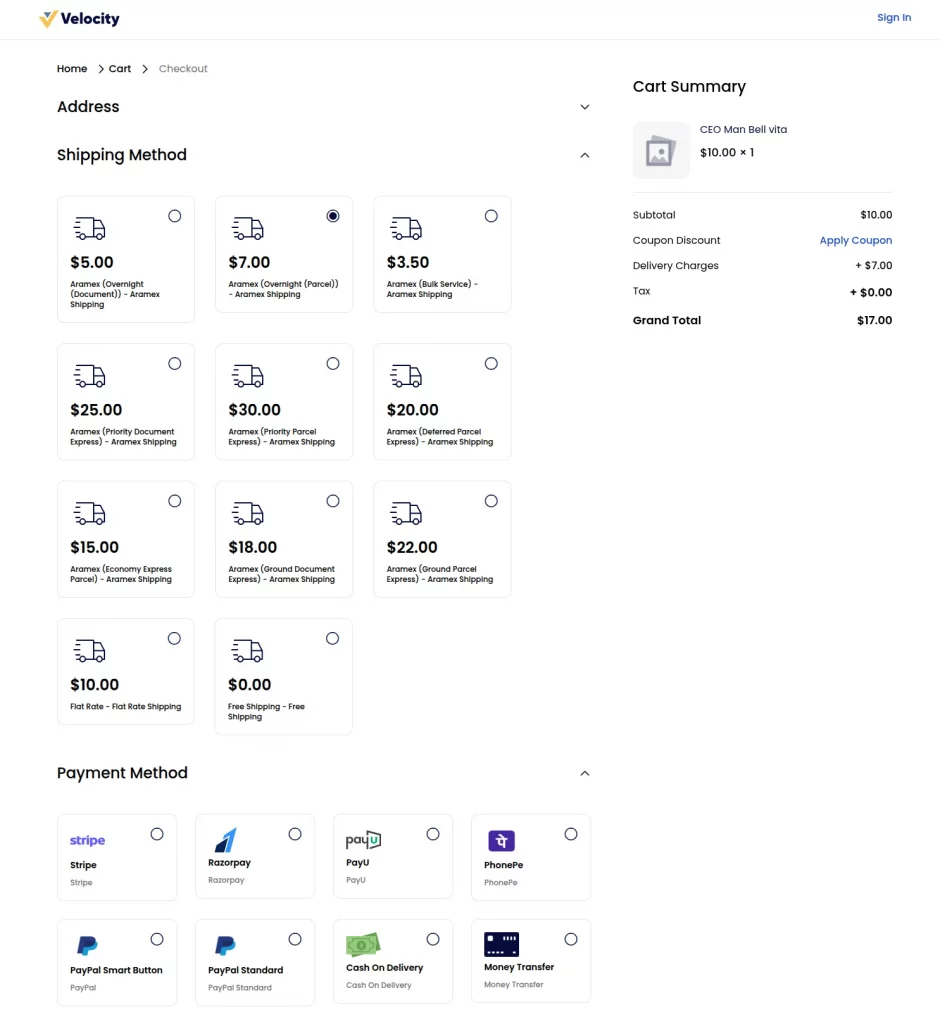
- Parcel services (ONP, BLK, PPX, DPX, EPX, GPX): The extension shows COD when the COD setting is enabled.
The following screenshots show both checkout scenarios.
Document service (PDX) — COD hidden:

Parcel service (PPX) — COD shown:
Order Management
Orders that use Aramex appear in the tenant order grid.
Go to Sales → Orders to view these orders.
The shipping method column shows the selected Aramex service.
For example, it may show “Aramex – Aramex (Priority Parcel Express)”.
Super admins and tenants can also view shipping rates in the order details.
Shipment Tracking
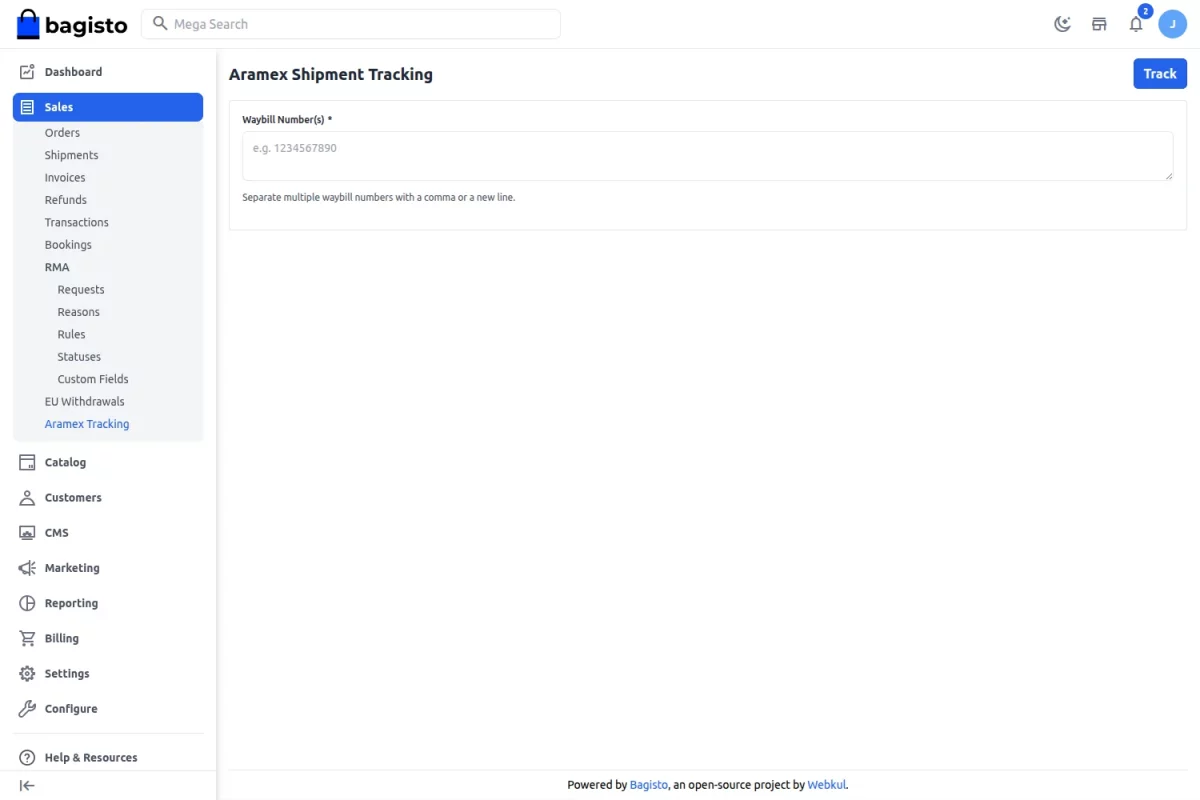
The extension includes a dedicated Aramex Tracking page.
Open Sales → Aramex Tracking from the admin menu.
Enter one or more waybill numbers to track shipments.
You can separate multiple numbers with commas or new lines.

In Mock Mode, the extension returns simulated tracking events.
It shows a five-stage delivery lifecycle for any waybill.
In Live or Sandbox Mode, the extension calls the Aramex TrackShipments SOAP API.
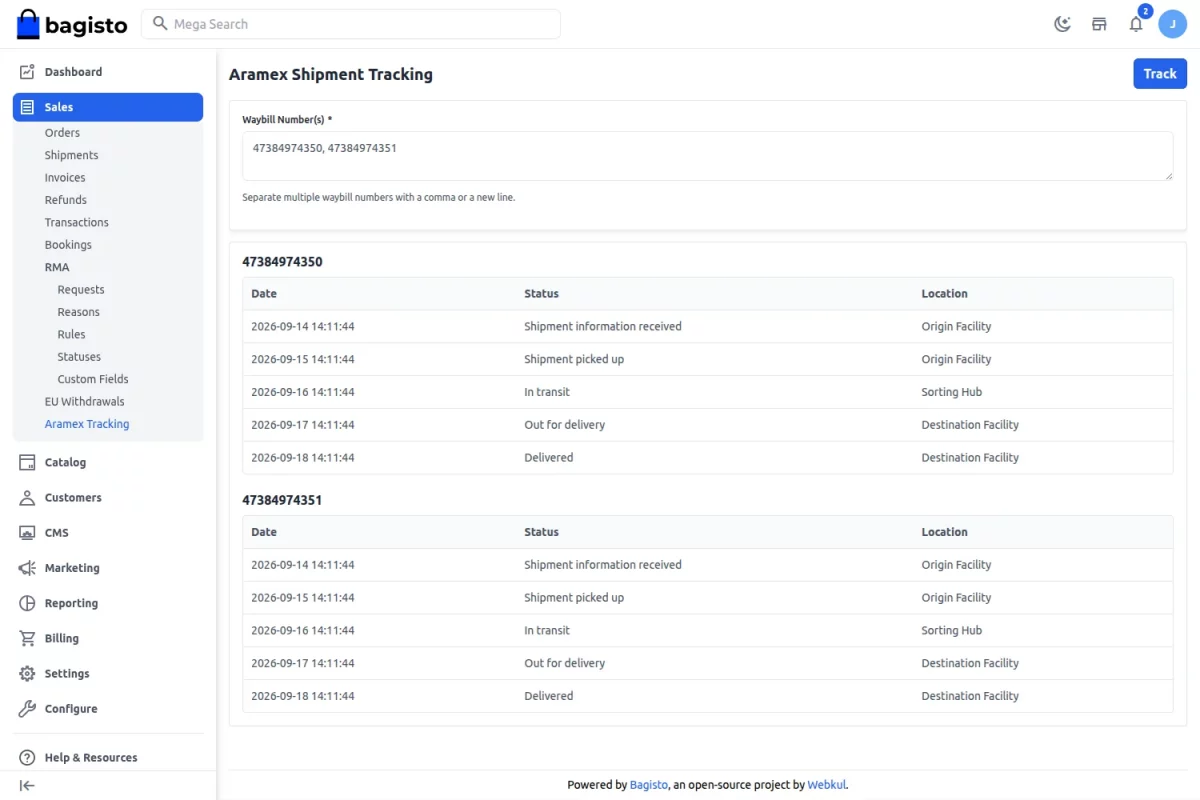
Tracking results provide important shipment details.
- Date and Time: Shows when each tracking event occurred.
- Status: Shows details such as picked up, in transit, or delivered.
- Location: Shows where the tracking event occurred.
- Comments: Shows additional notes or problem codes.
Support
If you have questions, contact our support team at support@webkul.com.
You can also submit a ticket through our HelpDesk System.
Finally, explore our Laravel Development Services.
You can also explore our Bagisto Extensions.