Is Your Magento Store Ready for AI Shopping Agents?
Online shopping is evolving from human browsing to AI-driven buying, as ChatGPT Operator, Perplexity Shopping, and Google AI help users discover, compare, and purchase products.
This movement is known as agentic commerce.
For Magento Open Source and Adobe Commerce merchants, this shift calls for rethinking store architecture. Stores have long been built for people, with sliders, JavaScript swatches, banners, and menus.


An AI shopping agent does not browse like a human. It does not click visual carousels or admire theme design. Instead, an agent sends automated HTTP requests, inspects server-rendered HTML, parses JSON-LD schema, checks real-time inventory, and attempts to initiate transactions via APIs.
If your store blocks the agent with a bot challenge, hides prices behind client-side JavaScript, or lacks machine-readable cart endpoints, the agent moves on to a competitor.
To help store owners test their sites, Webkul built the Magento AI Agent Checker. This free tool evaluates 93 distinct machine-readiness signals on your store in under 30 seconds.
Below is an overview of how AI shopping agents inspect Magento stores, what our scanner tests, and how you can prepare your catalog.
What Does the Magento AI Agent Checker Do?
The Magento AI Agent Checker is a specialized diagnostic scanner built by Webkul. It inspects your Magento or Adobe Commerce store from the perspective of an autonomous AI agent.
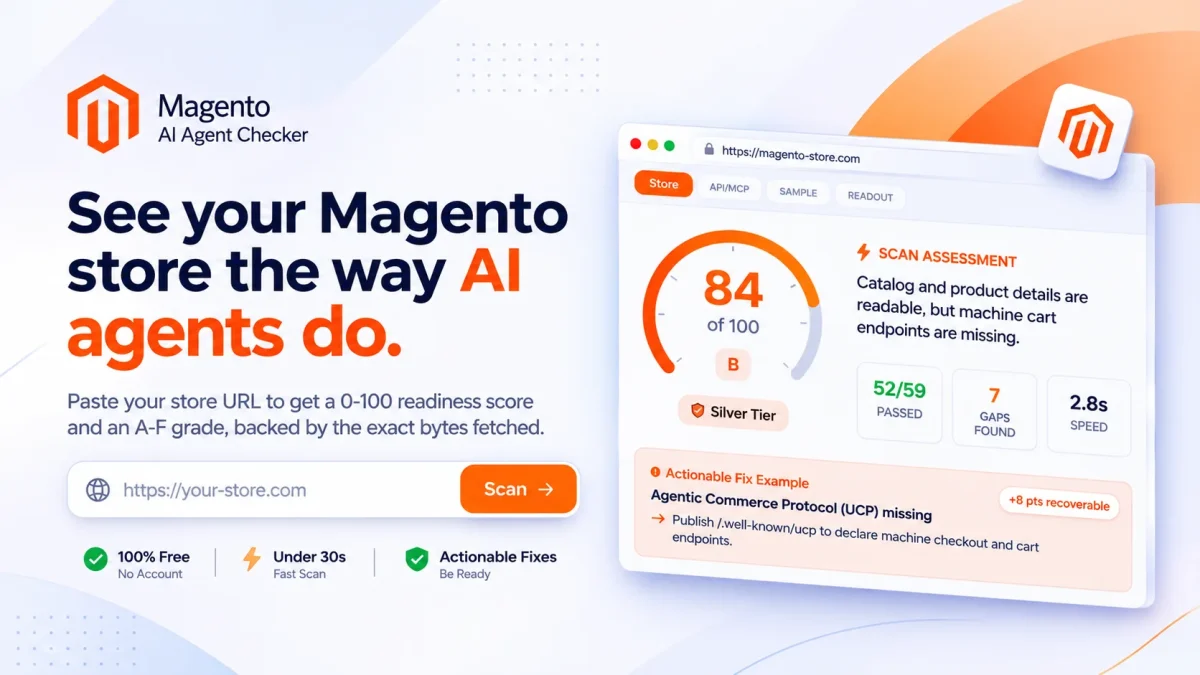
- 90+ automated checks across 12 operational categories.
- Scans public entry pages in under 30 seconds, no full-site crawl.
- Provides a 0–100 readiness score with A–F tier grades (Silver, Gold, etc.).
- Inspects actual HTTP responses, including headers, cookies, raw HTML, and APIs.
- Prioritizes Magento-specific signals before running universal checks.
- Delivers actionable fix guides, copy-ready configurations, and prompt templates.
- 100% free, no account or registration required.
What the Scanner Inspects a Magento Store
Unlike generic SEO checkers, the Webkul tool looks for the exact technical signatures that Magento emits:
- Bootstrap Scripts
- Theme Assets
- API Endpoints
- Cache and Cookie Headers
- Direct HTTP Evidence
Human Shoppers vs. AI Shopping Agents
Understanding how an AI agent interacts with your site helps explain why standard Magento stores run into issues:

| Shopping Stage | Human Shopper | AI Shopping Agent |
|---|---|---|
| Discovery | Clicks search ads or browses category pages | Reads robots.txt, XML sitemaps, and llms.txt |
| Page Rendering | Waits for JavaScript, fonts, and images to load | Parses raw initial HTML without executing heavy JS |
| Product Specs | Reads marketing bullet points and product images | Extracts structured JSON-LD attributes and tables |
| Variant Selection | Clicks visual color swatches and size dropdowns | Looks for child SKUs and prices inside schema |
| Security Walls | Solves CAPTCHAs or Cloudflare challenge pages | Fails instantly on HTTP 403 or interactive challenges |
| Adding to Cart | Clicks the Add to Cart button on the page | Uses GraphQL guest cart mutations or cart permalinks |
| Store Policies | Checks footer links for shipping and return FAQs | Parses MerchantReturnPolicy and shipping schemas |
The 12 Categories Tested by the 93-Check Audit
The Magento AI Agent Checker evaluates 93 checks grouped into 12 core categories:
- Discoverability – 10 checks
- Content for Agents – 3 checks
- Structured Data – 5 checks
- Content & Semantics – 6 checks
- Bot Access & Trust – 6 checks
- Agent Capabilities – 11 checks
- Security – 8 checks
- Product Data – 5 checks
- Operability – 4 checks
- Agentic Commerce – 6 checks
- Infrastructure – 7 checks
- Magento Intelligence – 22 checks
1. Discoverability (10 Checks)
Checks whether AI crawlers can locate your pages. It audits robots.txt directives for agents like GPTBot and ClaudeBot, XML sitemap presence, canonical URLs, response speed, and DNS-AID records.
2. Content for Agents (3 Checks)
Tests for modern AI discovery files, including /llms.txt, deep context files (/llms-full.txt), and clean markdown support.
3. Structured Data (5 Checks)
Verifies that your server outputs valid JSON-LD schema matching Schema.org standards. It checks core types (Product, Offer, Brand) and entity linking via sameAs.
4. Content & Semantics (6 Checks)
Ensures product details exist in the initial server-rendered HTML. It verifies heading structures (H1, H2, H3), document language attributes, descriptive link text, and image alt tags.
5. Bot Access & Trust (6 Checks)
Verifies that your firewall or CDN does not block verified shopping bots. It checks for Cloudflare or Fastly challenge walls, login gates, and Web Bot Auth acceptance.
6. Agent Capabilities & Protocols (11 Checks)
Audits support for emerging agentic standards: Model Context Protocol (MCP) Server Cards, OpenAPI specifications, OAuth discovery, Poppy protocol, and agents.json.
7. Security (8 Checks)
Inspects transport security, including HTTPS, HSTS headers, CORS policies, clickjacking protection (X-Frame-Options), and secure cookie flags.
8. Product Data (5 Checks)
Checks compliance with Google Merchant listing rules, server-rendered pricing, child product variant modeling, OpenGraph tags, and structured return policies.
9. Operability (4 Checks)
Tests whether storefront controls can be driven programmatically. It audits whether buttons, variant pickers, search fields, and forms use accessible, native DOM elements.
10. Agentic Commerce & Payments (6 Checks)
Evaluates machine checkout affordances: Universal Commerce Protocol profiles at /.well-known/ucp, direct cart permalinks, and machine payment protocols (x402 and MPP).
11. Infrastructure & DNS (7 Checks)
Evaluates DNS resolution speed, nameserver redundancy, DNSSEC security, CAA records, IPv6 availability, and edge CDN caching.
12. Magento Intelligence (22 Checks)
The heart of the scanner. This category probes Magento-specific systems:
- Server-Side Rendering vs. client JavaScript hydration
- Theme detection (Luma vs. Hyvä vs. Headless PWA)
- Public accessibility of
/graphqland/rest/V1/ - SKU discoverability and custom attribute tables
- Configurable product child SKU mapping
- Real-time stock counts and backorder awareness
- Guest cart creation via the
createEmptyCartmutation - Form-key validation on cart additions
- Store view context and currency handling
- Detection of outdated Magento 1 endpoints
Four Common Magento Problems That Stop AI Agents
When stores scan their sites with the Magento AI Agent Checker, these four problems appear most often:
1. Configurable Variants Hidden in JavaScript
In standard Magento themes, configurable product variants (sizes, colors, materials) are stored inside a large JSON object handled by <script type="text/x-magento-init">. When a human clicks a swatch, JavaScript dynamically updates the price and SKU.
AI agents often do not execute client-side swatch scripts. As a result, the agent only sees the base parent product and cannot confirm whether an individual size or color is in stock.
Fix: Output child product variants directly inside your JSON-LD schema using AggregateOffer or nested Offer entries with separate SKUs, prices, and stock statuses.
2. Aggressive Bot Challenges Blocking Friendly Crawlers
Many merchants enable strict Cloudflare Turnstile or CAPTCHA rules to stop scrapers. When an AI shopping crawler visits the store, the security wall intercepts the request with an HTTP 403 or interactive verification page.
AI shopping agents cannot solve interactive CAPTCHAs. The agent marks your store as unavailable and selects an alternative store.
Fix: Update your CDN or WAF settings to allow verified commercial AI user-agents (such as GPTBot, ClaudeBot, and PerplexityBot) on public catalog URLs.
3. Missing llms.txt and Machine Profiles
AI language models have strict token limits. Loading a 2MB Magento HTML page full of scripts, CSS, and layout markup wastes token capacity.
Fix: Add an /llms.txt file and a /.well-known/ucp manifest to your server root. These files provide a clean summary of your catalog, policies, and API endpoints in a lightweight format.
4. CSRF Form-Key Blocks on Cart Additions
Magento requires an anti-CSRF form key for standard browser submissions to /checkout/cart/add. When an automated agent attempts to send an HTTP POST request without a pre-generated session key, Magento drops the request with a redirect.
Fix: Ensure your Magento GraphQL endpoints permit guest cart initialization via the createEmptyCart mutation, or support direct cart permalinks.
Actionable Code Snippets to Improve Your Score
Here are four drop-in configurations you can add to your store today:
1. Update robots.txt for AI Crawlers
Add permissions for verified AI agents while keeping admin and account routes protected:
# Allow verified AI shopping agents
User-agent: GPTBot
User-agent: ClaudeBot
User-agent: PerplexityBot
User-agent: Google-Extended
Allow: /
Allow: /graphql
Allow: /llms.txt
Allow: /.well-known/ucp
Disallow: /checkout/
Disallow: /customer/
Disallow: /admin/
Disallow: /catalogsearch/

# Default rules
User-agent: *
Disallow: /checkout/
Disallow: /customer/
Disallow: /app/
Disallow: /var/

Sitemap: https://your-store.com/sitemap.xml
2. Add an llms.txt File
Create a lightweight markdown file at https://your-store.com/llms.txt:
# Store Name Catalog

> Quality commercial tools and equipment with fast delivery.

## Key Categories
- [Power Tools](https://your-store.com/power-tools)
- [Hand Tools](https://your-store.com/hand-tools)
- [Safety Gear](https://your-store.com/safety-gear)

## Machine Endpoints
- API Endpoint: https://your-store.com/graphql
- Machine Profile: https://your-store.com/.well-known/ucp

## Store Policies
- Shipping: Free standard shipping on orders over $99.
- Returns: 30-day return window on unopened items.
- Warranty: 1-year standard replacement warranty.
3. Declare a Machine Profile (/.well-known/ucp)
Create a Universal Commerce Protocol JSON manifest at https://your-store.com/.well-known/ucp:
{
  "version": "1.0",
  "name": "Your Store Name",
  "homepage": "https://your-store.com",
  "transport": {
    "type": "graphql",
    "endpoint": "https://your-store.com/graphql"
  },
  "capabilities": {
    "catalog_search": true,
    "inventory_verification": true,
    "guest_cart": true,
    "cart_permalink": true
  },
  "endpoints": {
    "cart_permalink": "https://your-store.com/checkout/cart/add?sku={sku}&qty={qty}",
    "graphql": "https://your-store.com/graphql",
    "llms_manifest": "https://your-store.com/llms.txt"
  },
  "currency": "USD"
}
4. Complete Product JSON-LD Schema
Ensure your product template outputs full product, price, and return policy data in the initial server response:
{
  "@context": "https://schema.org/",
  "@type": "Product",
  "name": "Pro Cordless Drill 20V",
  "image": "https://your-store.com/media/drill.jpg",
  "sku": "DRL-20V-PRO",
  "brand": {
    "@type": "Brand",
    "name": "ProTool"
  },
  "offers": {
    "@type": "Offer",
    "url": "https://your-store.com/drill.html",
    "priceCurrency": "USD",
    "price": "149.00",
    "availability": "https://schema.org/InStock",
    "hasMerchantReturnPolicy": {
      "@type": "MerchantReturnPolicy",
      "applicableCountry": "US",
      "merchantReturnDays": 30,
      "returnFees": "https://schema.org/FreeReturn"
    }
  }
}
How to Test Your Magento Store Today
Auditing your store does not require installing an extension or signing up for a plan.
- Go to magento-agentready.webkul.com.
- Enter your store domain.
- Click Scan.
- Within 30 seconds, review your 0-100 score, letter grade (A to F), and the full 93-point readout.
If your report highlights missing schema, bot-blocking rules, or API issues, Webkul’s certified Magento team can help implement the necessary updates.
Visit Webkul Magento Services or test your site on the Magento AI Agent Checker to ensure your store is ready for autonomous AI shopping.