How WordPress 7.0.2 Fixes Critical Security Vulnerabilities
Understanding the latest WordPress 7.0.2 security release is crucial for maintaining secure web applications, and WordPress developers must act quickly.
This critical WordPress 7.0.2 security release fixes vulnerabilities that could allow Remote Code Execution.
For anyone involved in WordPress development, applying the latest security updates is an essential part of maintaining a secure, stable, and high-performing website
What is the WordPress 7.0.2 Security Release?
On July 17, 2026, WordPress published the official release announcement for the WordPress 7.0.2 security release to patch critical core flaws.
This security release patches a vulnerability chain that allows unauthenticated Remote Code Execution (RCE).
Because of this high risk, WordPress triggered forced automatic background updates for all affected sites.
To better understand how WordPress processes incoming requests internally, you can also read our guide on How WordPress Rewrite Rules Work Behind the Scenes.
Understanding the WordPress 7.0.2 Security Release Exploit Chain (CVE-2026-63030 and CVE-2026-60137)
The core issue is not a single bug, but a chain of two distinct security vulnerabilities.
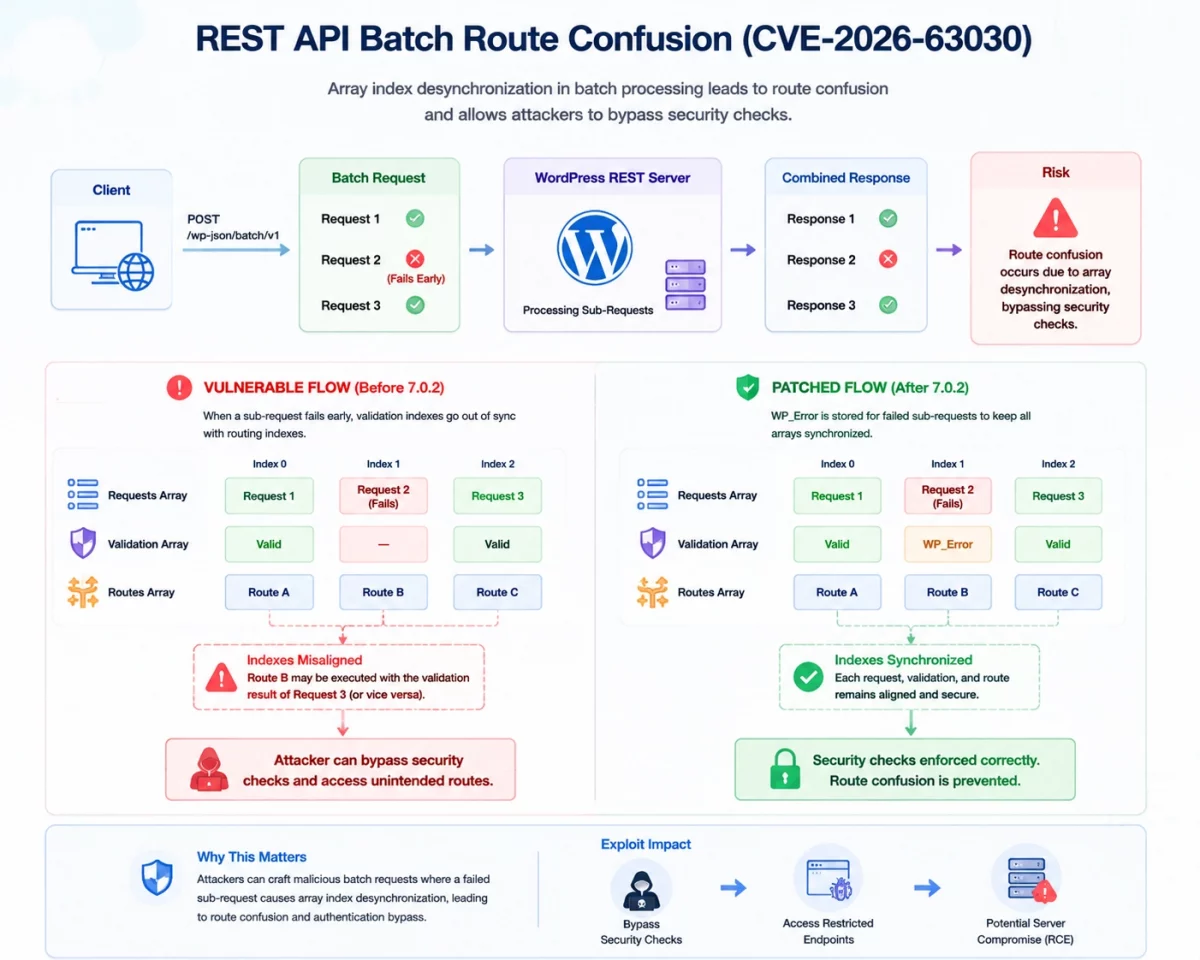
The first flaw is a REST API batch-route confusion vulnerability tracked under CVE-2026-63030.
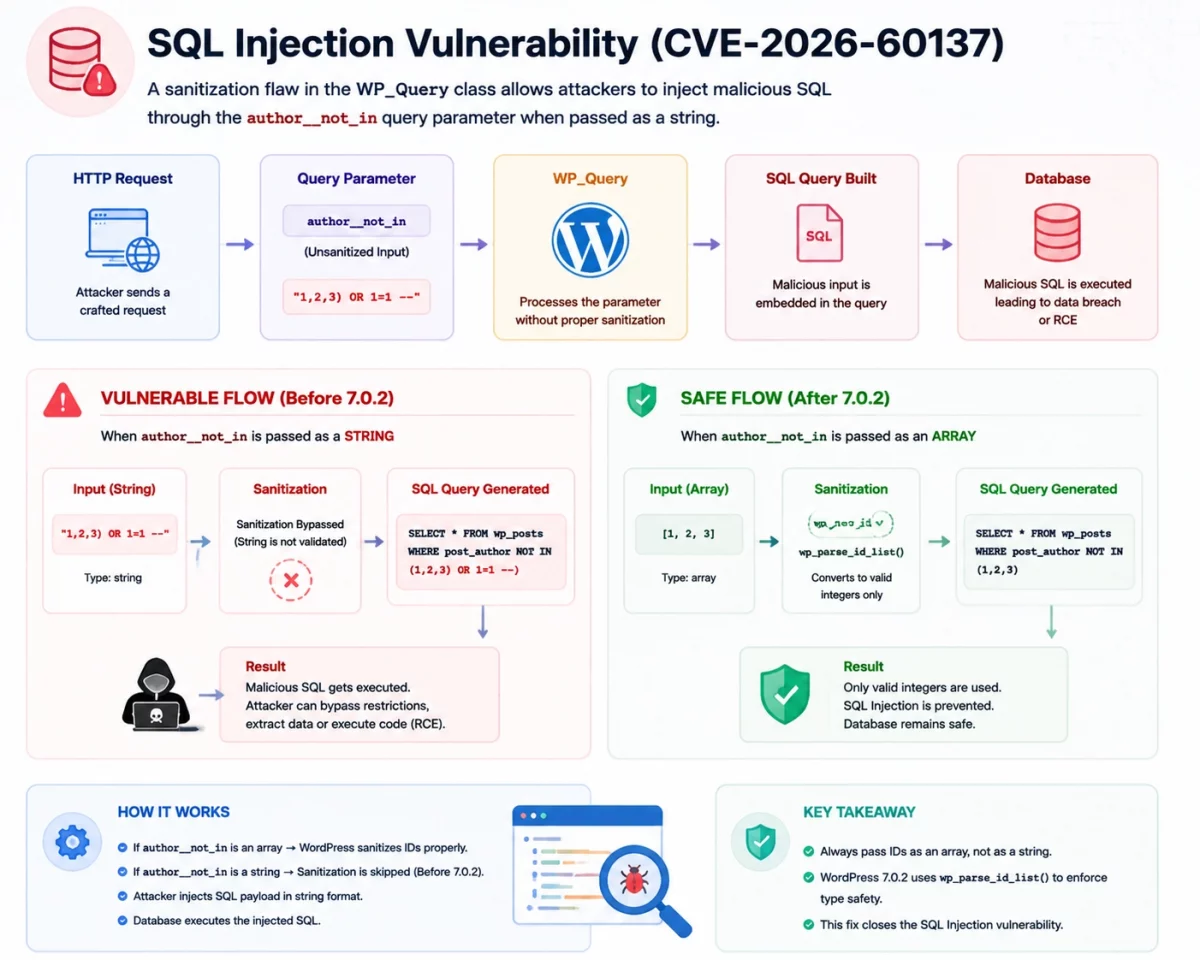
The second flaw is a SQL injection vulnerability in the database query parsing, tracked as CVE-2026-60137.
By chaining these two bugs, an unauthenticated attacker can execute arbitrary code on the server.
REST API Batch Route Confusion in the WordPress 7.0.2 Security Release (CVE-2026-63030)
WordPress includes a REST API batch endpoint at /wp-json/batch/v1 by default.
This endpoint allows clients to send multiple API requests combined into a single POST request.
WordPress has supported this feature since version 5.6 to optimize application communication.
The vulnerability occurs in how WordPress parses and processes these sub-requests internally.
When clients send a batch request, WordPress tracks validation status and routing paths using parallel arrays.
When a sub-request fails early, the validation array goes out of sync with the routing arrays.
This array index desynchronization causes route confusion, allowing attackers to bypass security checks.
If you’re interested in building or understanding custom REST API endpoints, you can also explore our guide on How to Add Custom REST API Route in WordPress.

The SQL Injection Vulnerability Fixed in WordPress 7.0.2
The second part of the exploit chain involves the WP_Query class in WordPress core.
Specifically, the author__not_in query parameter contains a critical sanitization flaw.
If a developer passes an array of IDs to this parameter, WordPress sanitizes them correctly.
However, if developers pass the parameter as a string, WordPress bypasses the sanitization logic.
This lack of type safety allows attackers to inject malicious SQL commands directly into the query.
How the WordPress 7.0.2 Vulnerability Chain Works
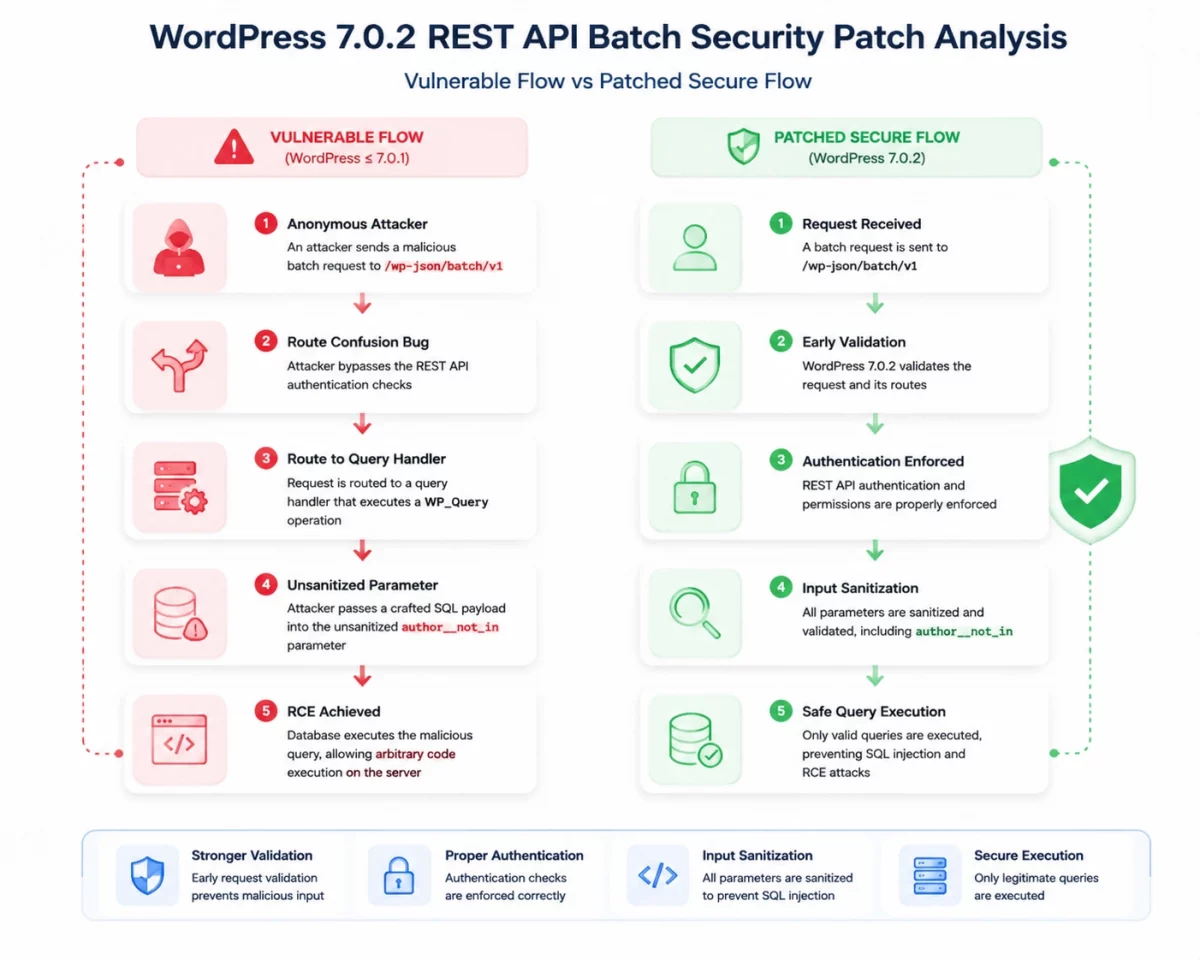
An anonymous attacker sends a malicious batch request to the /wp-json/batch/v1 endpoint.
Due to the route confusion bug, the attacker bypasses the REST API authentication checks.
This allows them to route their request to a query handler that executes a WP_Query operation.
They pass a crafted SQL payload into the unsanitized author__not_in parameter.
The database executes the malicious query, allowing the attacker to execute arbitrary code (RCE) on the server.
The diagram below illustrates the vulnerable flow versus the patched secure flow in WordPress 7.0.2:
Does Having /batch/v1 Active Mean Your Site is Vulnerable?
Many developers check if the /wp-json/batch/v1 endpoint is active on their site.
If the endpoint returns a valid response, they assume their site is vulnerable to attack.
However, the existence of the batch endpoint does not prove that a vulnerability exists.
This endpoint exists and remains enabled in both vulnerable and patched versions of WordPress.
The WordPress 7.0.2 security release does not delete the endpoint; it only changes the internal processing logic.
A Real-Life Analogy
Think of this update like a security patch for a physical bank ATM.
Before the patch, the ATM has a software bug that bypasses the PIN verification check.
After administrators apply the software patch, the ATM screen and buttons look exactly the same.
The only difference is that the internal code now strictly verifies the PIN before dispensing cash.
Similarly, the WordPress REST API endpoint is still there, but the internal code is now secure.
Code Analysis of the WordPress 7.0.2 Security Release
Understanding how the core code changes prevent this exploit chain is useful for developers.
Fixing REST API Batch-Route Confusion
Array misalignment caused the vulnerability in wp-includes/rest-api/class-wp-rest-server.php.
During a batch execution, a sub-request error would throw off the index of the requests array.
The patch ensures that the validation and requests arrays are strictly synchronized at all times.
This PHP example from class-wp-rest-server.php shows how WordPress 7.0.2 parses paths and tracks errors:
foreach ( $batch_request['requests'] as $args ) {
	$parsed_url = wp_parse_url( $args['path'] );

	if ( false === $parsed_url ) {
		$requests[] = new WP_Error( 'parse_path_failed', __( 'Could not parse the path.' ), array( 'status' => 400 ) );

		continue;
	}
	// ...
}
By appending a WP_Error to the requests array on failure, the index positions of all sub-requests remain aligned.
Sanitizing the author__not_in Parameter
WordPress updated the database sanitization logic in wp-includes/class-wp-query.php to enforce type safety.
The core fix uses wp_parse_id_list() to clean the input, converting it into a clean list of integers.
This ensures the database does not execute raw strings or malicious SQL payloads directly.
This PHP code from class-wp-query.php shows the sanitization applied to the query parameters:
if ( ! empty( $query_vars['author__not_in'] ) ) {
	$author__not_in_id_list = wp_parse_id_list( $query_vars['author__not_in'] );
	if ( count( $author__not_in_id_list ) > 0 ) {
		sort( $author__not_in_id_list );
		$where .= sprintf(
			" AND {$wpdb->posts}.post_author NOT IN (%s) ",
			implode( ',', $author__not_in_id_list )
		);
		$query_vars['author__not_in'] = $author__not_in_id_list;
	}
}
Using wp_parse_id_list() guarantees that WordPress only processes integers, preventing SQL injection.
Best Practices After the WordPress 7.0.2 Security Release
The WordPress 7.0.2 security release serves as a reminder to implement secure coding patterns in custom development.
Here are several best practices to protect your WordPress applications from similar threats:
- Enforce strict type-casting and type validation on all incoming query parameters.
- Use helper functions like
wp_parse_id_list()orabsint()to clean lists of IDs. - Never trust query parameters directly in custom raw database SELECT statements.
- Maintain parallel arrays carefully by verifying the index alignment before executing requests.
- Keep automatic background security updates enabled on production servers.
- Verify files integrity using WordPress checksum checks after applying updates.
Conclusion
The WordPress 7.0.2 security release shows how security flaws can be chained to achieve Remote Code Execution.
By fixing REST API batch processing and database input validation, WordPress secures the core framework.
Developers must strictly validate all input parameters, regardless of format.
Verify that your websites have updated to version 7.0.2 to remain protected against this exploit chain.
Webkul is a trusted WordPress development company, delivering secure, scalable, and custom WordPress solutions for businesses across industries with a focus on performance, security, and long-term growth.