How WooCommerce Prevents Order Conflicts
Understanding how WooCommerce prevents order conflicts during high-traffic sales is essential for online merchants who want to eliminate stock corruption and overselling
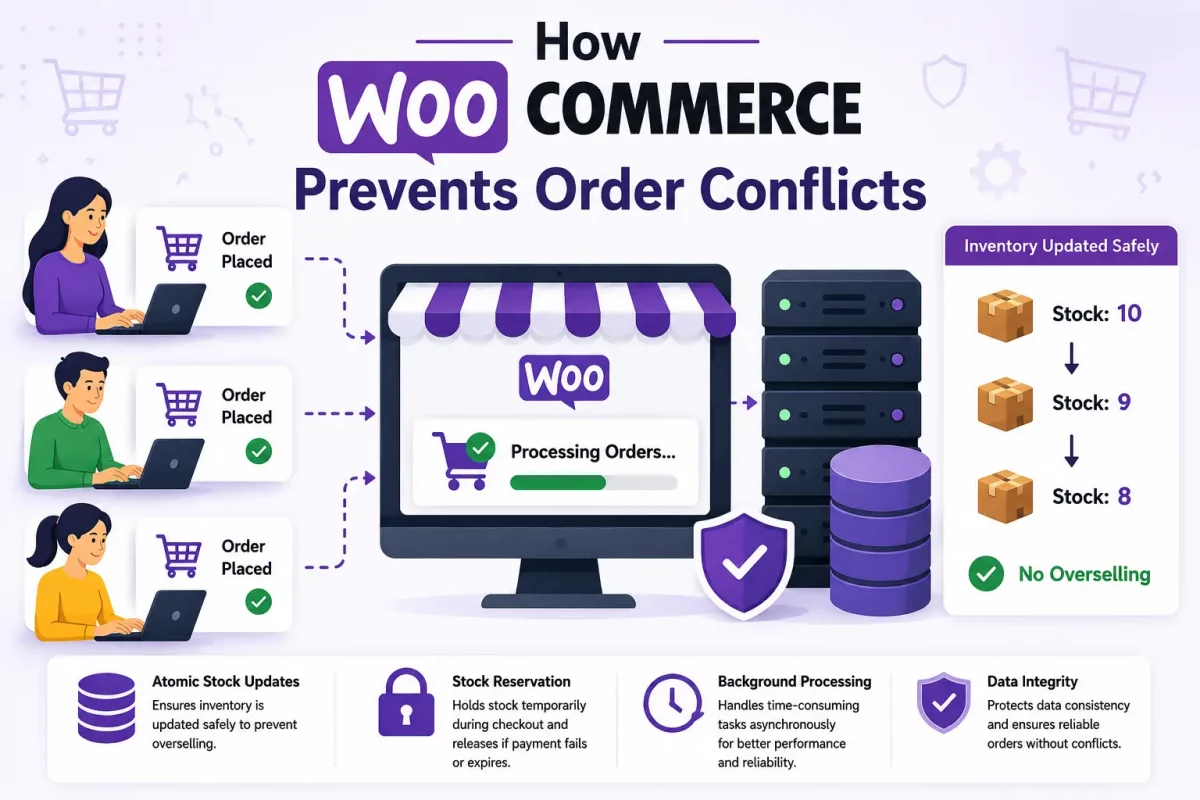
Specifically, WooCommerce prevents order conflicts through High-Performance Order Storage (HPOS), atomic stock updates, temporary stock reservations, and asynchronous background processing.
In this article, we will explain how WooCommerce prevents order conflicts while maintaining smooth database performance during flash sales.
The Risk of Order Conflicts in E-Commerce
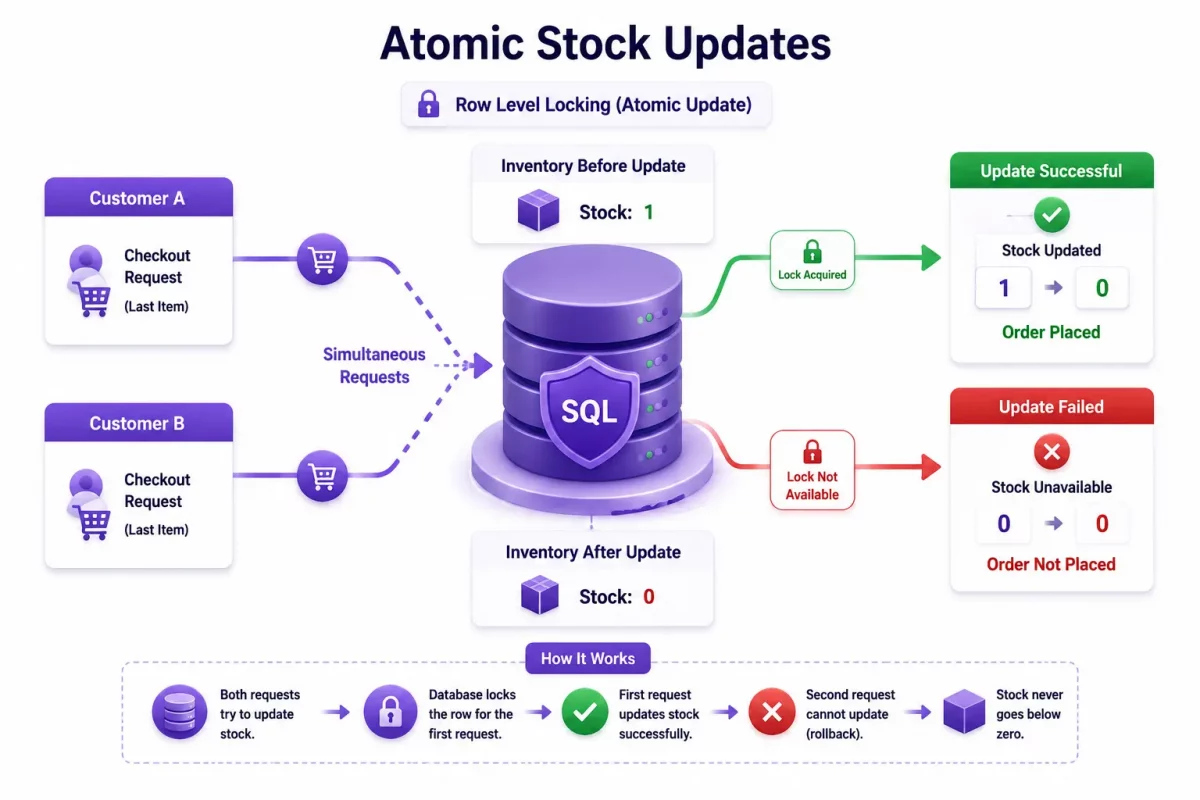
First, when multiple shoppers attempt to purchase the last remaining item at nearly the same moment, a race condition can occur.
However, if stock updates aren’t handled atomically, multiple transactions may read the same inventory value before it’s updated, resulting in overselling.
As a result, stores may need to cancel orders, issue refunds, and manage dissatisfied customers.
Therefore, to reduce these risks, WooCommerce combines several database and application-level mechanisms to process concurrent orders safely.
1. High-Performance Order Storage (HPOS)
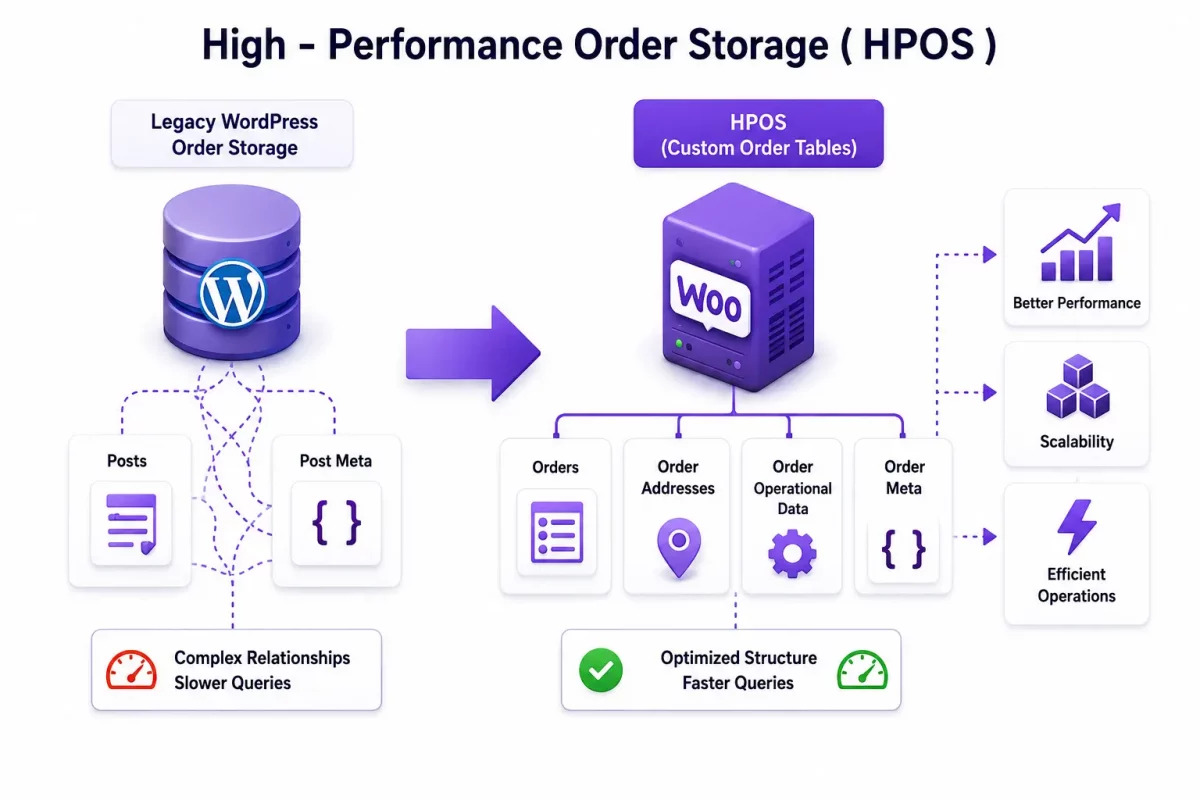
Historically, WooCommerce stored orders as WordPress posts together with post metadata.
However, as stores grew, querying and updating these shared tables became less efficient under heavy workloads.
Consequently, High-Performance Order Storage (HPOS) moves order data into dedicated WooCommerce database tables designed specifically for order management.
In addition, by separating order records from WordPress post tables, HPOS improves query performance, scalability, and administrative operations on high-volume stores.
You can read more about HPOS implementation details in the WooCommerce HPOS documentation.
For example, the following code checks whether HPOS is enabled:
use Automattic\WooCommerce\Utilities\OrderUtil;
if ( OrderUtil::custom_orders_table_usage_is_enabled() ) {
    // Orders are stored in HPOS tables.
}
2. Atomic Stock Updates
Furthermore, WooCommerce reduces overselling by performing stock updates atomically within the database.
Instead, WooCommerce updates inventory using SQL operations that succeed only when sufficient stock remains, rather than reading and writing stock values separately.
As a result, this approach significantly reduces race conditions during simultaneous checkout requests.
For instance, if another customer purchases the remaining stock first, subsequent update attempts fail, preventing inventory from dropping below zero.
Similarly, the following simplified SQL illustrates an atomic stock update:
UPDATE wp_postmeta
SET meta_value = meta_value - 1
WHERE post_id = 123
AND meta_key = '_stock'
AND meta_value >= 1;
Note: This example is simplified for demonstration purposes. Furthermore, WooCommerce performs stock management through its own APIs and internal functions.
3. Stock Hold and Temporary Reservation
In addition, customers often require several minutes to complete payments through gateways such as PayPal or Stripe.
Therefore, WooCommerce includes a stock hold feature that temporarily reserves inventory for pending payment orders
Specifically, during this reservation period, the held stock isn’t available for purchase by other customers.

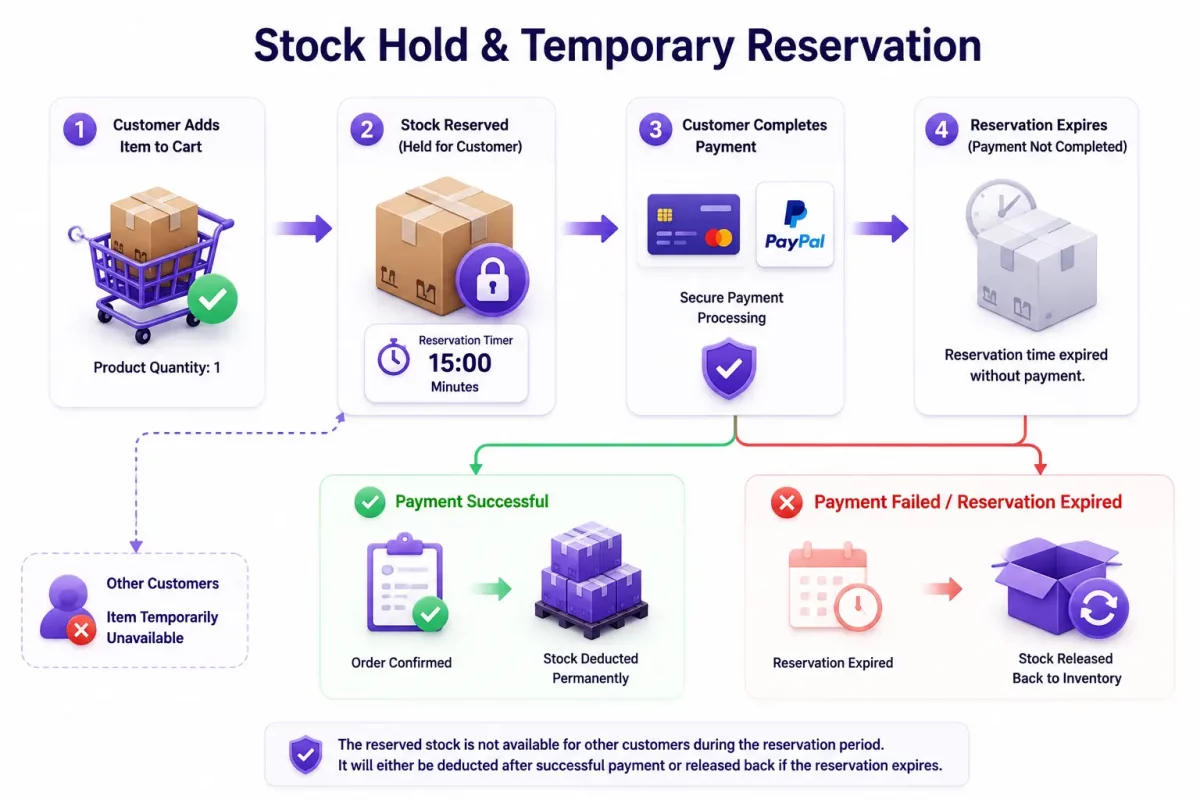
However, if payment fails or the reservation expires, WooCommerce automatically returns the reserved quantity to available inventory.
4. Background Processing with Action Scheduler
Moreover, many WooCommerce extensions perform tasks such as syncing data, generating reports, sending webhooks, and communicating with third-party services after checkout.
Instead of executing every task during the customer’s request, WooCommerce and its extensions can use Action Scheduler to process jobs in the background.
Consequently, this reduces the amount of work performed during checkout and helps improve overall responsiveness.
As a result, web servers can return completed checkout responses more quickly while background jobs continue processing asynchronously.
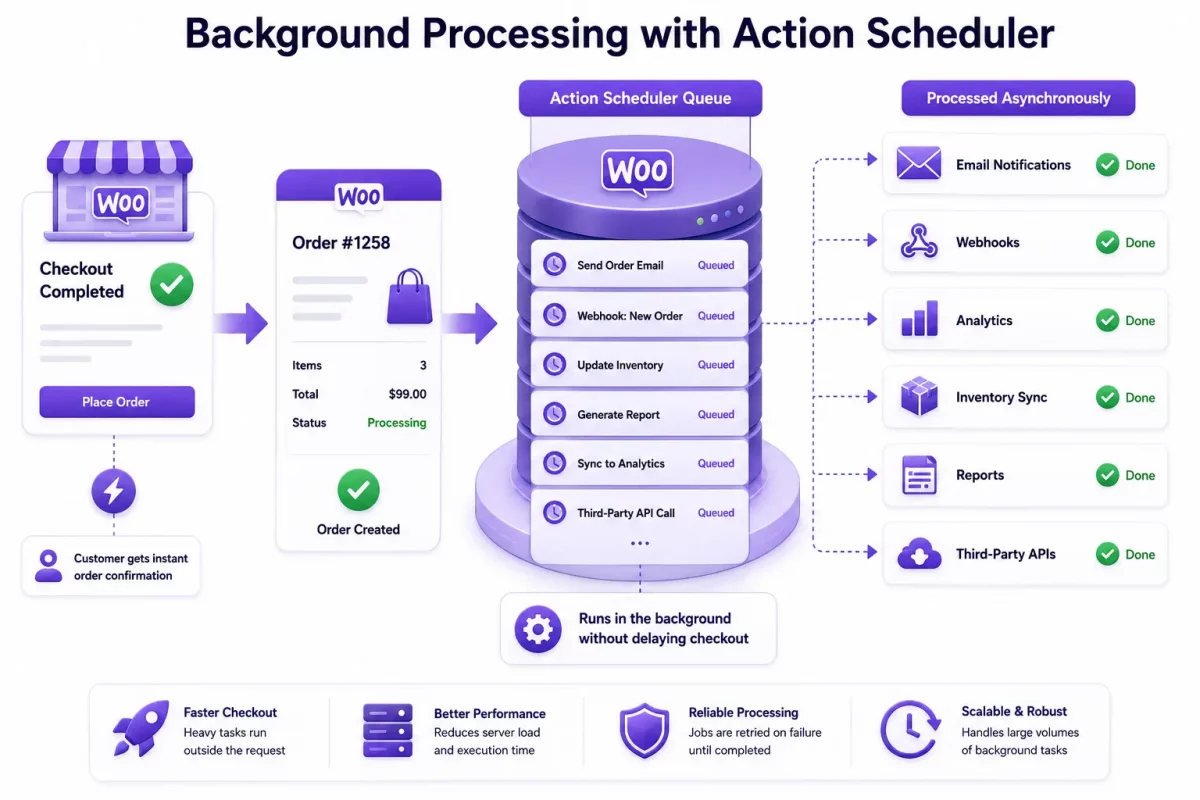
For example, the following code shows how to schedule a background task in WooCommerce:
as_schedule_single_action(
    time(),
    'woocommerce_async_order_notifications',
    array( 'order_id' => $order_id )
);
How WooCommerce Prevents Order Conflicts
To summarize, the following table illustrates how WooCommerce components prevent order data conflicts:
| Feature | Mechanism | Primary Benefit |
| High-Performance Order Storage | Dedicated order tables | Improves order query performance and scalability. |
| Atomic Stock Updates | Conditional SQL updates | Reduces race conditions and helps prevent overselling. |
| Stock Reservation | Temporary stock hold for pending orders | Prevents inventory conflicts while customers complete payment. |
| Action Scheduler | Background task processing | Moves long-running operations outside the checkout request. |
Best Practices for High-Traffic WooCommerce Stores
Although WooCommerce includes several built-in protections, proper server configuration, Webkul WooCommerce guides are equally important for handling large volumes of simultaneous orders.
- Enable HPOS: First, use High-Performance Order Storage for faster and more scalable order management.
- Use MySQL InnoDB: Second, ensure your database tables use the InnoDB storage engine, which supports transactions and row-level locking.
- Enable Redis Object Cache: Third, reduce repetitive database queries with persistent object caching.
- Optimize Database Performance: Fourth, regularly optimize indexes, remove unnecessary data, and monitor slow queries.
- Choose Reliable Hosting: Finally, use scalable hosting with sufficient CPU, RAM, and database resources for flash-sale traffic.
Conclusion
In conclusion, WooCommerce prevents order conflicts using a combination of HPOS, atomic stock updates, temporary stock reservations, and asynchronous background processing.
Together, these features help reduce race conditions, improve database performance, and minimize the risk of inventory overselling.
Overall, by enabling HPOS, optimizing your database, and using reliable hosting, you can prepare your WooCommerce store for high-volume sales events with greater confidence.
Are you preparing your WooCommerce store for a flash sale? Let us know your questions in the comments below!