User Guide For Laravel Marketplace EasyPost Shipping
Laravel Marketplace EasyPost Shipping connects EasyPost with Bagisto marketplaces. It provides live shipping rates, automatic label generation, and shipment tracking.
The module supports multi-vendor stores and allows sellers to manage shipping using their own EasyPost accounts.
With Laravel Marketplace EasyPost Shipping, marketplace owners can simplify shipping operations and offer accurate shipping costs to customers.
Note: To use this extension, you must purchase and install the Laravel Multi-Vendor Marketplace first.
Features of Marketplace EasyPost Shipping
The module includes several features that help streamline shipping operations.
- Admin can enable or disable the shipping method.
- The module fetches live shipping rates from EasyPost.
- Sellers can add their own EasyPost API Key and Webhook Secret.
- Additionally, the admin can allow or restrict seller API access.
- Admin can configure a default EasyPost API Key for the marketplace.
- The admin can set default parcel dimensions.
- Furthermore, the module packs the items from each inventory source into one parcel.
- Customers can view estimated delivery days during checkout.
- The module combines rates from admin and seller products into a single shipping charge.
- Admin can configure a shipping title and description.
- The module automatically purchases shipping labels after order placement.
- Additionally, admins and sellers download shipping labels from the shipment view and the seller order view.
- Customers receive tracking updates by email and track shipments from their order page.
- The module verifies every tracking webhook with a Webhook Secret.
- Moreover, the extension supports more than 20 languages and locales.
Installation
- Bagisto Version:
v2.5.0 - Marketplace: Laravel Multi-Vendor Marketplace for Bagisto 2.5
Step 1: Extract Package
Unzip the extension package and merge the packages folder into your project root.
Step 2: Register Service Provider
Go to: bootstrap/providers.php file and add the following line under ‘providers’
use Webkul\MPEasyPostShipping\Providers\MPEasyPostShippingServiceProvider

return
[
 MPEasyPostShippingServiceProvider::class,
 ]
Goto composer.json file and add the following line under ‘psr-4’
"Webkul\\MPEasyPostShipping\\": "packages/Webkul/MPEasyPostShipping/src"
Refresh the autoloader. The module calls the EasyPost API directly, so it needs no SDK.
composer dump-autoload
Run the install command. It runs the migrations, adds the seller API Key and Webhook Secret fields, and clears the caches.
php artisan mp-easy-post-shipping:install
Marketplace EasyPost Shipping – Admin Management
The admin will go to:
Admin Panel > Configure > Sales > Shipping Methods > Marketplace EasyPost Shipping

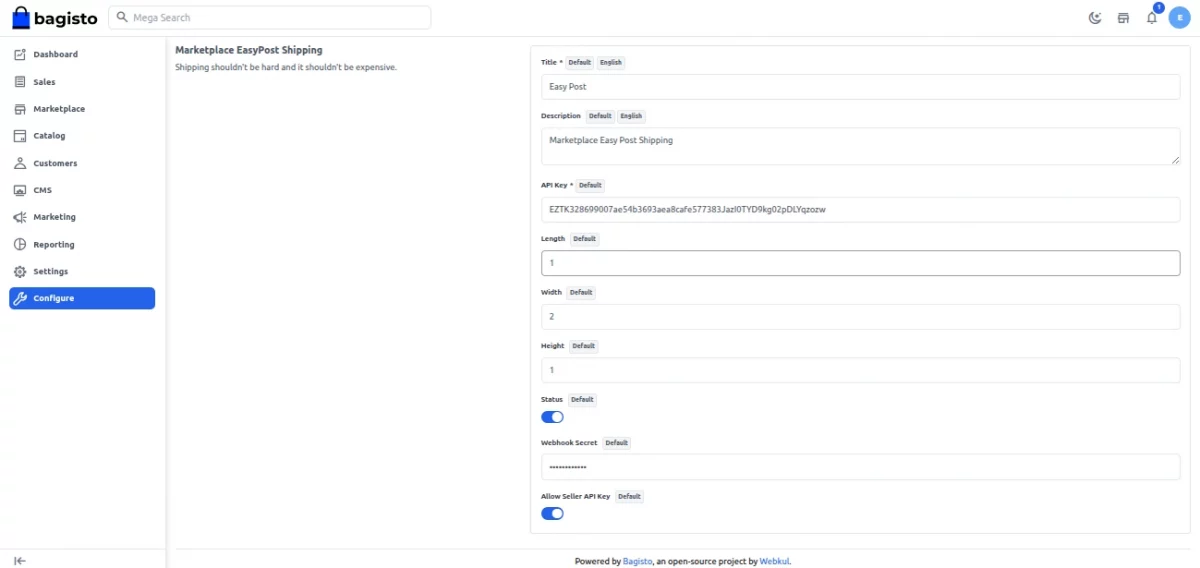
Configure the following fields:
- Status – Activate or deactivate the EasyPost shipping method.
- Title – The carrier name shown to customers at checkout (channel and locale based).
- Description – A short description displayed with the method (channel and locale based).
- API Key – The store’s default EasyPost API Key used to fetch rates and buy labels.
- Length / Width / Height – Default parcel dimensions. When set, these are used for rate requests; otherwise the module falls back to the product’s own dimensions.
- Webhook Secret – Verifies tracking webhook calls from EasyPost. Point the EasyPost webhook to
your-store.com/easypost/webhooks. - Allow Seller API Key – When enabled, an order containing products from a single seller (with no admin products) is rated, bought, and tracked using that seller’s own EasyPost API Key.
Click Save Configuration to apply the settings.
Shipping Origin (Inventory Sources)
EasyPost calculates shipping rates using the inventory source as the origin address and the customer’s delivery address.
The admin can configure inventory source details under Admin Panel > Settings > Inventory Sources.
- Contact Name and Contact Email
- Street, City, State, Postcode
- Contact Number
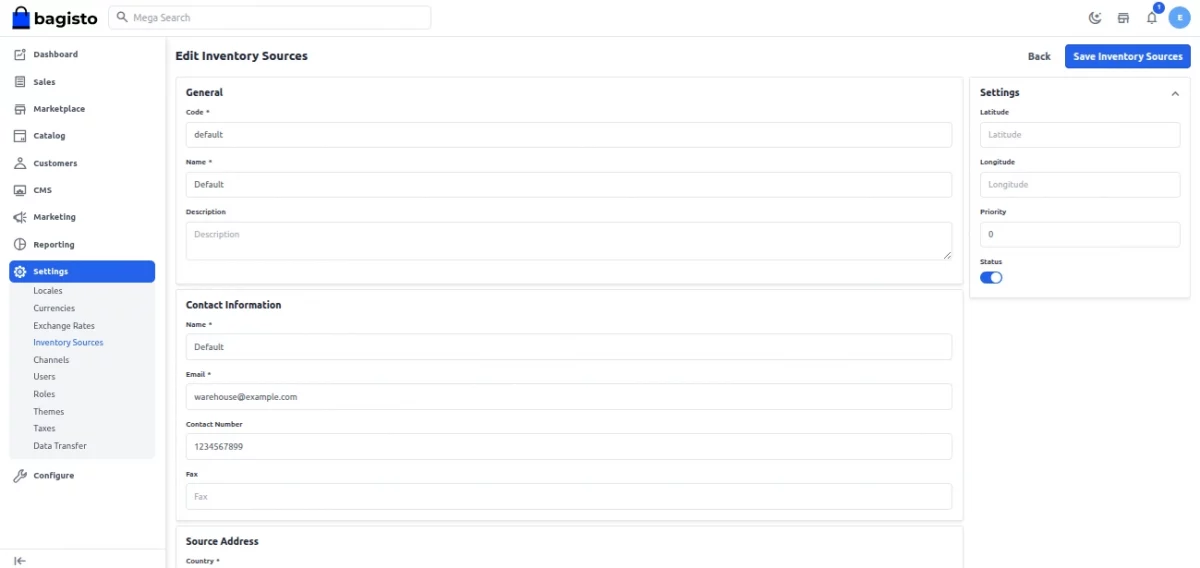
When an order contains products from multiple inventory sources, the module creates a separate EasyPost shipment for each source.
The module combines all shipping costs into a single rate, ensuring the selected service covers the entire order.
Marketplace EasyPost Shipping – Seller Management
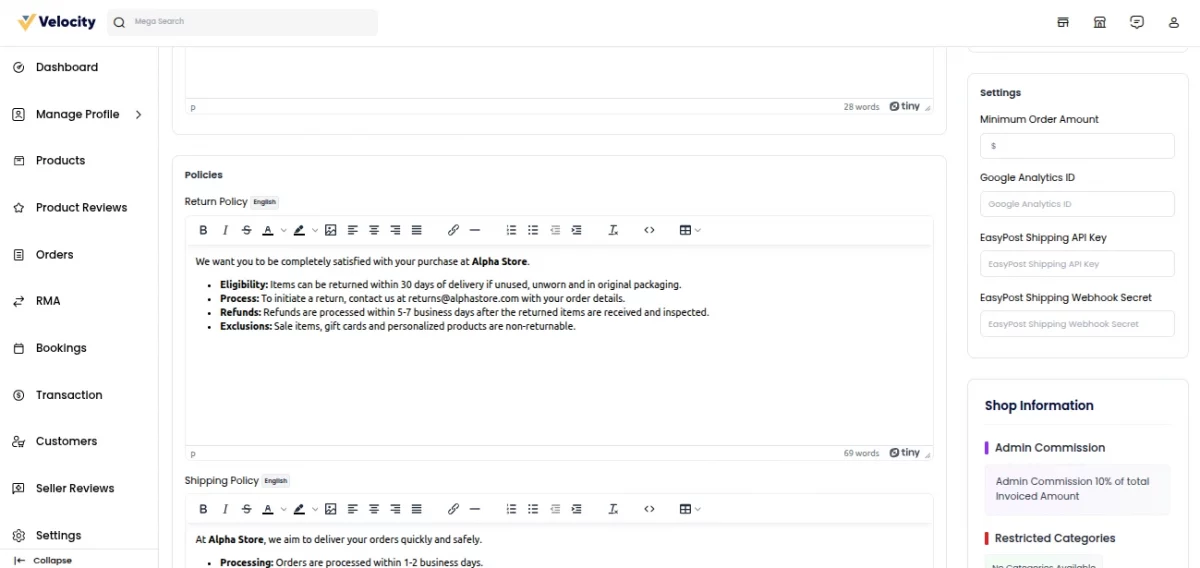
When the admin enables Allow Seller API Key, each seller can connect their own EasyPost account. The seller will go to:
Seller Dashboard > Profile
In the EasyPost Shipping section the seller can set:
- API Key – Used to rate, buy, and track shipments for the seller’s own products.
- Webhook Secret – Used to verify EasyPost tracking webhooks for the seller’s shipments.
Priority logic:
- If an order contains products from a single seller (and no admin products) and that seller has saved an API Key, the seller’s credentials are used.
- If the order mixes multiple sellers or includes admin products, the marketplace falls back to the admin’s default API Key and Webhook Secret.
- When a seller’s own key pays for shipping, the module adds that shipping amount to the seller’s total.
Marketplace EasyPost Shipping – Customer Order
- The customer adds products to the cart and proceeds to checkout.
- They enter or select a shipping address.
- The module groups cart items by inventory source and requests live rates from EasyPost for each origin.
- The available EasyPost services appear in the shipping-method list, each showing the rate and the Estimate Delivery Days.
- The customer selects a service and places the order.

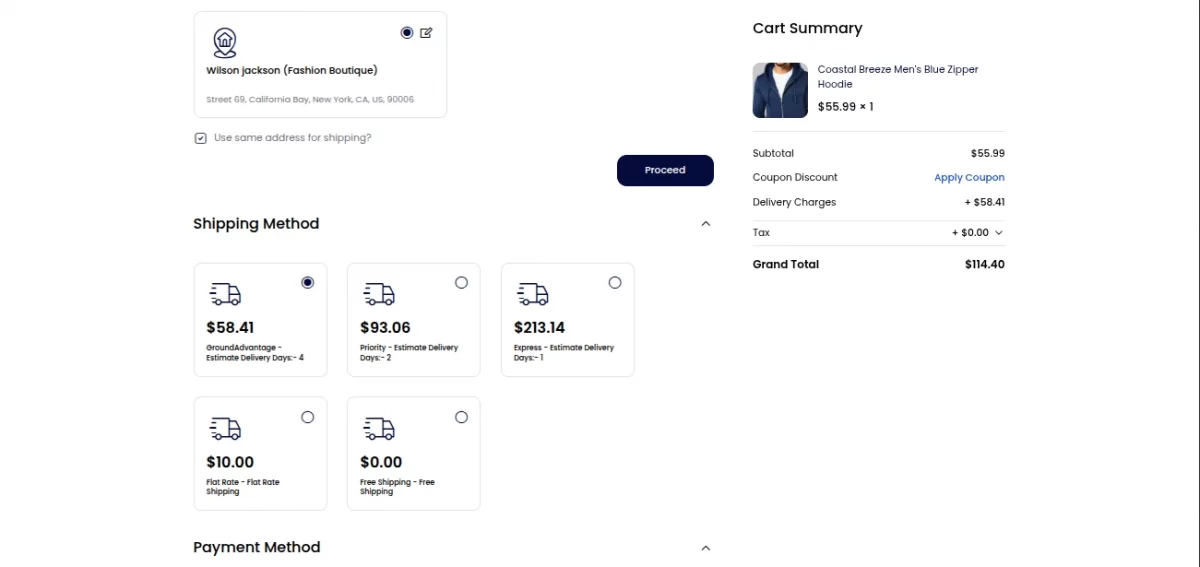
If EasyPost cannot calculate rates for any inventory source, the module hides the shipping method to prevent incomplete shipping coverage.
Marketplace EasyPost Shipping – Seller Order Management
- After the customer places an order, the module queues a job. The job buys EasyPost shipping labels for each inventory source with the admin’s or seller’s API Key. Run a queue worker if your queue is not
sync. - A Bagisto shipment is created automatically with the carrier title, tracking number, and inventory source.
- The admin opens the shipment under Sales > Shipments. The seller opens the order and scrolls to its shipments. Both see the carrier title, tracking number, and a Download Shipping Label link.
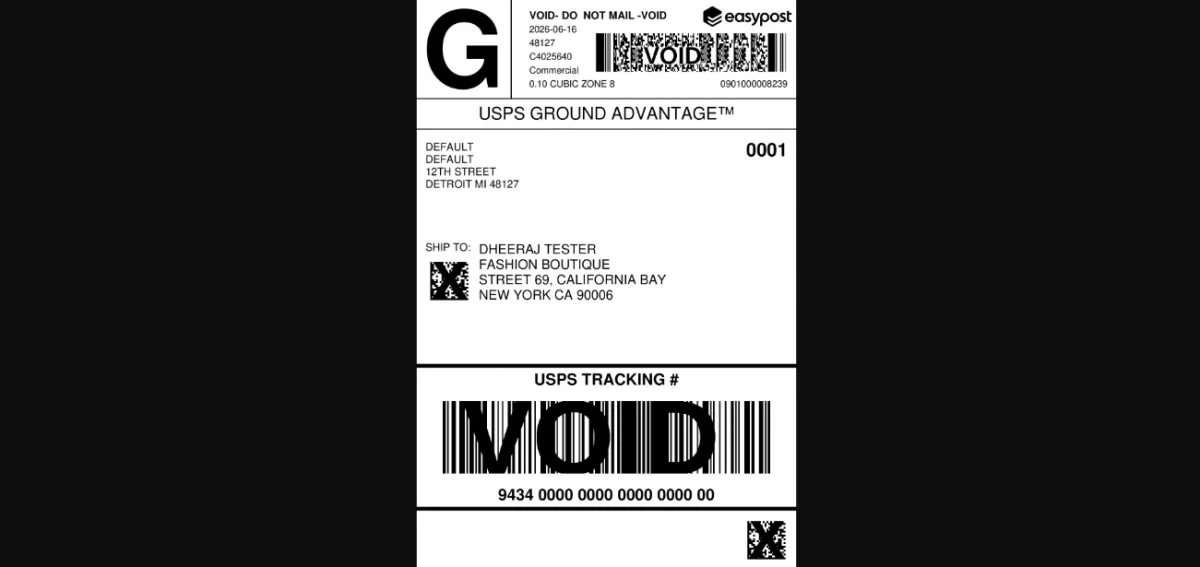
- EasyPost sends tracking updates to the module’s webhook endpoint, verified with the admin’s or seller’s Webhook Secret.
- Customers receive an email whenever the tracking status, status detail, or tracking link changes. On the order page, the Track Shipment button opens the tracking page.
Support
That’s all for the Laravel eCommerce Marketplace EasyPost Shipping module. It provides real-time rates, label purchases, and live tracking.
For any query or issue, please raise a ticket at our UVdesk Helpdesk System. You can also hire our Bagisto developers for any tailored marketplace functionality.