Architecture Patterns Behind Enterprise WooCommerce
Running a standard online store is simple, but scaling an enterprise WooCommerce storefront requires advanced planning.
As your business grows, you must focus on WooCommerce optimization to keep the storefront fast.
What once worked smoothly may slow down, affecting customer experience and operations.
Deploying an enterprise WooCommerce architecture is not simply about adding bigger servers.
It requires a designed architecture that manages growing workloads and keeps the store fast.
Why Enterprise WooCommerce Architecture Matters
When a WooCommerce store’s catalog expands to 50,000 products, database queries can become a major performance bottleneck.
Enterprise setups distribute workloads across specialized services instead of relying on a single database.
This comparison table highlights the difference between a standard small store and an enterprise architecture.
| Component | Small Store Setup | Enterprise Architecture |
|---|---|---|
| Hosting Layout | Shared hosting or single server | Multiple dedicated load-balanced servers |
| Product Search | MySQL standard text search | Dedicated Elasticsearch engine |
| Task Scheduling | WordPress default WP-Cron | System Cron with Action Scheduler |
| Data Caching | No object cache active | Redis persistent in-memory caching |
| Infrastructure | Single point of failure | Load balancer with static CDN |
Pattern 1: Optimized Data Layer
By default, WordPress stores product details as key-value pairs in the wp_postmeta table.
When a store’s catalog reaches 50,000 products, loading a single product page requires multiple database joins.
This Entity-Attribute-Value (EAV) model forces MySQL to search millions of metadata rows, locking tables during high traffic.
Enterprise stores solve this by migrating to flat, custom database tables that store attributes in a single row.
For example, High-Performance Order Storage (HPOS) separates order details into dedicated, optimized tables.
This SQL query defines a custom table to store core product metadata in single, flat rows.
CREATE TABLE wc_products (
    product_id BIGINT PRIMARY KEY,
    sku VARCHAR(100),
    price DECIMAL(10,2),
    stock INT
);
Business Benefit
Custom tables speed up queries, eliminate table locking during checkout, and support massive catalog scaling.
This table outlines the differences between traditional EAV storage and optimized HPOS tables.
| Feature | Traditional EAV (wp_postmeta) | Optimized HPOS (Custom Tables) |
|---|---|---|
| Data Layout | Row-per-attribute key-value rows | Column-per-attribute flat tables |
| Query Type | Multiple JOIN operations | Single SELECT query |
| Search Speed | Scans millions of metadata rows | Fast indexed column lookups |
| Database Load | High CPU and table locking | Minimal CPU and query overhead |
| Scale Limits | Bottlenecks at large volumes | Designed for enterprise traffic |
Pattern 2: Caching Layer
During flash sales, thousands of customers might request the exact same product details simultaneously.
Querying the MySQL database for every single page request wastes CPU and slows response times.
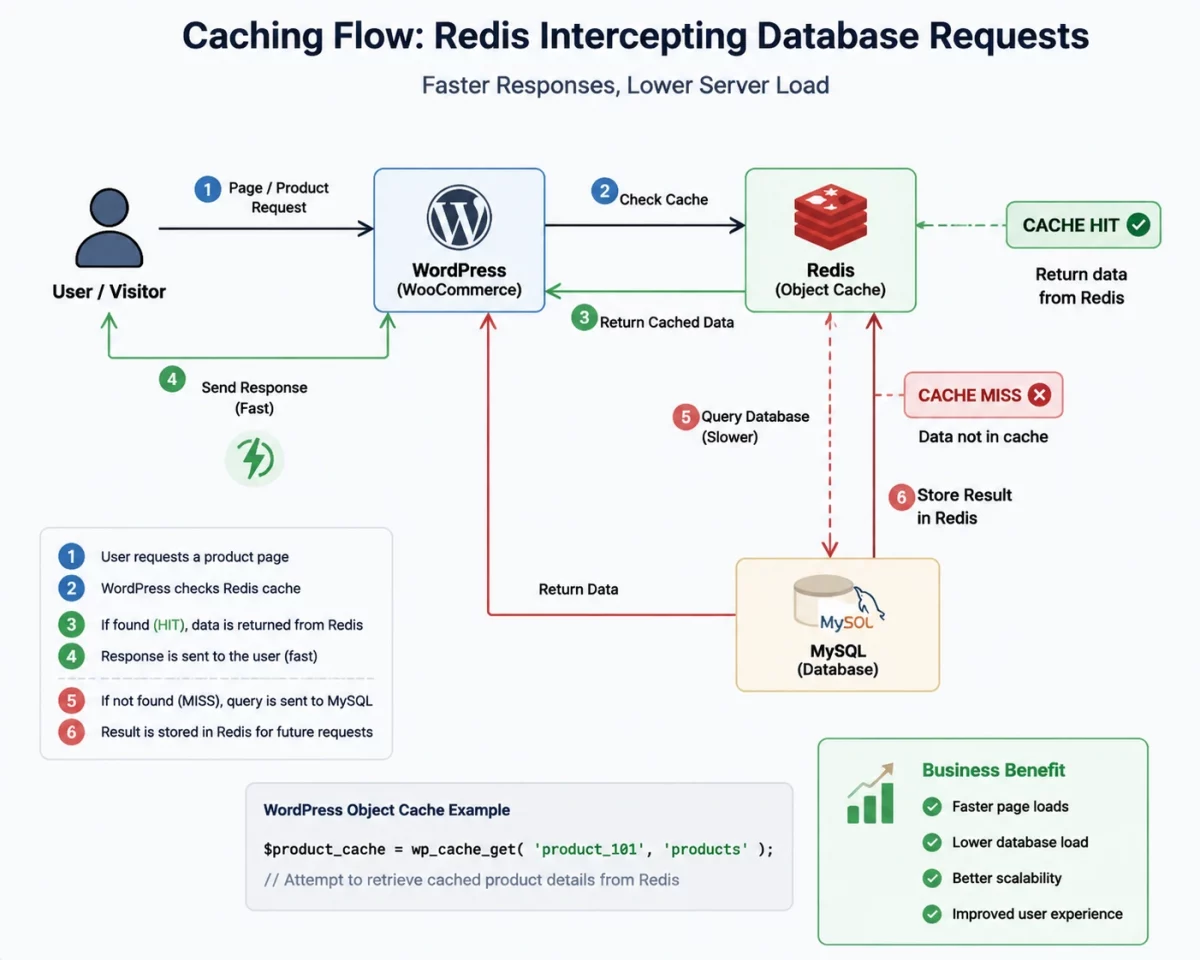
Object caching helps scale enterprise WooCommerce storefronts by keeping frequently accessed database query results in fast system memory.
A persistent in-memory cache store like Redis serves as a backend that intercepts database reads.
This PHP function retrieves a cached product detail block directly from memory using a unique key.
$product_cache = wp_cache_get('product_101', 'products');
Business Benefit
Using Redis reduces database query volume by up to 90%, preventing server crashes during peak traffic.

Pattern 3: Search Layer
When customers search for items on a large enterprise WooCommerce store, MySQL performs slow, resource-heavy text matches.
Simultaneous search queries scan the entire database, causing slow response times and cart abandonment.
Offloading the search query load to a dedicated search engine prevents database overload.
A dedicated search engine like Elasticsearch indexes products in advance, delivering instant search results without touching MySQL.
Business Benefit
Shoppers get instant, accurate autocomplete suggestions, directly increasing conversion rates on the store.
Pattern 4: Background Processing
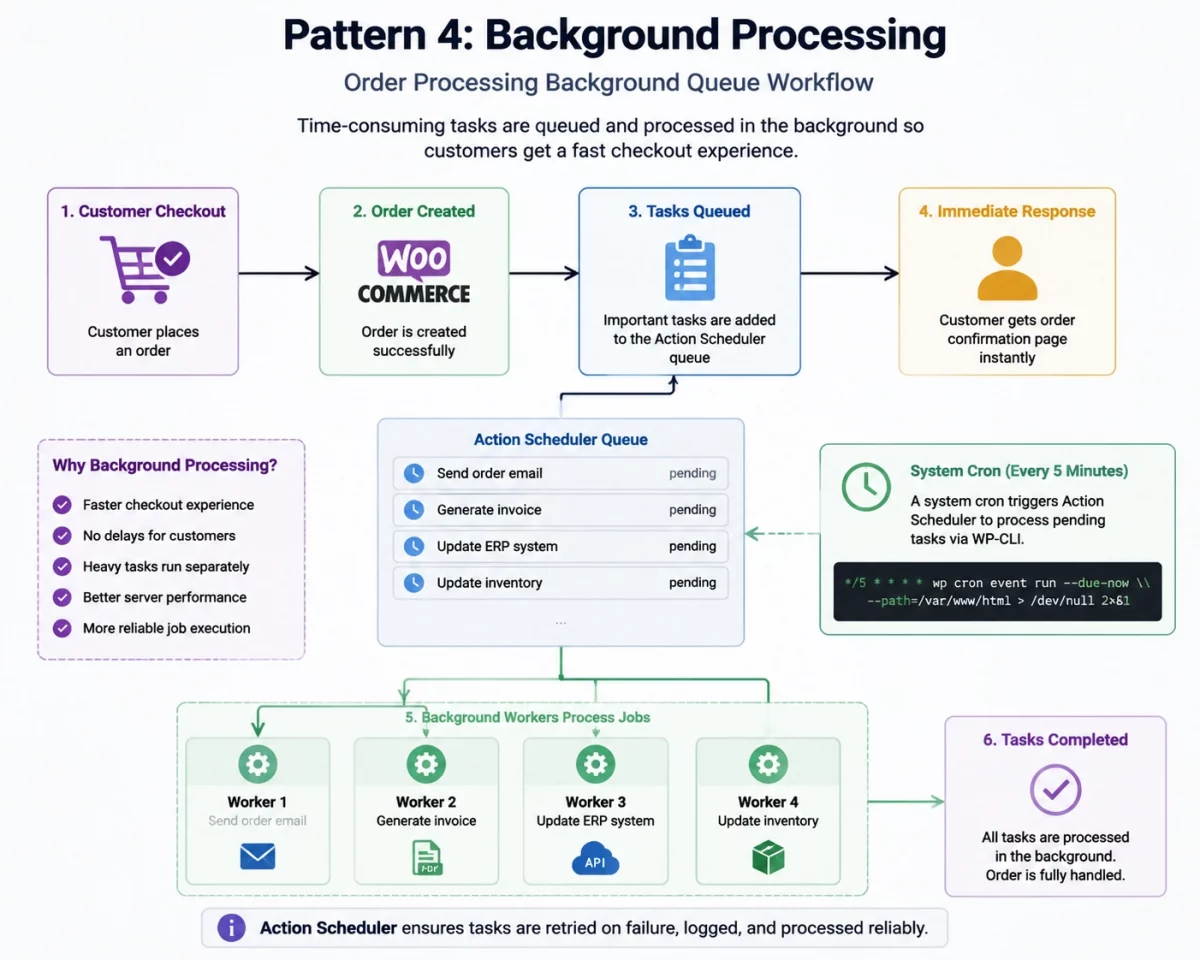
After checkout, WooCommerce needs to send emails, generate PDF invoices, and sync order data to an ERP.
Running these heavy tasks during the customer’s checkout process can delay the response and slow down checkout.
WooCommerce uses Action Scheduler to move these time-consuming tasks into the background so customers don’t have to wait.
In enterprise environments, background jobs are processed independently of customer requests, ensuring reliable and consistent execution even during high traffic.
This diagram shows how background tasks are queued and processed separately after checkout.
Pattern 5: Application Layer
Mixing complex business logic directly into theme files makes your codebase fragile and hard to update.
Enterprise WooCommerce stores solve this by separating core logic into a dedicated service layer.
This decoupled pattern keeps the main codebase modular, clean, and easy to maintain as it grows.
Pattern 6: Infrastructure Layer
Hosting an enterprise WooCommerce store on a single server creates a dangerous single point of failure.
During peak sales events, traffic spikes can easily overwhelm the server and crash the storefront.
To avoid this, enterprise infrastructure distributes incoming visitor traffic across multiple web servers.
A load balancer routes requests, while a Content Delivery Network (CDN) serves static assets globally.
Pattern 7: Message Queues
When checkout relies on direct calls to external ERPs, payment gateways, or shipping APIs, slow APIs delay customer checkout.
If an external ERP is temporarily offline, checkout fails completely and orders are lost.
A message queue (like RabbitMQ) decouples these integrations by storing order payloads until processed.
Business Benefit
Queuing integration tasks prevents checkout delays and keeps the store operational even if third-party systems fail.
Pattern 8: Monitoring and Security
Without active performance monitoring, you will only notice bottlenecks after customers complain about lag.
Centralized logging and Application Performance Monitoring (APM) tools track database query speeds in real time.
Simultaneously, active Web Application Firewalls (WAF) block malicious bots before they consume server resources.
Business Benefit
Real-time alerts identify issues early, letting developers patch slow queries before they impact sales.
Pattern 9: Cloud and Auto Scaling
Paying for massive servers year-round is expensive, but small setups crash during sudden holiday traffic spikes.
Cloud environments solve this by using auto-scaling groups to dynamically spin up new servers.
This elastic model automatically adds web nodes during high traffic and scales down when quiet.
Business Benefit
Auto-scaling keeps your storefront online during traffic surges while optimizing your monthly hosting costs.
How the Patterns Connect
These architectural patterns are not isolated features; they work together as a single ecosystem.
For example, Redis reduces database reads, while Elasticsearch removes search queries from MySQL entirely.
Meanwhile, message queues defer heavy ERP sync jobs, leaving the database free to process checkouts.
Together, these technologies significantly reduce database load, speed up page loads, and keep the store online.
Enterprise WooCommerce Architecture Flow
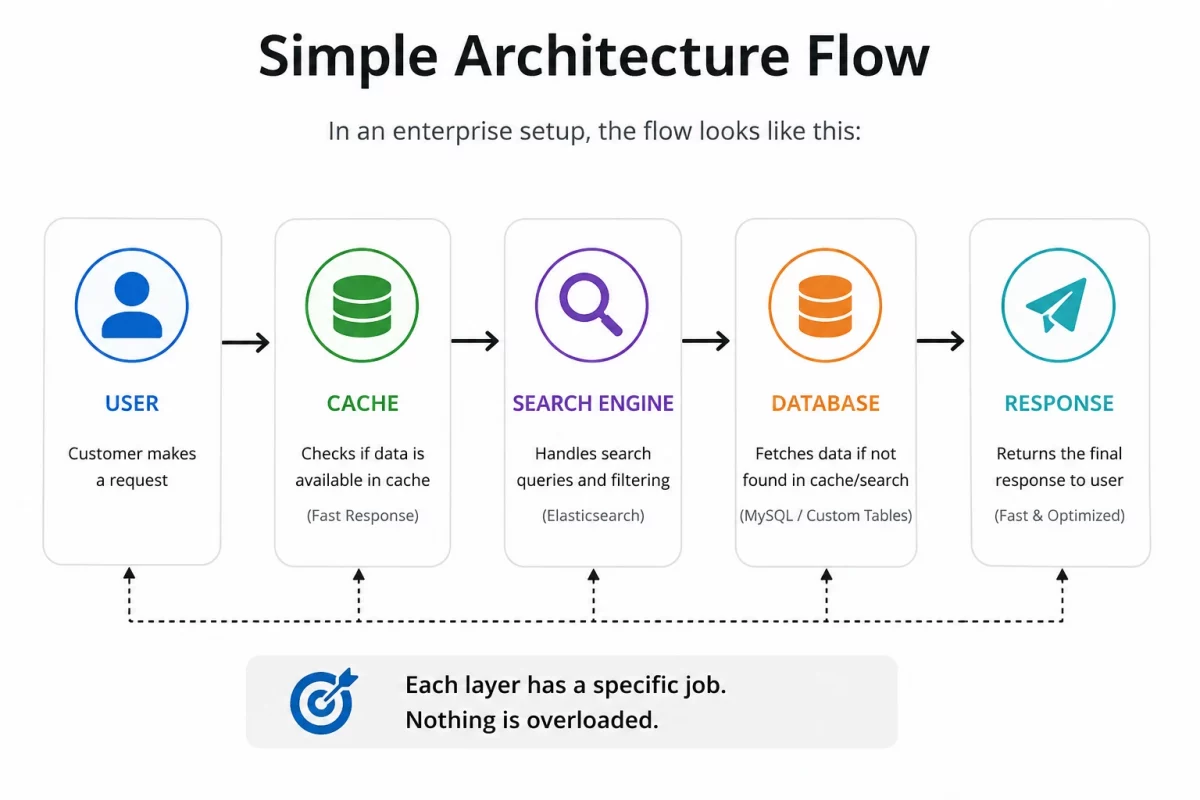
This diagram outlines the complete flow of requests from the customer through the enterprise infrastructure.
Customer
      │
      ▼
Load Balancer
      │
      ▼
WooCommerce
 ├── Redis
 ├── Elasticsearch
 ├── MySQL
 ├── Background Queue
 └── ERP / Payment APIs

Best Practices for Enterprise WooCommerce
- Enable High-Performance Order Storage (HPOS)
- Use Redis for persistent object caching
- Offload search and filtering to dedicated engines
- Move heavy background tasks to a background queue
- Use a CDN to serve static assets globally
- Monitor application and server performance regularly
- Secure the entire store with a firewall and rate limits
- Design the application for scalability from the start
Conclusion
Enterprise WooCommerce architecture is not about making a store more complex—it is about making it reliable.
By optimizing data storage, adding caching, and decoupling search and background queues, you can transform your WooCommerce store.
These architectural improvements keep the store fast, secure, and ready for future business growth.
Scaling a WooCommerce store requires a deliberate plan that addresses bottlenecks before they impact shoppers.
Building this solid architectural foundation allows you to grow your online business with confidence.