User Guide for Bagisto SMS Notification
Live Demo
Bagisto SMS Notification is a Laravel extension that allows the store admin to send automated SMS alerts for order updates, account activities, and other key store events.
Keeping customers informed at every stage of their journey is crucial for building trust, and SMS alerts make sure customers notice every important update.
With this module installed, your Bagisto store can instantly notify customers and admins through SMS whenever a customer places an order, creates an account, or completes any other important activity.
Features
- For instance, the store admin can trigger SMS alerts for a wide range of customer and order-related events.
- Additionally, the admin can configure notifications individually for each order status directly from the admin panel.
- Similarly, you can switch every SMS notification type on or off based on your store’s requirements.
- Once you set it up, the module handles SMS delivery automatically for all the selected events.
- Moreover, message templates for each notification type are fully customizable, letting you match your brand’s tone.
- As a result, customers stay updated in real time on order placement, status changes, registration, and other store activities.
- Overall, once you configure the module, it sends SMS alerts automatically without any manual work.
How to install the module?
Begin by extracting the extension package, then merge the included packages folder into your project’s root directory.
Next, open the bootstrap/providers.php file and register the following provider under the providers array.
Webkul\SmsNotifications\Providers\SmsNotificationsServiceProvider::class,
After that, open the composer.json file and add the following namespace entry under psr-4.
"Webkul\\SmsNotifications\\": "packages/Webkul/SmsNotifications/src",
Now, go to the config/concord.php file and register this line under providers.
Webkul\SmsNotifications\Providers\ModuleServiceProvider::class
Finally, run the commands below in your project root to finish the setup.
composer dump-autoload
php artisan sms-notifications:install
Admin Panel
Once installed, you can access the SMS Notifications module by heading to Admin Panel → Configuration → SMS Notifications, as shown below.

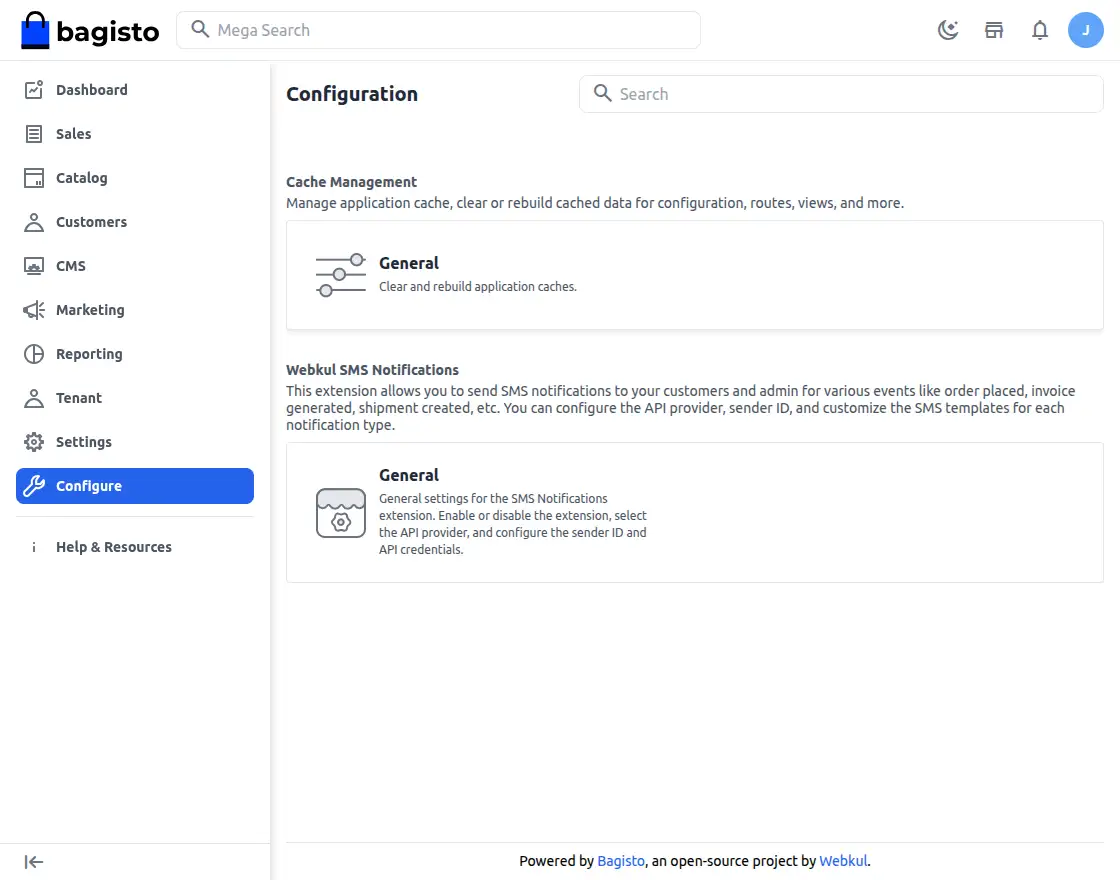
From here, you’ll find the SMS Notifications general settings, which we explain in detail below.
General Settings
First, this section lets you set up the core configuration for the module, including your SMS provider details and default sending options.
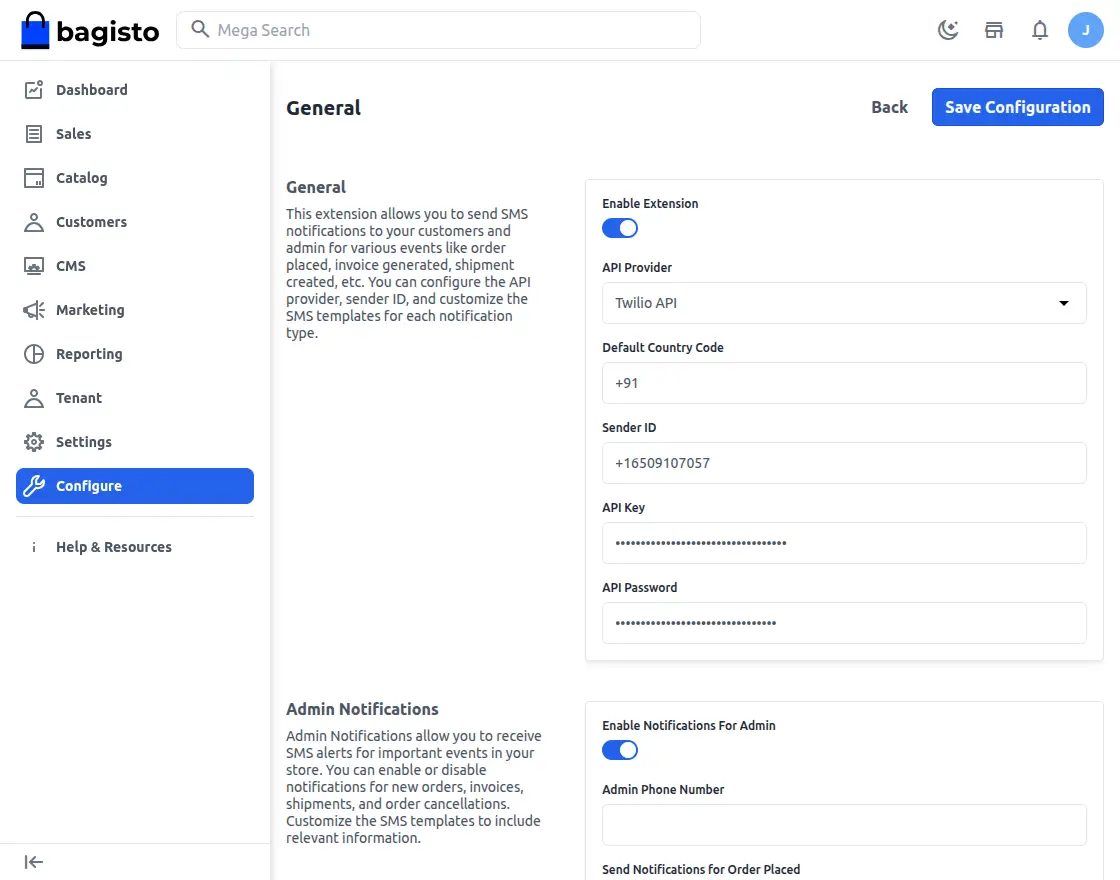
Enable Extension — Use this toggle to switch the module on or off for your store.
Api Provider — Choose which SMS gateway/API provider will send your messages.
Default Country Code — Set the default dialing code applied to outgoing SMS notifications.
Sender ID — Enter the sender ID that will appear on messages sent to customers.
API Key — Enter the API key your SMS gateway provider issued.
API Password — Enter the API password your SMS gateway provider issued.
Admin Notifications
Here, you can control which store events trigger an SMS alert to the admin.
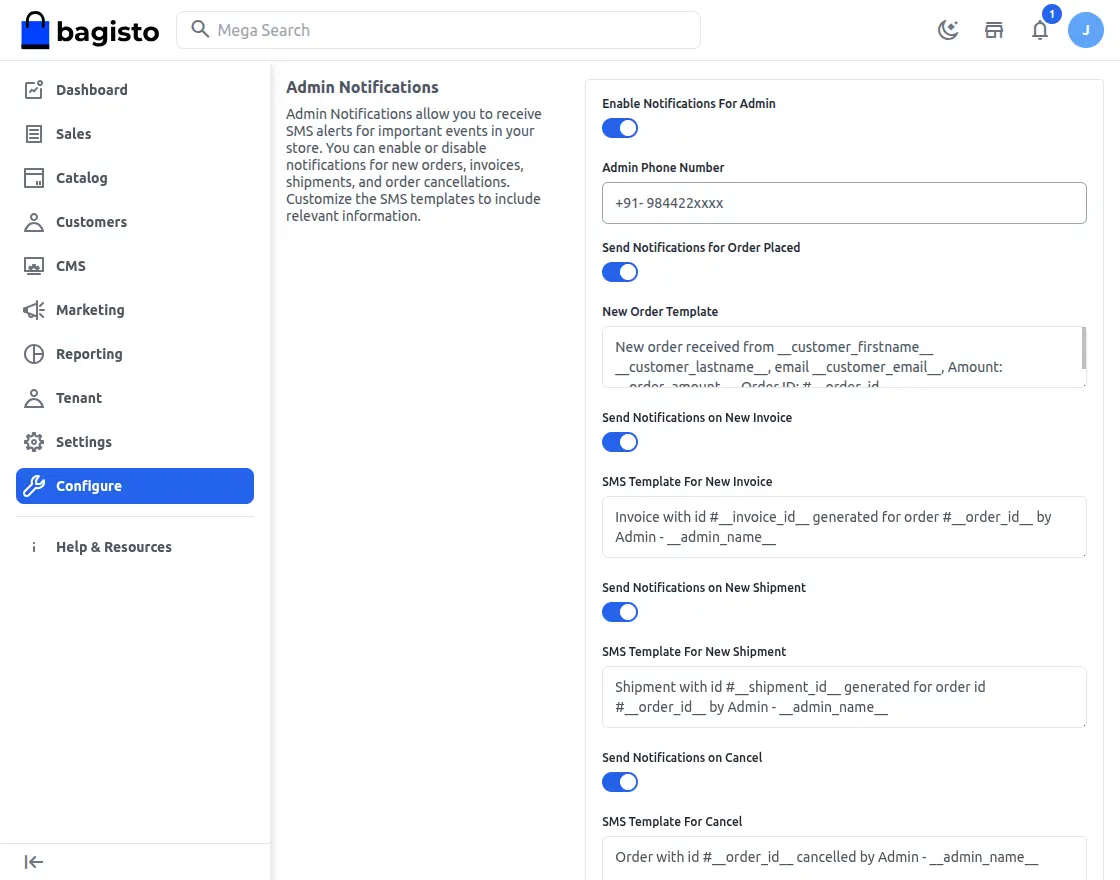
- Enable Notifications for Admin – Turns on SMS alerts for the admin across chosen store events.
- Admin Phone Number – The mobile number where admin SMS alerts will arrive.
- Order Placed notify – Sends an SMS to the admin the moment a new order comes in.
- New Order Template – The message template used for new order alerts.
- New Invoice sms – Notifies the admin as soon as a new invoice is generated.
- SMS Template for New Invoice – The message template used for invoice-related alerts.
- Shipment sms – Alerts the admin the instant a shipment is created for an order.
- SMS Template for New Shipment – The message template used for shipment alerts.
- Cancel sms – Notifies the admin immediately when an order is cancelled.
- SMS Template for Cancel – The message template used for order cancellation alerts.
- Customer Registration Notification – Notifies the admin whenever a new customer signs up.
- Customer Registration Template – The message template used to alert the admin about new customer sign-ups.
Customer Notifications
In the same way, you can set up SMS alerts that keep customers informed about their orders, account activity, and other store updates.
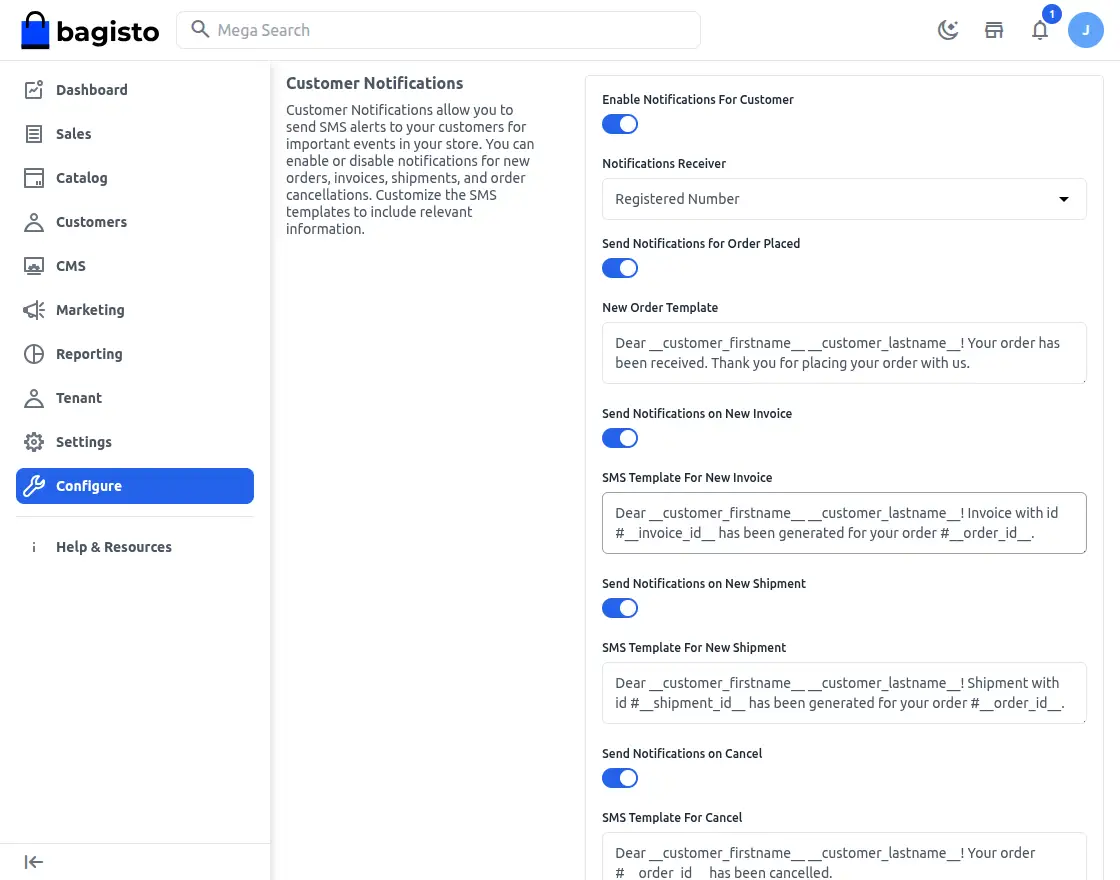
Enable Notifications for Customer — Switches on SMS alerts for customers across the selected account and order events.
Notifications Receiver — Determines which source supplies the customer’s phone number for sending SMS alerts.
Send Notifications for Order Placed — Sends an SMS to the customer right after their order is placed successfully.
New Order Template — The message template used to confirm order placement to customers.
Invoice Notifications — Alerts the customer by SMS whenever a new invoice is raised for their order.
SMS Template for New Invoice — Lets you customize the SMS content sent for invoice-related updates.
New Shipment Notifications — Sends an SMS the moment a shipment is created for the customer’s order.
SMS Template for New Shipment — The message template used for shipment-related customer alerts.
Order Cancelled SMS — Notifies the customer by SMS whenever their order is cancelled.
SMS Template for Cancel — Lets you customize the message sent for order cancellation updates.
Login Successful — Sends an SMS confirmation to the customer after a successful account login.
SMS Template for Login Success — The message template used for login confirmation alerts.
Registration Successful — Sends an SMS to the customer once their account registration is complete.
SMS Template for Registration Success — Lets you customize the SMS content sent after successful registration.
Reset Password — Sends a confirmation SMS to the customer once their account password has been reset.
SMS Template for Password Reset — The message template used for password reset confirmations.
SMS Alerts for Store Events
In short, the SMS Notification module takes care of sending timely alerts for every important order, account, and store-related event.
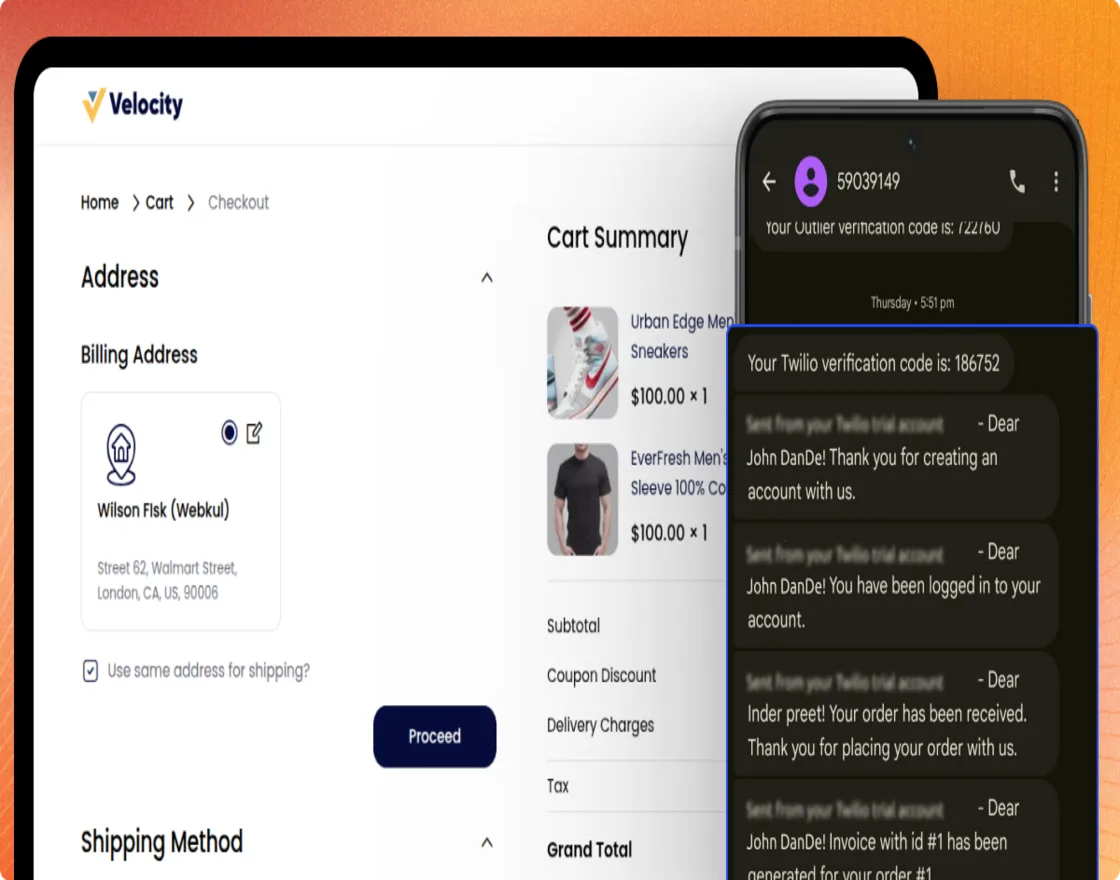
In addition, you can toggle each event independently and assign a separate SMS template for both admin and customer notifications.
Support and Contact Information
That wraps up the User Guide for the Bagisto SMS Notification module. If you have any questions, feel free to reach out to us at support@webkul.com.
You’re also welcome to raise a ticket through our HelpDesk system.
Additionally, feel free to check out our Laravel Development Services and browse our quality Bagisto Extensions.