Adding an additional tab on Sales Order View page in Magento 2 Frontend
Hello Everyone! Today, we will learn how can we add an additional tab on the Order view page in Magento 2 front.
We need to follow the steps below:
Step 1: In sales_order_info_links.xml in Vendor/Module/view/frontend/layout folder, add the following code –
<?xml version="1.0"?>
<page xmlns:xsi="http://www.w3.org/2001/XMLSchema-instance" xsi:noNamespaceSchemaLocation="urn:magento:framework:View/Layout/etc/page_configuration.xsd">
    <body>
        <referenceBlock name="sales.order.info.links">
            <block class="Magento\Sales\Block\Order\Link" name="sales.order.info.links.new.tab">
                <arguments>
                    <argument name="key" xsi:type="string">tab_new</argument>
                    <argument name="path" xsi:type="string">route/controller/path</argument>
                    <argument name="label" xsi:type="string" translate="true">Tab Label</argument>
                </arguments>
            </block>
        </referenceBlock>
      </body>
</page>
Step 2: Create another layout corresponding to route/controller/path, and add the following code to it–
<?xml version="1.0"?>
<page xmlns:xsi="http://www.w3.org/2001/XMLSchema-instance" xsi:noNamespaceSchemaLocation="urn:magento:framework:View/Layout/etc/page_configuration.xsd">
    <update handle="customer_account"/>
    <update handle="sales_order_info_links"/>
    <body>
        <referenceContainer name="page.main.title">
            <block class="Magento\Sales\Block\Order\Info" name="order.status" template="Magento_Sales::order/order_status.phtml"/>
            <block class="Magento\Sales\Block\Order\Info" name="order.date" template="Magento_Sales::order/order_date.phtml"/>
            <container name="order.actions.container" htmlTag="div" htmlClass="actions-toolbar order-actions-toolbar">
                <block class="Magento\Sales\Block\Order\Info\Buttons" as="buttons" name="sales.order.info.buttons" cacheable="false"/>
            </container>
        </referenceContainer>
        <referenceContainer name="content">
            <block class="Magento\Framework\View\Element\Html\Link\Current" name="tab_custom" template="Vendor_Module::tab.phtml"/>
        </referenceContainer>
    </body>
</page>
Step 3: Add the template file tab.phtml at Vendor/Module/view/frontend/templates folder and write the data that you want to see in the tab. e.g.
This is the data that you want to see in the tab.
Now save the file, flush the Magento cache, and go to the order view page, it will look like this-

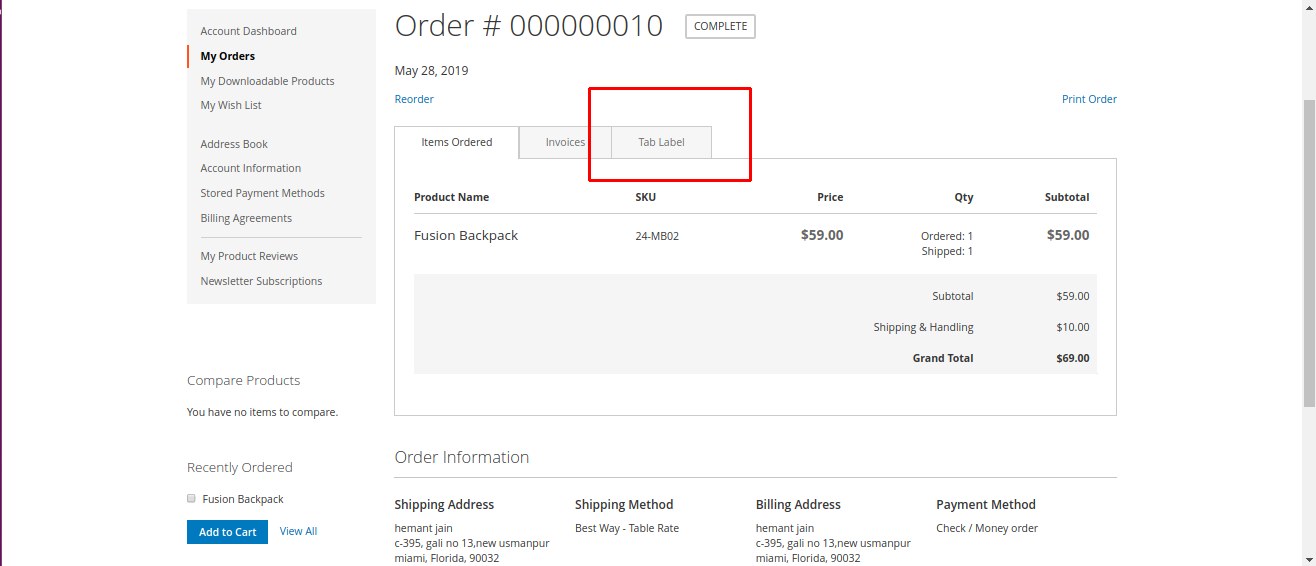


This is all for now, I will be back with more exciting customization in default Magento 2.
Happy Coding. 🙂
View Comments
Comment or Ask a Question
Quick Links